module
20

Everything so far has been one-way: your program puts things on the screen. POINT goes the other way. It asks whether a particular pixel is lit, and that one question is enough to build the whole of a platform game's physics on.
A mouse falls until there is something under its feet. "Is there something under its feet" is POINT.
PRINT POINT(100,50)
gives 1 if that pixel is lit, 0 if it is not, and 255 if the point is off the screen altogether.
Three things to notice.
It keeps its brackets. PLOT and DRAW must not have brackets round their co-ordinates (S18), but POINT is a function, like LEN or INT, so the brackets are part of it.
It does not tell you the colour: only lit or not lit. For the game that is exactly right: a platform is a platform whatever colour it is painted.
255 for off-screen is useful. It is not 0, so a test written as IF POINT(X,Y)=0 will not think the void outside the screen is empty space. If that matters, test for =0 rather than <>1.
Here is the whole idea, in three lines:
160 Y=180
170 IF POINT(X,Y)=0 AND Y>0 THEN Y=Y-1:GOTO 170
180 PRINT "GROUND IS AT Y=";Y
Start high up. While the pixel below is empty, move down one. Stop when it is not, or when you reach the bottom of the screen, which is what AND Y>0 is for. A loop with no such guard would keep going for ever if it were ever started below everything.
That is gravity. S25 makes it fall a few pixels at a time instead of one, so that it looks like falling rather than teleporting, but the test is this one.
The same question answers others:
POINT at the mouse's feet before moving.POINT just above.POINT to the side.All the same statement, at different places.
For completeness: SCRN$(r) gives you a whole row of the text screen as a string: SCRN$(0) is the top row, 40 characters wide. It reads characters, not pixels, so it is no use for the game, but it is there if you ever want to know what a program printed.
10 BCOL 1
20 TCOL 15,1
30 CLS
40 GCOL 7,1
50 FOR Y=0 TO 5
60 DRAW 0,Y TO 255,Y
70 NEXT Y
80 FOR P=1 TO 3
90 READ X1,X2,PY
100 DRAW X1,PY TO X2,PY TO X2,PY+6 TO X1,PY+6 TO X1,PY
110 FILL X1+3,PY+3
120 NEXT P
130 DATA 20,110,40,150,240,75,40,140,115
140 TCOL 11,1
150 FOR X=10 TO 250 STEP 40
160 Y=180
170 IF POINT(X,Y)=0 AND Y>0 THEN Y=Y-1:GOTO 170
180 PRINT @0,0;"AT X=";X;" GROUND IS AT Y=";Y;"   ";
190 GCOL 11,1
200 DRAW X,Y+2 TO X,Y+9
210 FOR D=1 TO 300:NEXT D
220 NEXT X
230 PRINT @0,0;"DONE                       ";
Starting from
A fresh boot, or NEW.
What you should see
The field is drawn, and then a yellow post appears every 40 pixels across it: each one standing exactly on whatever is beneath it, on a platform where there is one and on the floor where there is not. The top line reports each height as it goes.
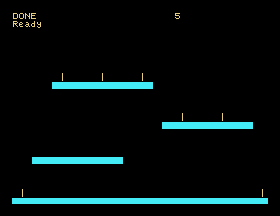
Nothing in the program knows where the platforms are. Line 170 finds them by looking.
That is worth dwelling on: the DATA in line 130 could say anything at all, and the posts would still land on top of whatever got drawn. The picture is the map.
Y=30: start the search below the top platform. What happens at the x positions where that platform is, and why?AND Y>0 out of line 170 and run it with the floor removed (delete lines 50 to 70). What does the program do, and how do you get out of it?IF POINT(X,Y)<>1 AND Y>0 .... It looks equivalent. Is it? What about the very first test, at y=180?20.1 Draw a shape of your own, then use POINT to count how many pixels are lit along one horizontal line across it.
20.2 Write a loop that plots a dot falling down the screen, one pixel at a time, stopping when it lands on something.
20.3 Draw two platforms with a gap between them, then find and print the x positions where the gap begins and ends, using POINT rather than the numbers you drew them with.
Worked solutions are in Appendix II.
| Symptom | Cause |
|---|---|
POINT always gives 255 | The co-ordinates are off the screen. Remember y counts up from the bottom. |
Syntax Error on a POINT | It needs its brackets; it is a function, unlike PLOT and DRAW. |
| A falling loop never stops | Nothing below it is lit, and there is no guard. Add AND Y>0, and remember from S13 that nothing outside the program will stop it. |
| The dot lands one pixel into the platform | You are testing where the object is rather than where its feet are. Decide which pixel represents the bottom and test that one. |
POINT says 0 where you can see something | You are probably looking at a printed character rather than a drawn pixel, or the picture scrolled after you drew it. |
POINT(x,y) is 1 for a lit pixel, 0 for a clear one, 255 off the screen. It keeps its brackets and it does not report colour. Falling is "while the pixel below is 0, go down one", with a guard so it stops at the bottom. The drawn picture is the map, so the program does not have to remember where anything is.
S21, A Character Of Your Own: designing a shape of your own, one row of eight pixels at a time.
This form is protected by reCAPTCHA, and the Google Privacy Policy and Terms of Service apply.
