module
19

Lines will draw a platform. They will not draw a circle without a great deal of arithmetic, and they will not colour an area in at all.
This section is the rest of the drawing statements, and at the end of it the game has the thing the mouse is trying to reach.
ELLIPSE 128,96,40
draws an ellipse centred at 128,96 with a horizontal radius of 40.
Note ellipse, not circle. Left alone, the vertical radius is four thirds of the horizontal one, so that statement draws an oval, taller than it is wide. If you want a circle you have to say so, with a fourth number:
ELLIPSE 128,96,40,1
The fourth number is the ratio between the two radii. 1 makes them equal.
Two more numbers turn the ellipse into an arc: the angle to start at and the angle to stop at, in radians rather than degrees. A whole turn is about 6.28, so half a turn is about 3.14.
Angles start at 3 o'clock and go anticlockwise, so:
ELLIPSE 100,122,13,1,0,0,3.15
draws the top half of a circle: an arch. (The 0 before the angles is the line type from S18: 0 for a solid line. Get that wrong and put a 1 there and the arc will be drawn in erase mode, which is a confusing way to draw nothing at all.)
POLY 6,128,96,40,1
draws a regular six-sided figure inside the same circle: the arguments are the number of sides and then exactly what ELLIPSE takes. Three gives a triangle, and thirty is indistinguishable from a circle and takes about a third of a second.
POLY 0 asks for a nought-sided shape and gets you a Division Error, which is a fair answer.
FILL x,y
floods outwards from that point in the current GCOL colour, stopping wherever it meets a lit pixel. FILL x,y,c fills in colour c instead.
It is the quickest way to get a solid shape: draw the outline, fill the middle. The platforms in the listing below are drawn as four-sided outlines and then filled, which is shorter and clearer than the stack of lines S18 used.
Three things about FILL will bite you.
A gap lets it out. The fill stops at lit pixels, and a single-pixel hole in your outline is enough for it to escape through, and once out, it fills the entire screen. If a fill floods everything, the outline is not closed.
Starting on a lit pixel erases. If the point you give is already lit, FILL removes the connected lit region instead of colouring it: outline and all. So fill from a point you are sure is inside and empty, not from the edge.
Text stops it dead. Filling a region that has printed characters in it gives Stack Full Error and leaves the job half done. Keep fills away from the text rows.
And it is not fast: filling the whole screen takes nearly three seconds. Fill small areas, and do it while the reader is not watching.
10 BCOL 1
20 TCOL 15,1
30 CLS
40 PRINT @12,0;"MOUSE IN A HOLE"
50 TCOL 11,1
60 PRINT @2,2;"SCORE 0"
70 PRINT @28,2;"LIVES 3"
80 GCOL 7,1
90 FOR Y=0 TO 5
100 DRAW 0,Y TO 255,Y
110 NEXT Y
120 GOSUB 500
130 GOSUB 600
140 END
490 REM -- THE PLATFORMS --
500 FOR P=1 TO 3
510 READ X1,X2,PY
520 DRAW X1,PY TO X2,PY TO X2,PY+6 TO X1,PY+6 TO X1,PY
530 FILL X1+3,PY+3
540 NEXT P
550 RETURN
570 DATA 20,110,40,150,240,75,40,140,115
590 REM -- THE MOUSE HOLE --
600 HX=100:HY=122
610 GCOL 11,1
620 ELLIPSE HX,HY,13,1,0,0,3.15
630 DRAW HX-13,HY TO HX-13,HY-2
640 DRAW HX+13,HY TO HX+13,HY-2
650 RETURN
Starting from
LOAD "MOUSE2" from S18, or type it fresh.
What you should see
The same field as S18 but with solid platforms, and a yellow arch standing on the top one.
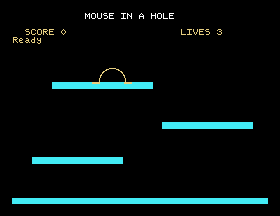
The hole is not filled, and that is the point: the screen behind it is black, so an outline is a hole. Filling it would give you a dome.
Save this. SAVE "MOUSE3".
645 FILL HX,HY+6,11 to fill the arch in. Does it still look like a hole?0,3.15 to 0,6.3. What do you get, and is it round? Now take the ,1 ratio out as well.FILL X1,PY, exactly on the corner of the outline. Run it. What happened to the platform, and which of the three warnings does that demonstrate?19.1 Draw a snowman: three circles of different sizes, one above another, each a true circle rather than an oval.
19.2 Draw a triangle, a square, a pentagon and a hexagon in a row across the screen with POLY, all the same size.
19.3 Draw a closed shape of your own and fill it. Then deliberately leave a one-pixel gap in the outline and fill it again, so that you have seen what that looks like once, on purpose.
Worked solutions are in Appendix II.
| Symptom | Cause |
|---|---|
| The fill covered the whole screen | The outline has a gap. Look closely at the corners. |
| The fill erased the shape | The starting point was already lit. Fill from somewhere inside and empty. |
Stack Full Error half way through a fill | There is text inside the area. Fills and text do not mix. |
| A circle came out as an oval | The vertical radius defaults to 4/3 of the horizontal. Add ,1. |
| An arc drew nothing | A line type of 1 erases. Solid is 0. |
Division Error | POLY 0. |
| The shape is the wrong way round | Angles are in radians, start at 3 o'clock and go anticlockwise. |
| Filling took ages | A big fill costs seconds. Keep them small, or do them before the player is watching. |
ELLIPSE x,y,r draws an oval, add ,1 for a circle, and two more numbers make it an arc, in radians from 3 o'clock. POLY n,... draws a regular polygon in the same space. FILL x,y floods from a point in the current colour and stops at lit pixels: leave no gaps, start from an empty pixel inside, and keep away from text.
S20, Reading The Screen Back: asking what is already drawn at a particular point, which is how the game will know the mouse is standing on something.
This form is protected by reCAPTCHA, and the Google Privacy Policy and Terms of Service apply.
