module
18

The screen you have been printing on is also a grid of 256 by 192 pixels, and BASIC can light any of them. That is what the rest of this course is built on: the platforms, the mouse hole, and eventually everything that moves.
There is one thing to get straight before anything else, because it is the single most likely thing to trip you up.
PLOT 0,0
lights the pixel in the bottom left corner.
x runs 0 to 255 from left to right, as you would expect. y runs 0 to 191 from the bottom upwards, so a bigger y is higher up the screen.
That is the opposite of the text rows in S17, where row 0 is at the top. Both are true at once, on the same screen, and you will mix them up at least once. The rule: text counts down from the top, graphics counts up from the bottom.
A pixel off the edge of the screen is simply ignored: no error, nothing drawn, which is convenient when a game's object walks off the side, and unhelpful when you have got the co-ordinates wrong and nothing appears.
GCOL is to drawing what TCOL is to text, and they are completely separate:
GCOL 7,1
draws in cyan on black from now on. Setting one does not touch the other.
DRAW 20,40 TO 110,40
draws a line between two points. You can chain them:
DRAW 0,0 TO 255,0 TO 255,191 TO 0,191 TO 0,0
draws a box round the whole screen in one statement.
DRAW TO x,y with no starting point carries on from wherever the last thing finished, which PLOT also sets. So you can walk a shape out step by step.
Do not put brackets round the co-ordinates. The Einstein's own manual prints examples like DRAW (40,70) TO (90,80), and they do not work: that is a Syntax Error. Write the numbers bare.
A third number after a point is a line type: 0 is solid, 2 to 5 are dashes, and 1 erases, which is how you rub a line out again without clearing the whole screen.
They share one screen, and text wins.
A printed character wipes out the graphics underneath it. Not draws over: wipes. It clears its whole character cell and recolours a little way either side. So a score printed across a picture punches a hole in it.
And when the screen scrolls, the picture scrolls with it. Everything drawn moves up eight pixels along with the text.
The practical answer, which the game uses from here on: decide which rows belong to text and keep the drawing out of them. The score line is text rows 0 to 2, which is the top 24 pixel rows: y 168 and above. Everything drawn stays below that, and nothing is ever printed low enough to scroll.
A PLOT takes about two milliseconds, so about 430 a second. A full-width line takes about a tenth of a second.
That is worth knowing now: you cannot redraw a screenful of pixels while someone is watching. A picture is drawn once and then left alone, and the things that move are handled a different way, which is S21 and S22.
10 BCOL 1
20 TCOL 15,1
30 CLS
40 PRINT @12,0;"MOUSE IN A HOLE"
50 TCOL 11,1
60 PRINT @2,2;"SCORE 0"
70 PRINT @28,2;"LIVES 3"
80 GCOL 7,1
90 FOR Y=0 TO 5
100 DRAW 0,Y TO 255,Y
110 NEXT Y
120 GOSUB 500
130 END
490 REM -- THE PLATFORMS --
500 FOR P=1 TO 3
510 READ X1,X2,PY
520 FOR Y=PY TO PY+4
530 DRAW X1,Y TO X2,Y
540 NEXT Y
550 NEXT P
560 RETURN
570 DATA 20,110,40,150,240,75,40,140,115
Starting from
LOAD "MOUSE1" from S17 if you saved it, or type it fresh.
What you should see
The title screen from S17, and below it a floor across the bottom and three cyan platforms climbing from left to right.
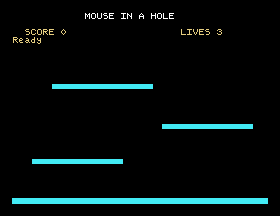
Each platform is five lines drawn one above another, which is how you get a solid bar out of a statement that draws thin lines. The heights come from the DATA in line 570, three numbers at a time: left edge, right edge, height, which is S15 earning its keep: to move a platform you change a number in the data, not the program.
Save this. SAVE "MOUSE2".
40 in line 570's first triple to 160. Run it. What happens to that platform when the score line is printed, and which rule does that demonstrate?DRAW 0,Y TO 255,Y,2: a line type of 2. What is the floor made of now?DRAW (X1,Y) TO (X2,Y). What do you get?18.1 Draw a square 100 pixels on a side in the middle of the screen, in one DRAW statement.
18.2 Draw a staircase of five steps going up to the right, using a loop.
18.3 Draw the floor, then use line type 1 to rub out a gap in the middle of it: a hole the mouse could fall through.
Worked solutions are in Appendix II.
| Symptom | Cause |
|---|---|
| Nothing appears | The co-ordinates may be off the screen, which is ignored silently. Or GCOL is drawing in the background colour. |
| The drawing is upside down | y counts up from the bottom. Text rows count down from the top. |
Syntax Error on a DRAW | Brackets round the co-ordinates. The manual is wrong; write them bare. |
Operand Error | A graphics statement with no arguments at all. |
Qty Error | A co-ordinate of 32768 or more, or a colour of 256 or more. |
| A hole appears in the picture | Something was printed over it. A character wipes its cell. |
| The whole picture jumped up | The text scrolled, and the bitmap goes with it. Keep printing away from the bottom row. |
| A line changed the colour of what it crossed | Only two colours can share eight pixels across in one row. Crossing lines of different colours will fight. |
PLOT x,y lights a pixel with the origin at the bottom left, y upward. GCOL sets the drawing colour, separately from TCOL. DRAW a,b TO c,d TO ... draws joined lines with no brackets, DRAW TO continues from the last point, and a third number of 1 erases. Printing wipes the graphics under it and scrolling drags the picture, so text and drawing keep to their own parts of the screen.
S19, Shapes And Filling: circles, polygons and flood fill, and the mouse hole the game is named after.
This form is protected by reCAPTCHA, and the Google Privacy Policy and Terms of Service apply.
