module
26

The mouse can climb now, but there is nothing to climb for. This section puts five pieces of cheese around the screen and makes eating them worth points.
It is where arrays stop being an exercise and start doing a job. There are five pieces, each with a position and a note of whether it has been eaten, and a program that has to remember all of that for all of them.
65 DIM CHX(5),CHY(5),EATEN(5)
Three arrays, one entry per piece of cheese: its x, its y, and whether it has been eaten. CHX(3) and CHY(3) are where the third piece is; EATEN(3) is 0 until the mouse gets it, then -1.
The positions come from DATA, two numbers a piece, so you can move the cheese around by changing one line:
870 DATA 70,6,200,6,90,47,210,82,80,122
Each piece is drawn the way S19 drew shapes: a triangle outline in yellow, then FILLed.
Checking all five pieces on every pass would work, and it would be slow: five lots of array lookups and arithmetic, every time round the loop, nearly always to find that the mouse is nowhere near any of them.
So the game asks a cheaper question first. The cheese is drawn on the screen, so POINT can see it, just as it sees the platforms. Is anything lit just in front of the mouse's feet?
390 IF POINT(MX+5,MY-15)<>1 AND POINT(MX+11,MY-15)<>1 THEN RETURN
MY-15 is the second row up from the mouse's bottom row, on a piece of cheese standing on the same floor or platform as the mouse, a row where the wedge is still wide. Two points, six pixels apart, look across the middle of the mouse. If neither is lit there is no cheese, and that is the end of it: two POINTs and a RETURN.
Why two points? The mouse moves six pixels at a time and a wedge is only about seven wide at that height. One point could step clean over it; two, six apart, cannot both miss.
And it is only asked after the mouse has moved. The ground and air subroutines from S25 now end by going to line 390 instead of returning: lines 338, 346 and 352, so a mouse standing still is never checked, and a mouse that lands on a piece is checked on the pass it lands.
Only when something is lit does the game do the real work: which piece is it, and has it gone already?
400 C=0:FOR I=1 TO 5:IF EATEN(I)=0 AND ABS(MX+8-CHX(I))<10 AND ABS(MY-12-CHY(I))<10 THEN C=I
410 NEXT I:IF C=0 THEN RETURN
420 I=C:EATEN(I)=-1:PTS=PTS+10
440 GOSUB 500:GOSUB 560
450 RETURN
Two things are touching when they are close both across and up. MX+8 is the middle of the mouse across and MY-12 roughly the middle of it up and down; ABS, the distance, whichever side, saves writing each test twice. This is a box test: it pretends both things are rectangles. It is not exact, and nobody playing will ever notice.
The loop remembers the piece it found in C. If it found none, the lit pixel was a platform the mouse is jumping up through, it returns having done no harm.
This is the lesson of the section, and it applies to every game you will write: ask the cheap question on every pass, and the expensive one only when the cheap one says it is worth it.
When a piece is eaten it has to go from the screen:
500 FOR Y=CHY(I) TO CHY(I)+7
510 DRAW CHX(I)-5,Y TO CHX(I)+5,Y,1
520 NEXT Y
The ,1 on the end is the line type from S18: erase. It is tempting to draw over the cheese in black instead, and it looks exactly the same. It is not the same: drawing in black lights the pixels, black on black, and POINT would go on finding them: the nose test would keep firing, and the mouse would stand on nothing where the cheese had been. Erasing unlights them.
Add line 65, the subroutines at 388 to 570 and the cheese at 845 to 870; change lines 338, 346 and 352 to go to 390, and line 795 to put the cheese out.
65 DIM CHX(5),CHY(5),EATEN(5)
338 GOTO 390
346 MY=MY+VY:IF VY>=0 THEN 390
352 GOTO 390
388 REM -- CHEESE UNDER THE MOUSE'S NOSE? --
390 IF POINT(MX+5,MY-15)<>1 AND POINT(MX+11,MY-15)<>1 THEN RETURN
400 C=0:FOR I=1 TO 5:IF EATEN(I)=0 AND ABS(MX+8-CHX(I))<10 AND ABS(MY-12-CHY(I))<10 THEN C=I
410 NEXT I:IF C=0 THEN RETURN
420 I=C:EATEN(I)=-1:PTS=PTS+10
440 GOSUB 500:GOSUB 560
450 RETURN
490 REM -- RUB OUT CHEESE I --
500 FOR Y=CHY(I) TO CHY(I)+7
510 DRAW CHX(I)-5,Y TO CHX(I)+5,Y,1
520 NEXT Y
530 RETURN
550 REM -- SHOW THE SCORE --
560 TCOL 11,1:PRINT @2,2;"SCORE";PTS;"  ";
570 RETURN
795 GOSUB 850
845 REM -- PUT OUT THE CHEESE --
850 RESTORE 870:GCOL 11,1
855 FOR I=1 TO 5
860 READ CHX(I),CHY(I):EATEN(I)=0
862 DRAW CHX(I)-4,CHY(I) TO CHX(I)+4,CHY(I) TO CHX(I),CHY(I)+7 TO CHX(I)-4,CHY(I)
864 FILL CHX(I),CHY(I)+2
866 NEXT I
868 RETURN
870 DATA 70,6,200,6,90,47,210,82,80,122
Starting from
LOAD "MOUSE8" from S25.
What you should see
Five yellow wedges of cheese: two on the floor and one on each platform. Walk the mouse into one and it vanishes, and the score goes up by ten.
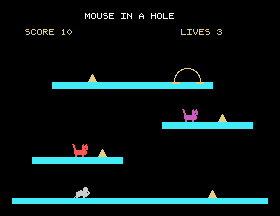
Save this. SAVE "MOUSE9".
,1 to nothing, so it draws, and add GCOL 1,1 in front of the loop: drawing over the cheese in black. Eat a piece, then walk back over the spot. What does the mouse do, and why?395 PRINT @2,4;"LOOKING";MX; and play. When does the game look for cheese? Jump up through a platform from underneath: what happens, and why does it do no harm?RETURN. Which pieces can the mouse still eat, and how?26.1 Add a sixth piece of cheese. What do you have to change besides the DATA?
26.2 Make a piece on a higher platform worth more: twenty points on the middle one and thirty on the top. (A fourth array, or work it out from CHY.)
26.3 Print how many pieces are left on the score line, and keep it up to date.
Worked solutions are in Appendix II.
| Symptom | Cause |
|---|---|
| The mouse stands on thin air where a piece of cheese was | It was rubbed out by drawing in black, which lights the pixels. Use line type 1. |
| The mouse walks past a piece without eating it | Line 390 looks at only one point, or at the wrong height, or line 338 returns instead of going to 390. |
| A piece cannot be eaten | Its DATA puts it somewhere the mouse cannot reach, or the box test's distance is too small. |
| The score counts the same piece twice | EATEN(I) is not being set, so the piece is still "there" on the next check. |
| A piece is floating or buried | Its y in the DATA should be one more than the top of what it stands on. |
Several things of the same kind live in arrays: here where each piece is and whether it has gone. Two things touch when they are close both across and down: a box test with ABS. But ask a cheap question first: is anything lit at the mouse's nose?, and do the search only when it says yes. Rub things out with line type 1, never by drawing in the background colour.
S27, The Cats: things that move on their own.
This form is protected by reCAPTCHA, and the Google Privacy Policy and Terms of Service apply.
