module
10

Every program so far has done exactly the same thing every time you ran it. That is about to stop. Once a program can ask a question, its behaviour depends on the answer, and it becomes something you use rather than something you watch.
BASIC has two ways of asking: one that waits for a whole line and ENTER, and one that catches a single key the instant it is pressed. A game needs both.
10 INPUT "WHAT IS YOUR NAME";NAME$
20 PRINT "HELLO ";NAME$
INPUT prints the message, waits for a line to be typed, and puts it in the variable. The program stops dead until ENTER is pressed.
Three details that are particular to this BASIC:
The message is followed by nothing at all: no question mark, no space. So WHAT IS YOUR NAMEGAVIN is what the screen shows as you type. Put the space in yourself, inside the quotes:
10 INPUT "WHAT IS YOUR NAME? ";NAME$
The separator must be a semicolon. INPUT "TEXT",A with a comma is a Syntax Error.
INPUT with no message at all prints a ?, which is where every other BASIC's question mark went.
30 INPUT "HOW OLD ARE YOU";AGE
40 PRINT "IN TEN YEARS YOU WILL BE";AGE+10
A variable without a $ wants a number, and what you get is whatever number is at the front of the answer. The rest is thrown away.
And if there is no number at the front, you get 0. No complaint, no second chance. Type FRED and the program carries on with AGE as 0, as it does if you just press ENTER. It is the program's job to check, which is S11.
You can ask for two things at once:
10 INPUT "A AND B";A,B
answered with 3,4. Give too many and BASIC says Extra ignored and carries on.
INPUT is no use in a game: nobody wants to press ENTER to jump. INCH waits for a single key and gives you its code:
60 K=INCH
70 PRINT "YOU PRESSED CODE";K
Press Z and K is 90, the code from S9's ASC. Nothing is echoed to the screen, and no ENTER is needed. INCH$ is the same thing as a one-character string, so A$=INCH$ then IF A$="Z" reads more clearly than comparing codes.
INCH still waits, though, and a game cannot afford to stop. For that there is KBD:
K=KBD
which does not wait at all. It gives the code of a key that is being pressed, or 0 if none is. In a loop that is how you move a mouse while everything else carries on. The game uses it from S24.
10 INPUT "WHAT IS YOUR NAME";NAME$
20 PRINT "HELLO ";NAME$
30 INPUT "HOW OLD ARE YOU";AGE
40 PRINT "IN TEN YEARS YOU WILL BE";AGE+10
50 PRINT "PRESS A KEY"
60 K=INCH
70 PRINT "YOU PRESSED CODE";K
Starting from
A fresh boot, or NEW.
What you should see
Typing GAVIN, then 44, then pressing Z:
RUN
WHAT IS YOUR NAMEGAVIN
HELLO GAVIN
HOW OLD ARE YOU44
IN TEN YEARS YOU WILL BE 54
PRESS A KEY
YOU PRESSED CODE 90
Ready
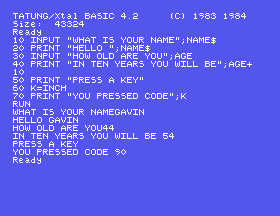
Look at lines 1 and 3 of that: the answer is jammed against the question, because INPUT adds nothing after your message.
"WHAT IS YOUR NAME? ", and run it again. Better?FRED instead of a number. What does line 40 print, and did BASIC warn you?K=KBD and run it again. What happens now, and why does the program not wait?10.1 Ask for two numbers and print their total, their difference and their product, each labelled.
10.2 Ask for someone's name and print it back with a line of dashes under it exactly as long as the name. MUL$ from S9 will do the dashes.
10.3 Ask the reader to press a key, then print the key, its code, and the character five codes further on.
Worked solutions are in Appendix II.
| Symptom | Cause |
|---|---|
Syntax Error on an INPUT line | The separator is a semicolon, not a comma: INPUT "TEXT";A. |
| The answer runs straight into the question | INPUT puts nothing after your message. Add a space inside the quotes. |
| A number is 0 and the reader definitely typed something | They typed something that does not start with a number. INPUT gives 0 and says nothing. |
Extra ignored | More items in the answer than the INPUT asked for. |
| The program will not wait for a key | KBD never waits; INCH does. |
| A key is pressed and nothing appears on screen | INCH does not echo. Print it yourself if you want to see it. |
INPUT "message";VARIABLE asks and waits; the message gets no question mark and no space, the separator is a semicolon, and a bad answer to a numeric INPUT is silently 0. INCH waits for a single key and gives its code without echoing; INCH$ gives it as a string; KBD does the same without waiting at all, which is what a game needs.
S11, Making A Choice: doing one thing or another depending on what the answer was.
This form is protected by reCAPTCHA, and the Google Privacy Policy and Terms of Service apply.
