module
11

A program that asks a question and then ignores the answer is not much of a program. IF is what makes the answer matter: it looks at something and decides whether to carry on along this line or skip it.
It is the most useful statement in BASIC and the one with the most traps, so this section goes slowly.
IF N=7 THEN PRINT "RIGHT!"
If the condition between IF and THEN holds, the rest of the line happens. If it does not, BASIC gives up on the line and moves to the next one.
The condition is usually a comparison:
= | equal |
<> | not equal, >< works too |
< > | less, greater |
<= >= | less or equal, greater or equal, =< and => also work |
They work on text as well as numbers, comparing character by character, so "CAT"<"DOG" holds.
THEN can be followed by a line number instead of a statement, which means "go there":
IF N=7 THEN 100
and you can put several statements after THEN, separated by colons: all of them belong to the IF:
IF N=7 THEN PRINT "RIGHT!":PTS=PTS+10
Both happen, or neither does.
A comparison is not a special kind of thing in BASIC; it is just a number. Try it:
PRINT 1=1;1=2
-1  0
True is -1. False is 0. Not 1: minus one.
And IF will take any number at all, not only a comparison. Anything that is not zero counts as true, so IF A THEN ... happens whenever A is not 0, which is a short way of writing IF A<>0 THEN ....
You can join conditions with AND and OR:
IF A>0 AND A<10 THEN PRINT "IN RANGE"
IF A=1 OR A=5 THEN PRINT "ONE OR FIVE"
AND binds more tightly than OR, so A OR B AND C means A OR (B AND C). When in doubt, bracket it.
ELSE gives the other half:
IF N=7 THEN 100 ELSE 200
After a line number, that is all there is to it.
After a statement, ELSE must have a colon in front of it:
IF N=7 THEN PRINT "RIGHT!":ELSE PRINT "WRONG"
That colon is easy to leave out, and here is why it matters so much. Without it:
10 A=1
20 IF A=6 THEN PRINT "SIX" ELSE PRINT "NOT SIX"
runs perfectly and prints NOT SIX. Change line 10 to A=6 and the same program prints SIX and then stops with:
Syntax Error in 20
The missing colon is only an error when the condition comes out true. A program can work for weeks, and fail the first day the interesting thing happens. If you take one thing from this section, take the colon.
If a condition is false, BASIC skips along the line looking for an ELSE, and it takes the next one it finds, even if that ELSE belongs to a different IF further along the same line.
The cure is simple: do not put two IFs on one line. Give each its own line and the question never comes up.
10 SECRET=7
20 INPUT "GUESS A NUMBER 1 TO 10? ";N
30 IF N=SECRET THEN PRINT "RIGHT!":ELSE PRINT "NO - IT WAS";SECRET
40 IF N<SECRET THEN PRINT "YOU WERE LOW"
50 IF N>SECRET THEN PRINT "YOU WERE HIGH"
Starting from
A fresh boot, or NEW.
What you should see
Guessing 4:
GUESS A NUMBER 1 TO 10? 4
NO - IT WAS 7
YOU WERE LOW
Ready
and guessing 7:
GUESS A NUMBER 1 TO 10? 7
RIGHT!
Ready
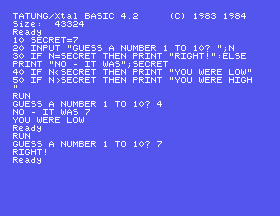
Notice that lines 40 and 50 are still looked at even when line 30 was right; they just do not hold. Each IF is judged on its own.
... THEN PRINT "RIGHT!" ELSE PRINT .... Run it and guess wrong. Then run it and guess right. Why does only one of those fail?IF N=SECRET AND N>0. Does anything change? Now try IF N on its own: what does that ask?60 IF N=SECRET THEN PRINT "WELL DONE":PRINT "GO AGAIN". Guess wrong. Do you get either message?11.1 Ask for a number and print whether it is positive, negative or zero: three outcomes, so you will need more than one IF.
11.2 Ask for a password and print IN or OUT. Then make it accept either of two passwords.
11.3 Ask for someone's age and print whether they can vote (18 or over). Then add a message for an impossible answer: a negative age, or one over 120, remembering from S10 what INPUT does with a non-number.
Worked solutions are in Appendix II.
| Symptom | Cause |
|---|---|
Syntax Error in <line> on an IF line that has worked before | The colon before ELSE is missing, and today the condition came out true. |
The wrong ELSE ran | Two IFs on one line. Split them. |
IF A=5 THEN ... never happens although A is 5 | A may not be what you think; check the name against S8's traps, and print it. |
Type Error | A string compared with a number. Compare like with like. |
Everything after THEN happens even when you meant only the first part | Everything after THEN on that line belongs to the IF, which is usually what you want. If you did not, give it its own line. |
| A condition you expected to be 1 prints -1 | True is -1 in this BASIC. |
IF condition THEN ... carries on along the line when the condition holds and abandons the line when it does not. True is -1, false is 0, and any non-zero number is true. THEN takes a statement, several statements, or a line number. ELSE needs a colon before it when it follows a statement, and forgetting it only breaks when the condition is true. One IF to a line.
S12, Doing It Again: repeating something a set number of times without writing it out.
This form is protected by reCAPTCHA, and the Google Privacy Policy and Terms of Service apply.
