module
9

A game needs words as well as numbers: a title, a name, a message when the cat gets you. BASIC keeps text in variables too, and they work almost exactly like the ones in S8, with one mark on the end of the name to say which sort they are.
NAME$="MOUSE"
The $ is part of the name. NAME$ and NAME are two different variables and can both exist at once, one holding text and one a number.
Text goes in double quotes when you write it down, exactly as in PRINT.
An unset string variable is empty: not zero, not an error, just nothing at all. Printing one prints nothing.
The five-character rule from S8 applies here too, and so does the keyword trap: WORD$ has OR in it and is not a variable.
+ between two strings sticks them together:
PRINT NAME$+" HOLE"
gives MOUSE HOLE. That is the only arithmetic strings do: -, * and / on text are all errors.
A string holds at most 255 characters. Going past that is Str Ovfl Error, and the variable is left as it was.
PRINT LEN(NAME$)
gives 5. LEN of an empty string is 0.
Three functions, all counting from 1 for the first character:
LEFT$(A$,n) | the first n characters |
RIGHT$(A$,n) | the last n characters |
MID$(A$,p,n) | n characters starting at position p |
So with NAME$="MOUSE": LEFT$(NAME$,2) is MO, RIGHT$(NAME$,1) is E, and MID$(NAME$,2,3) is OUS.
Ask for more than there is and you get what there is: LEFT$("MOUSE",9) is MOUSE, not an error.
MID$ with two arguments, MID$(A$,p), gives everything from p to the end.
Every character has a code. ASC( gives you the code of the first character of a string, and CHR$( turns a code back into a character:
PRINT ASC("A");CHR$(65)
 65 A
You will want CHR$( later for the Einstein's own graphics characters, which have codes of their own.
"42" is text. 42 is a number. They are not interchangeable, and mixing them is a Type Error.
Two functions convert:
STR$(n) | the number as text, including the leading space PRINT would give it |
VAL(A$) | the number at the front of the text, or 0 if there is not one |
VAL("42")+1 is 43. VAL("HELLO") is 0: no error, just 0, which is worth remembering when you start reading what somebody typed.
MUL$(A$,n) repeats a string:
PRINT MUL$("-",10)
draws a line of ten dashes. Useful for a title screen, and shorter than a loop.
10 NAME$="MOUSE"
20 PRINT "THE ";NAME$;" IS HERE"
30 PRINT LEN(NAME$)
40 PRINT NAME$+" HOLE"
50 PRINT LEFT$(NAME$,2)
60 PRINT MID$(NAME$,2,3)
70 PRINT RIGHT$(NAME$,1)
Starting from
Anything; RUN clears the variables first.
What you should see
RUN
THE MOUSE IS HERE
 5
MOUSE HOLE
MO
OUS
E
Ready
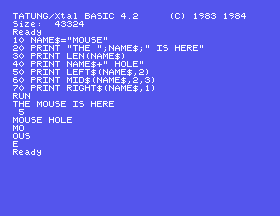
Notice line 20: the semicolons join the pieces with nothing between them, so the spaces you can see came from inside the quotes. And line 30's 5 has the leading space of a number, while none of the text lines do.
PRINT LEFT$(NAME$,9). The name is only five characters long. What do you get: an error, or something else?PRINT LEN(NAME$+" HOLE"). Does LEN count the space?80 PRINT NAME$+5 and run it. Read the error. Then make it work with STR$.9.1 Put your first name in one variable and your surname in another, and print them with a space between, then print how many letters there are in both together.
9.2 Print the first letter of a word on its own, then the last letter, without counting the letters yourself: use LEN.
9.3 MID$("MOUSETRAP",6,4) gives TRAP. Work out, before you run it, what MID$("MOUSETRAP",1,5) gives, and what RIGHT$("MOUSETRAP",4) gives.
Worked solutions are in Appendix II.
| Symptom | Cause |
|---|---|
Type Error | A string where a number belongs, or the other way round. STR$( and VAL( convert between them. |
| A string variable prints nothing | It has never been assigned; check the spelling, and the first five characters. |
Str Ovfl Error | The result would be over 255 characters. The variable is unchanged. |
VAL gives 0 for something that looks like a number | It reads from the front; if the front is not a number, you get 0 with no complaint. |
PRINT STR$(42) has a space in front of the 42 | STR$ gives exactly what PRINT would, and PRINT puts a space where a minus sign would go. |
Str Complex Error | Too many joins nested inside one another. Break the expression into two lines. |
A $ on the end of a name makes it hold text. + joins, LEN measures, LEFT$ RIGHT$ MID$ take pieces out counting from 1, ASC and CHR$ convert to and from character codes, and STR$ and VAL convert to and from numbers. Text and numbers never mix by accident; you get a Type Error instead.
S10, Asking A Question: getting something from whoever is at the keyboard, which is where a program stops being a fixed list of instructions.
This form is protected by reCAPTCHA, and the Google Privacy Policy and Terms of Service apply.
