module
8

So far every number in a program has been written into it. That is fine for a sum and useless for a game: a score goes up, a mouse moves, a life is lost. You need somewhere to keep a number that changes, with a name you can use.
BASIC gives you that in the plainest way imaginable. You also need to know two things about names on this machine, and the second one is the nastiest trap in the language.
LIVES=3
That is it. LIVES now holds 3, and anywhere you write LIVES the machine uses 3. You can print it:
PRINT LIVES
and you can change it, including in terms of itself:
LIVES=LIVES-1
which reads oddly as arithmetic and perfectly as an instruction: work out LIVES-1, and put the answer back in LIVES.
You may write LET LIVES=3 if you like the look of it. BASIC accepts it and ignores it. Nobody bothered in 1984 and this course does not either.
A name you have never used is 0. No error, no warning: PRINT NEVERSET prints 0. Convenient, and a good way to lose an hour to a typo.
A name may be as long as you like, but Xtal BASIC only looks at the first five characters. So COUNTER and COUNTS are the same variable:
COUNTER=5
COUNTS=9
PRINT COUNTER;COUNTS
 9  9
Both names are COUNT as far as the machine is concerned, and the second assignment overwrote the first.
Long names cost nothing in memory: every number variable takes eight bytes whatever it is called; so write LIVES if it reads better than LV. Just make sure any two names differ within their first five letters.
Try this at the Einstein's prompt:
SC=5
E=3
PRINT SCORE
 7
SCORE is not a variable at all. BASIC has read it as SC OR E: the variable SC, the operator OR, the variable E, and given you 5 OR 3.
Any name with a keyword buried in it is broken at the keyword and the pieces are worked out as an expression. Sometimes that is an error, sometimes a wrong number, and sometimes nothing at all.
Of sixty ordinary names you might reach for, nine are unusable, and they are exactly the ones a beginner writing a game would pick first:
| Name | What BASIC sees |
|---|---|
SCORE | SC OR E |
POINTS | POINT S |
TOTAL | TO TAL |
LIFE | L IF E |
WORD | W OR D |
FLOOR | FLO OR |
BONUS | B ON US |
DELAY | DEL AY |
SPEED | a statement in its own right |
OR is the worst of them. It hides in the middle of perfectly ordinary English.
And nothing tells you. A line like 20 SCORE=50 is accepted when you type it, stored, and listed back exactly as you wrote it. It fails when the line runs, with Syntax Error in 20, and the line looks completely fine.
Do not try to memorise the keyword list. When you want a name, spend two seconds:
LIVES=7
PRINT LIVES
 7
If 7 comes back, the name is yours. If you get 0, an error, or silence, pick another.
These are all safe, and this course uses them: LIVES PTS MX MY VX VY CATX CATY DX DY JUMP HIT FRAME COUNT NAME TEXT MOUSE CAT HOLE WALL PLAT.
CLEAR sets every variable back to nothing. So does NEW, and so does RUN, which is worth knowing: a program cannot rely on a value left over from the last run. Every run starts with every variable at 0.
10 LIVES=3
20 PTS=0
30 PRINT "LIVES:";LIVES
40 PTS=PTS+100
50 PRINT "POINTS:";PTS
60 PTS=PTS+100
70 PRINT "POINTS:";PTS
80 LIVES=LIVES-1
90 PRINT "LIVES:";LIVES
Starting from
Anything; RUN clears the variables first.
What you should see
RUN
LIVES: 3
POINTS: 100
POINTS: 200
LIVES: 2
Ready
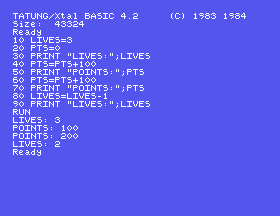
The space before each number is the one from S7: PRINT puts it there, and it is why LIVES: and the number are not jammed together.
PTS to SCORE everywhere: four places. The program still looks right and still lists right. What happens when you run it, and which line does it blame?100 PRINT PTS+LIVES and run it. Then change line 100 to PRINT PTSX, a name you have never used. What do you get, and why is that more dangerous than an error?COUNTER after setting COUNTS. Predict the answer before you run it.8.1 Write a program that puts your age in a variable, works out how old you will be in ten years, and prints both with labels.
8.2 A mouse starts at position 10 and moves right by 4 three times. Use one variable and print where it is after each move.
8.3 Find out whether TIMER, LENGTH and MYSCORE are usable names, using the check above. For any that are not, work out which keyword is hiding in them.
Worked solutions are in Appendix II.
| Symptom | Cause |
|---|---|
Syntax Error in <line> on a line that looks perfect | A keyword inside a variable name. Check every name on that line with the two-second test. |
| A variable is the wrong number and you never assigned it | Either a keyword name being worked out as a sum, or two names that match in their first five letters. |
| A variable is 0 when it should not be | You have never assigned it; probably a typo in the name. BASIC does not warn you. |
SPEED=1 makes the screen crawl | SPEED is a statement. You did not make a variable, you slowed the machine down. SPEED 255 puts it back. |
| A value from the last run has gone | RUN clears every variable before it starts. |
NAME=value stores a number; the name can be used anywhere the number could. Unset names are 0. Only the first five characters of a name count. A keyword buried in a name breaks it, silently, until the line runs; so test a new name by assigning to it and printing it back.
S9, Words: variables that hold text rather than numbers, and taking pieces out of them.
This form is protected by reCAPTCHA, and the Google Privacy Policy and Terms of Service apply.
