About
This is the disc image the site's SuperForth course is written against. Mount it in MAME, type FORTH at the DOS prompt, and ten seconds later you have everything the course needs. It is equally useful on its own if you want to try SuperForth and be able to keep what you write.
What Is on It
- FORTH.COM, SuperForth 1.12 exactly as sold: the language and nothing else.
- BIGFORTH.COM, the same SuperForth with the disc tools and the 40 column screen editor already loaded. See below for how it was made.
- The extension files that shipped with SuperForth, all in Forth source you can read: UTILITY (random numbers, arrays, typed-in numbers, the clock and more), GRAPHICS, SPRITES, SOUNDS, FLOAT (floating point and trigonometry), FUNKEYS (the function keys), and GAME, a complete arcade game called Red Baron.
- DOSTOOLS and EDITOR40, the source of what is built into BIGFORTH, and MESSAGES, the text of SuperForth's error messages.
- 80K of free space, which is where your own programs go.
Why It Is an .mfi and Not a .dsk
This matters more than it sounds, and it is the reason this disc exists.
MAME will not write to a .dsk image. It will read one perfectly well, so SuperForth boots and runs and everything looks fine. But SuperForth keeps your programs in files on its disc: the editor's work is written to the disc, every saved screen is written to the disc, and the enlarged SuperForth its own manual tells you to build first has to be written to the disc. On a .dsk each of those fails with Bad Data, Drive 0:, which says nothing about the real cause. The .mfi format is MAME's own flux-level format, and MAME does write to it, so anything you save is still there next time.
If you want the disc as Tatung sold it, that is here too, as SuperForth 1.12. It is fine for looking. It is no good for working. The Einstein Disc Tools will convert between the two formats in either direction.
Using It
Put the file somewhere you can find again and point MAME at it:
mame -rompath ~/roms einstein -flop1 ~/einstein/superforth.mfi -window
The Einstein boots to TATUNG/XtalDOS 1.11. Type FORTH for the bare language, or BIGFORTH MYWORK to start with the editor and a file of your own called MYWORK. There is no prompt: a block cursor under the sign-on means it is listening. 1 SELECT opens screen 1 in the editor, ESC leaves it, FLUSH writes it to the disc and 1 LOAD compiles it. DOS takes you back out. Leave that way: closing the MAME window loses anything you have not flushed.
Three things worth knowing before you start, all of which stop people dead:
- Keep typed lines under 40 characters. SuperForth reads only the row of the screen the cursor is on. A longer line loses its beginning, and a line of exactly 40 is thrown away and answered ok. A definition can run over as many lines as you like.
- SuperForth's words are in capitals, and it starts with capitals locked on. If words you know stop working, look at CAPS LOCK.
- The punctuation is where the Einstein kept it. In MAME,
"is SHIFT and 2,:is the'key,+is SHIFT and;, and minus is SHIFT and=. Three of the arrow keys type characters, square brackets among them.
Red Baron
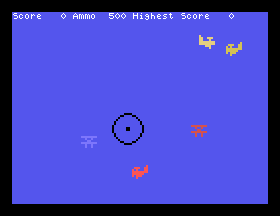
It is worth your time. Load GRAPHICS, SOUNDS and SPRITES, then NEWFILE GAME, 1 LOAD and GAME, and you are looking through a gunsight at five aeroplanes. Z and X bank, : and / climb and dive, SPACE fires. It is eleven screens of Forth, and once you have played it you can LIST every one of them and see how it was done.
Real Hardware
If you have a real Einstein and a SuperForth disc, you do not need this download. This image exists for emulation, for the free space, and for BIGFORTH. Nothing on this page has been tried on a real machine.
How It Was Made
It is the SuperForth 1.12 disc with one program added and a little taken off. Three empty junk files that the archive's copy had picked up were removed, along with EDITOR80 (the editor for the 80 column card) and COPY.COM, neither of which the course uses. Nothing that remains was altered, and XtalDOS 1.11 is still on the system tracks underneath.
BIGFORTH.COM was made by SuperForth itself, on the emulated machine, by following the procedure in section 3.6 of its own manual line for line: start FORTH DOSTOOLS, load its three screens, NEWFILE EDITOR40, load that, define TASK, type SAVE - SuperForth answers SAVE 62 BLOCKS and drops to DOS - and then SAVE 62 BIGFORTH.COM. Nothing was assembled or patched off the machine. The course's last section shows you how to make your own the same way.
The disc was then tested in MAME end to end: it boots, BIGFORTH starts, a definition typed into the editor is flushed to the disc, and after a restart it lists, loads and runs. The file on this page was downloaded back and checked byte for byte against the tested one.
Gallery