module
18
VLIST showed you a great many words, and still SuperForth cannot draw a line, play a tune or pick a random number. It can, though - just not yet. Those words are on the disc, written in Forth, in files like the one you made in S9, waiting to be loaded.
This is how the whole system is meant to be used. You load what a program needs and nothing else, and the room is left for your own work.
| File | Holds |
|---|---|
UTILITY | random numbers, arrays, typed-in numbers, the clock and more |
GRAPHICS | drawing |
SPRITES | moving shapes |
SOUNDS | the sound chip |
FLOAT | numbers with decimal points |
FUNKEYS | the function keys |
GAME | a complete game, to read |
DOSTOOLS and EDITOR40 are there too; they are already inside BIGFORTH.
SuperForth works on one file at a time. NEWFILE changes which:
NEWFILE UTILITY
Now LIST, LOAD and the editor all mean UTILITY. Your own file has been closed, safely, first.
The author put a comment on the top line of every screen, so INDEX gives you a table of contents:
1 8 INDEX
You load just the screen you want. Screen 1 is the random number generator:
1 LOAD
and now there is a new word. 100 CHOOSE leaves a number from 0 to 99.
Notice that LOAD counted only three blocks, not eight. The screen ends with the word ;S, which means "stop loading here", and the rest of it is blank.
At the 0: prompt:
BIGFORTH
Then:
NEWFILE UTILITY
1 8 INDEX
1 LOAD
100 CHOOSE .
Starting from
A fresh boot of the course disc, with BIGFORTH started and no file named.
What you should see
  1 ( RANDOM NUMBER GENERATOR )
  2 ( MACHINE CODE SUBROUTINE CALL )
  3 ( ARRAY DEFINING WORDS )
  4 ( NUMBER INPUT & ADC PORTS )
  5 ( DIRECT KEYSCAN )
  6 ( TIME WORDS )
  7 ( BAUD RATE SET AND SERIAL PORT )
  8 ( DOUBLE NUMBER EXTENSIONS )ok
1 LOAD

Loading Blocks: 1 2 3 ok
100 CHOOSE .
79 ok
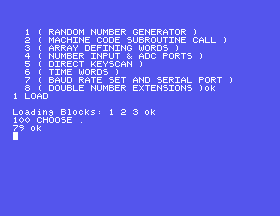
Your number will be 79 too. S20 explains why, and what to do about it.
The words you loaded stay in memory when you change file, so the routine is: open the extension, load what you need, and go home.
NEWFILE UTILITY
1 LOAD
NEWFILE MYWORK
After that your own screens can use CHOOSE as if it had always been there.
Most extension screens start by defining a word that does nothing, for exactly the reason you met in S8. Screen 1 of UTILITY starts with : RANDTASK ;, so
FORGET RANDTASK
takes the random number words out again, along with anything you defined after loading them.
NEWFILE will open anything. If the file does not exist, it says New File and makes one. So NEWFILE UTILTY gives you an empty file with a silly name, and a LOAD from it loads nothing. BIGFORTH has a word to clear up: DELETE-FILE removes whichever file is current. Make very sure which file that is - .FILE tells you - before you use it.
NEWFILE GRAPHICS and 1 4 INDEX. What is on the fourth screen?UTILITY twice. What does SuperForth say? Then FORGET RANDTASK once. Does CHOOSE still work? Why?NEWFILE UTILTY, with the mistake. Then .FILE, then DELETE-FILE, then DIR. What is the current file afterwards?2 LIST to read screen 2 of UTILITY. You will not understand all of it yet. What is the last word on the screen, and what is it for?18.1 FLOAT is 22 screens long. Find out how many of them are in use, using INDEX.
18.2 Load CHOOSE, then go back to a file of your own, and on screen 1 of it define DICE ( -- n ) to leave a number from 1 to 6. Save and load it.
18.3 Restart BIGFORTH with your file. 1 LOAD fails. Why, and what do you have to do first, every time?
Worked solutions are in Appendix II.
| Symptom | Cause |
|---|---|
New File when you expected an extension | The name is misspelt. You now have an empty file of that name; DELETE-FILE while it is still current. |
CHOOSE? from your own screen after a restart | Extensions live in memory. Load them again each session before your own screens. |
Isn't Unique several times during a load | That screen was already loaded. |
| Your own words have vanished | You used FORGET on an extension's marker, which takes out everything defined after it, including yours. |
NEWFILE name changes the current file; INDEX shows what its screens hold; LOAD brings one in, stopping at ;S. The loaded words stay when you switch back to your own file, until you FORGET the extension's marker word or leave SuperForth. Load what you need, each session, before your own screens.
S19, Asking A Question - getting a number, not just a keypress, out of the person at the keyboard.
This form is protected by reCAPTCHA, and the Google Privacy Policy and Terms of Service apply.
