module
31
.png)
The game from S29 works, and it is not finished. You cannot start it - it is
already running the moment it loads. You cannot lose it: a rock reaching the
ship flashes the screen red and play carries on. You cannot leave it, either,
because the loop ends JR main and nothing in it ever stops.
That is the difference between a program that draws a game and a game. A game has a beginning, a way to fail, and a way to go round again, and none of those are about graphics. They are about the program knowing which part of itself it is in.
Right now there is one loop and it does one thing:
main:   CALL waitframe
        CALL input
        CALL animate
        ...
        JR main
A title screen needs a different loop - draw some words, watch for a key, do nothing else. A game over screen needs a third. And the program has to be able to move between them.
The wrong way to do this is a pile of flags: LD A,(playing), OR A,
JR Z,..., repeated at the top of everything. It works for two states and
collapses at four.
The right way is a state number and a table.
One byte says where the program is:
state: DEFB 0 ; 0 title, 1 playing, 2 game over
And a table says what to run for each:
states: DEFW title
        DEFW playing
        DEFW over
The loop becomes two lines, and never changes again however many states you add:
main:   CALL waitframe
        CALL dispatch
        JR main
You have written dispatch before. It is S14's table of routines, unchanged:
double the index, add it to the table's address, fetch the two bytes there,
and jump.
dispatch:
        LD A,(state)
        ADD A,A
        LD L,A
        LD H,0
        LD DE,states
        ADD HL,DE
        LD E,(HL)
        INC HL
        LD D,(HL)
        EX DE,HL
        JP (HL)
S14 left one problem open. JP (HL) is a jump, not a call, so the routine it
lands on has no way back - its RET goes wherever the stack was pointing
before. The fix S14 describes is the one used here: reach the dispatcher
with a CALL. The state routine's own RET then returns through the
dispatcher's caller, which is main, and the loop carries on.
That is worth sitting with for a moment. CALL dispatch pushes a return
address; JP (HL) jumps without pushing another; the state's RET pops the
one that is there. Two instructions in different routines, cooperating through
the stack, and the result is a game loop that runs whichever state is current
and comes back afterwards.
Adding a state is now: write the routine, add a DEFW, use the number.
Every state has two different jobs, and separating them is most of what makes this work.
On the way in, once: clear the screen, draw whatever words belong there, set the backdrop, decide what the sprites are doing.
Every frame afterwards: watch for a key, move things, publish them.
One byte keeps them apart:
entered: DEFB 0 ; has this state drawn its screen yet?
and one routine reads it:
; --- Z, once, on the first frame of a state. NZ every frame after.
once:   LD A,(entered)
        OR A
        RET NZ
        LD A,1
        LD (entered),A
        XOR A
        RET
So a state opens CALL once / JR NZ,<the every-frame part>, and the setup
sits between them. Changing state clears the flag, so the next state sets
itself up on its first frame:
gostate:
        LD (state),A
        LD A,0
        LD (entered),A
        RET
The rule that keeps this from becoming a mess: when a state is running, everything on screen is its responsibility. Not just the part it cares about.
That means the backdrop. S24 made the point for a collision light - a display
you only write on some passes is a display you do not own - and it applies
here one level up. flash writes the backdrop every frame while you are
playing, so the playing state owns it. The title and game over states are not
running flash, so they must set it themselves, or they inherit whatever the
last state happened to leave:
; --- the backdrop colour in A
backdrop:
        OUT (9),A
        LD A,135
        OUT (9),A
        RET
It means the sprites, too. There is no rocket on a title screen, and the cheapest way to have none is S19's terminator - one byte into the first sprite's Y and the VDP stops reading the list entirely:
hide:   LD A,0
        OUT (9),A
        LD A,123
        OUT (9),A
        LD A,208
        OUT (8),A
        RET
Nothing has to put them back. place writes sprite 0's Y every frame while
you are playing, so the moment the playing state runs again the terminator is
overwritten and the ship reappears.
S29 borrows the font into bank 0 only, which is why its score line sits in the top row: bank 0 is the top eight rows and there are no letters anywhere else. A title in the middle of the screen needs the same patterns in all three banks, and white ink in all three colour banks to go with them.
That is two loops and three calls each:
        LD A,65         ; bank 0 patterns, 0100h
        CALL fontto
        LD A,73         ; bank 1, 0900h
        CALL fontto
        LD A,81         ; bank 2, 1100h
        CALL fontto

        LD A,97         ; bank 0 colours, 2100h
        CALL colto
        LD A,105        ; bank 1, 2900h
        CALL colto
        LD A,113        ; bank 2, 3100h
        CALL colto
The addresses are S17's and S18's, one page in from each bank's base because the printable characters start at code 32 and 32 patterns is 256 bytes.
With that done, a string goes anywhere:
; --- the zero-terminated string at HL, into the name table at DE
text:   LD A,E
        OUT (9),A
        LD A,D
        ADD A,64
        OUT (9),A
tx:     LD A,(HL)
        OR A
        RET Z
        OUT (8),A
        INC HL
        JR tx
and the caller can say where in a form you can read:
        LD HL,msgname
        LD DE,3800h+9*32+12
        CALL text
Row 9, column 12. The assembler works the address out; you never write
392Ch and wonder later what it meant.
A life is a byte, and losing one happens where the rock already reaches the ship. S29 ends that path by flashing the screen and spawning the next rock. Now it costs you something:
        LD A,25         ; the rock reached the ship: half a second of red
        LD (flashT),A
        CALL spawn
        LD A,(lives)    ; and it costs you one of three
        DEC A
        LD (lives),A
        CALL dlives
        OR A
        RET NZ
        LD A,2          ; that was the last one
        JP gostate
There is a trap in those nine lines, and it is worth pointing at because it is
the oldest lesson in the course wearing new clothes. dlives draws the lives
digit, and to do that it loads lives and adds 48 to make a character - so it
comes back with A holding 51, not 3. Test A after calling it and the test
is meaningless.
The fix is S12's, applied to a routine of your own rather than a ROM call:
dlives: PUSH AF         ; the caller is about to test A - S12's habit
        LD A,26
        OUT (9),A
        LD A,120
        OUT (9),A
        LD A,(lives)
        ADD A,48
        OUT (8),A
        POP AF
        RET
Two bytes, and the routine can now be called from anywhere without the caller having to know what it does to the accumulator. That is what S8 meant by saying you cannot assume a register survives a call - and here you are on the other side of it, writing the call somebody else has to trust.
With the machinery in place each state is short. The title:
title:  CALL once
        JR NZ,tpoll
        LD A,244                ; this screen owns the backdrop too
        CALL backdrop
        CALL hide               ; no sprites on this screen
        CALL clearall
        LD HL,msgname
        LD DE,3800h+9*32+12
        CALL text
        LD HL,msgstart
        LD DE,3800h+12*32+10
        CALL text
tpoll:  CALL spacedown
        RET NZ                  ; space not down - keep waiting
        CALL newgame
        LD A,1
        JP gostate
Playing is S29's loop with its furniture drawn on the way in:
playing:
        CALL once
        JR NZ,play
        CALL clearall
        LD HL,msgscore          ; the furniture this screen needs
        LD DE,3800h+2
        CALL text
        LD HL,msglives
        LD DE,3800h+20
        CALL text
        CALL dlives
play:   CALL input
        CALL animate
        CALL bullet
        CALL fall
        CALL hits
        CALL place
        CALL apub
        CALL dscore
        CALL flash
        RET
And game over, with one thing the other two do not need:
over:   CALL once
        JR NZ,opoll
        LD A,246                ; red, chosen rather than left over
        CALL backdrop
        CALL hide
        CALL clearall
        LD HL,msgover
        LD DE,3800h+10*32+11
        CALL text
        LD HL,msgstart
        LD DE,3800h+13*32+10
        CALL text
        LD A,50                 ; a second before the key counts - the
        LD (hold),A             ; space that killed you is probably still down
opoll:  LD A,(hold)
        OR A
        JR Z,opoll2
        DEC A
        LD (hold),A
        RET
opoll2: CALL spacedown
        RET NZ
        LD A,0
        JP gostate
That lockout is not fussiness. You die with your finger on the fire button, and without it the game over screen is dismissed by the same press that killed you - on screen for a fiftieth of a second, which reads as a bug. It is the same one-byte timer as the collision flash, spent on an input problem instead of a display one.
The last piece is the one that makes a second game possible. Starting is not "go to the playing state" - it is putting everything back:
newgame:
        LD A,3
        LD (lives),A
        LD A,0
        LD (scoreU),A
        LD (scoreT),A
        LD (flashT),A
        LD (bullA),A
        LD A,224
        LD (bullY),A
        LD A,124
        LD (rockX),A
        LD A,160
        LD (rockY),A
        JP spawn
Every variable the game changes while it runs has to appear in that list. Miss one and the second game starts with the first game's leftovers - a score that carries over, a bullet already in flight, a ship parked where it died. This is the routine to come back to whenever you add a variable to the game.
Everything above goes into S29's program. The rest of it - the rocket, the bullet, the rock, the collisions, the score, the frame wait - is unchanged. Three edits to what is already there:
CALL waitframe / CALL dispatch / JR main, with
dispatch and the states table after it.fontto, with
colto for the colours. The SCORE label that setup used to draw comes
out - the playing state draws its own now.hits ends with the nine lines above instead of
JR spawn.Plus the new data:
state:  DEFB 0          ; 0 title, 1 playing, 2 game over
entered: DEFB 0         ; has this state drawn its screen yet?
lives:  DEFB 3
hold:   DEFB 0

msgscore: DEFM "SCORE ",0
msglives: DEFM "LIVES ",0
msgname:  DEFM "ROCKFALL",0
msgstart: DEFM "PRESS SPACE",0
msgover:  DEFM "GAME OVER",0
What you should see
It loads to a title screen: ROCKFALL and PRESS SPACE, white on blue,
centred, with nothing else on the display.

Press space and the game begins, with SCORE 00 on the left of the top row
and LIVES 3 on the right.
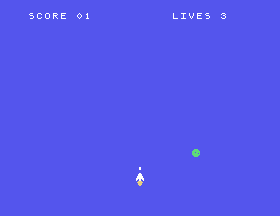
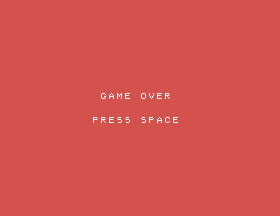
Let three rocks reach the ship. The third one takes the last life and the
screen turns red: GAME OVER, PRESS SPACE. Press it and you are back at the
title, on blue, with a fresh three lives and a score of zero waiting.
CALL once and JR NZ,tpoll from title, so its setup runs
every frame. Run it. Nothing changes - the title screen is identical
down to the pixel. Now do the same to playing: delete its CALL once and
JR NZ,play. The score and lives never appear at all, while the ship, the
rock and the bullet carry on exactly as before. The redraw is not failing;
work out where in the loop the screen is being looked at.LD A,3 in newgame to LD A,1. One life. Does anything else in
the program need to know?CALL hide out of over and lose a game. What is still on the screen,
and why does nothing move it?states table, so it reads
DEFW over / DEFW playing / DEFW title. Predict what happens before you
run it. What does that tell you about where the wiring of this program
actually lives?31.1 - A pause state. Add a fourth state that freezes the game: the screen stays as it is, nothing moves, and a key returns to playing. Where does it go in the table, and what must it not do on the way in?
31.2 - Tell them the score. Put the final score on the game over screen.
The digits are already kept as two bytes; text will not help you directly,
so work out what will.
31.3 - A high score. Keep the best score so far, show it on the title screen, and update it when a game beats it. It survives a new game but not a reset of the machine - say why, and what it would take to change that.
31.4 - Waves. Make the rocks fall faster every time the score passes a
multiple of ten. fall gates on every other frame; that gate is where to
start.
31.5 - Attract mode. After a few seconds on the title screen, let the game play itself - rocks falling, nothing shooting - until a key is pressed. You will find this is much easier than it sounds, and the reason why is the point of the exercise.
| Symptom | Cause |
|---|---|
| The lives count goes past zero and the game never ends | A routine you called destroyed the value you were about to test. dlives returns a character code, not a count - PUSH AF / POP AF round it. |
| A screen keeps the previous screen's backdrop | Only the playing state writes register 7, through flash. Every state that does not run flash has to set the backdrop itself. |
| Sprites from the last game sit on the title screen | Nothing hid them. One 208 into sprite 0's Y stops the VDP reading the list. |
| The game over screen flashes past before you can read it | The key that fired your last shot is still down when the state changes. Lock the input out for a moment on the way in. |
| The second game starts with the first game's score | A variable that changes during play is missing from newgame. |
| A state's text never appears | Its setup is running every frame, so the screen spends nearly all its time cleared. Guard the setup with once. |
CALL so the state's own RET comes back.A is a routine its callers have to trust. Push what
you clobber.S32. Three Events, Three Noises. The game has a beginning and an end and makes no sound at all - S27 taught the chip and nothing has used it since. The shot, the hit and the flash that is already counting down are three events looking for three noises, and the trick is fitting them into a loop that cannot stop to listen.
This form is protected by reCAPTCHA, and the Google Privacy Policy and Terms of Service apply.
