module
30
.png)
By the end of S29 a working game lives in one file, and it has gotten long - VDP setup, tile data, sprite shapes and game logic all interleaved. Finding anything means scrolling past everything else, and reusing a routine in your next game means copying it by hand.
This section splits that one file into several, each with a single job, and joins them back into one program at assembly time. Nothing about the game changes - only where its pieces live.
A sensible split for a tile-and-sprite game:
| File | Holds |
|---|---|
vdp.asm |
Routines that talk to the VDP - loading a tile bank, a name table, a sprite |
screens.asm |
One project's worth of tile patterns and name-table maps |
sprites.asm |
Sprite shapes |
main.asm |
The game itself - the file you actually build |
main.asm calls routines and reads data it does not define, and pulls the
files that define them in with INCLUDE.
include 'vdp.asm'
An include line is replaced, at assembly time, by the named file's own
source - the same as if you had typed it there yourself. The result is one
program, with one set of labels, not several files compiled separately and
linked. That has a useful consequence: main.asm can CALL a routine or
LD HL, a table defined in a file it has not included yet, so long as
that file is included somewhere before the end of the source - the order
the files appear in does not have to match the order they are used in.
The quotes are not optional, and the file name inside them is used exactly as written.
Keep every file an include line brings in inside the same project folder
as the file you build - either directly beside it, or in a subfolder you
name in the include line itself:
include 'screens/level1.asm'
Build and run from the extension as usual and paths like that resolve
correctly. The one way to break it is assembling by hand from some other
folder - a relative path in include is read against wherever the
assembler is actually run from, not against the file that contains the
include line - so keep a project entirely under one folder and you will
not meet this.
Four files. main.asm is the one you build; the other three exist only to
be included by it.
main.asm:
        ORG 256

        LD HL,tiles
        LD A,64
        CALL loadbank
        LD HL,tiles
        LD A,72
        CALL loadbank
        LD HL,tiles
        LD A,80
        CALL loadbank

        LD HL,level1map
        CALL loadmap

        LD HL,face
        CALL loadsprite0

        LD B,100        ; Y
        LD C,120        ; X
        LD D,0          ; pattern 0
        LD E,15         ; colour 15, white
        CALL showsprite0

        JP $

        include 'vdp.asm'
        include 'screens.asm'
        include 'sprites.asm'
vdp.asm:
; loadbank - write five 8-byte tile patterns (40 bytes) into a tile bank.
;   In: A = bank's high address byte (64, 72 or 80)
;       HL = pointer to 40 bytes of pattern data
loadbank:
        LD D,A
        LD A,0
        OUT (9),A
        LD A,D
        OUT (9),A
        LD B,40
lb:     LD A,(HL)
        OUT (8),A
        INC HL
        DJNZ lb
        RET

; loadmap - write a 768-byte name table.
;   In: HL = pointer to 768 bytes of tile numbers
loadmap:
        LD A,0
        OUT (9),A
        LD A,120        ; 40h + 38h - the name table
        OUT (9),A
        LD BC,768
lm:     LD A,(HL)
        OUT (8),A
        INC HL
        DEC BC
        LD A,B
        OR C
        JR NZ,lm
        RET

; loadsprite0 - write an 8-byte shape into sprite pattern 0.
;   In: HL = pointer to 8 bytes of pattern data
loadsprite0:
        LD A,0
        OUT (9),A
        LD A,88         ; 40h + 18h - the sprite pattern table
        OUT (9),A
        LD B,8
ls:     LD A,(HL)
        OUT (8),A
        INC HL
        DJNZ ls
        RET

; showsprite0 - set sprite 0's four attribute bytes.
;   In: B = Y, C = X, D = pattern number, E = colour
showsprite0:
        LD A,0
        OUT (9),A
        LD A,123        ; 40h + 3Bh - the sprite attribute table
        OUT (9),A
        LD A,B
        OUT (8),A
        LD A,C
        OUT (8),A
        LD A,D
        OUT (8),A
        LD A,E
        OUT (8),A
        RET
screens.asm:
tiles:
        ; 0 - blank
        DEFB 00000000b,00000000b,00000000b,00000000b
        DEFB 00000000b,00000000b,00000000b,00000000b
        ; 1 - corner
        DEFB 11111111b,10000001b,10111101b,10100101b
        DEFB 10100101b,10111101b,10000001b,11111111b
        ; 2 - horizontal
        DEFB 00000000b,11111111b,00000000b,11111111b
        DEFB 11111111b,00000000b,11111111b,00000000b
        ; 3 - vertical
        DEFB 01011010b,01011010b,01011010b,01011010b
        DEFB 01011010b,01011010b,01011010b,01011010b
        ; 4 - spot
        DEFB 00000000b,00000000b,00111100b,00111100b
        DEFB 00111100b,00111100b,00000000b,00000000b

level1map:
        DEFB 1,2,2,2,2,2,2,2,2,2,2,2,2,2,2,2,2,2,2,2,2,2,2,2,2,2,2,2,2,2,2,1
        DEFB 3,4,4,4,4,4,4,4,4,4,4,4,4,4,4,4,4,4,4,4,4,4,4,4,4,4,4,4,4,4,4,3
        DEFB 3,4,4,4,4,4,4,4,4,4,4,4,4,4,4,4,4,4,4,4,4,4,4,4,4,4,4,4,4,4,4,3
        DEFB 3,4,4,4,4,4,4,4,4,4,4,4,4,4,4,4,4,4,4,4,4,4,4,4,4,4,4,4,4,4,4,3
        DEFB 3,4,4,4,4,4,4,4,4,4,4,4,4,4,4,4,4,4,4,4,4,4,4,4,4,4,4,4,4,4,4,3
        DEFB 3,4,4,4,4,4,4,4,4,4,4,4,4,4,4,4,4,4,4,4,4,4,4,4,4,4,4,4,4,4,4,3
        DEFB 3,4,4,4,4,4,4,4,4,4,4,4,4,4,4,4,4,4,4,4,4,4,4,4,4,4,4,4,4,4,4,3
        DEFB 3,4,4,4,4,4,4,4,4,4,4,4,4,4,4,4,4,4,4,4,4,4,4,4,4,4,4,4,4,4,4,3
        DEFB 3,4,4,4,4,4,4,4,4,4,4,4,4,4,4,4,4,4,4,4,4,4,4,4,4,4,4,4,4,4,4,3
        DEFB 3,4,4,4,4,4,4,4,4,4,4,4,4,4,4,4,4,4,4,4,4,4,4,4,4,4,4,4,4,4,4,3
        DEFB 3,4,4,4,4,4,4,4,4,4,4,4,4,4,4,4,4,4,4,4,4,4,4,4,4,4,4,4,4,4,4,3
        DEFB 3,4,4,4,4,4,4,4,4,4,4,4,4,4,4,4,4,4,4,4,4,4,4,4,4,4,4,4,4,4,4,3
        DEFB 3,4,4,4,4,4,4,4,4,4,4,4,4,4,4,4,4,4,4,4,4,4,4,4,4,4,4,4,4,4,4,3
        DEFB 3,4,4,4,4,4,4,4,4,4,4,4,4,4,4,4,4,4,4,4,4,4,4,4,4,4,4,4,4,4,4,3
        DEFB 3,4,4,4,4,4,4,4,4,4,4,4,4,4,4,4,4,4,4,4,4,4,4,4,4,4,4,4,4,4,4,3
        DEFB 3,4,4,4,4,4,4,4,4,4,4,4,4,4,4,4,4,4,4,4,4,4,4,4,4,4,4,4,4,4,4,3
        DEFB 3,4,4,4,4,4,4,4,4,4,4,4,4,4,4,4,4,4,4,4,4,4,4,4,4,4,4,4,4,4,4,3
        DEFB 3,4,4,4,4,4,4,4,4,4,4,4,4,4,4,4,4,4,4,4,4,4,4,4,4,4,4,4,4,4,4,3
        DEFB 3,4,4,4,4,4,4,4,4,4,4,4,4,4,4,4,4,4,4,4,4,4,4,4,4,4,4,4,4,4,4,3
        DEFB 3,4,4,4,4,4,4,4,4,4,4,4,4,4,4,4,4,4,4,4,4,4,4,4,4,4,4,4,4,4,4,3
        DEFB 3,4,4,4,4,4,4,4,4,4,4,4,4,4,4,4,4,4,4,4,4,4,4,4,4,4,4,4,4,4,4,3
        DEFB 3,4,4,4,4,4,4,4,4,4,4,4,4,4,4,4,4,4,4,4,4,4,4,4,4,4,4,4,4,4,4,3
        DEFB 1,2,2,2,2,2,2,2,2,2,2,2,2,2,2,2,2,2,2,2,2,2,2,2,2,2,2,2,2,2,2,1
sprites.asm:
face:
        DEFB 00111100b
        DEFB 01000010b
        DEFB 10100101b
        DEFB 10000001b
        DEFB 10100101b
        DEFB 10011001b
        DEFB 01000010b
        DEFB 00111100b
What you should see
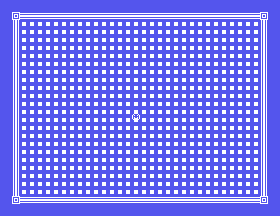
A bordered screen with a spotted interior, and a white face sprite near the centre. Nothing here looks different from building it as one file - that is the point.
include lines in main.asm so sprites.asm
comes first. Does anything about the result change? Why would it, or why
wouldn't it?showsprite0's Y argument from 100 to 208. What does that do to a
sprite's Y byte, and does it happen here too?screens.asm - call it level2map - and change
main.asm's call to loadmap to use it instead of level1map. That is
the whole change needed to show a different screen.| Symptom | Cause |
|---|---|
unable to open file <name>.asm, naming one of your included files |
The assembler ran from a different folder than the project lives in, so a relative include path did not resolve. Keep every included file under the same project folder as the file you build. |
include.include is a genuine merge at assembly time: labels and data defined in
any included file are visible from any other, regardless of order.S31. A Game You Can Lose. The game runs, and it cannot be started, lost or restarted - it simply is, from the moment it loads until you pull the plug. Next it gets a title screen, three lives and an ending, and the thing that makes all three possible turns out to have nothing to do with graphics.
screens.asm is already shaped to hold more than one map, and a routine that
swaps loadmap's argument on a key press is open ground from here - the same
ground S29 left open.
This form is protected by reCAPTCHA, and the Google Privacy Policy and Terms of Service apply.
