module
20
.png)
An 8x8 sprite is a bullet, a bonus, a face. It is not a hero. On a screen 256 pixels wide, eight pixels is not much to build a game around - and stitching several small sprites together by keeping their coordinates in step is fiddly, eats attribute entries, and walks straight into the four-per-line limit.
The VDP has a better offer. One register bit makes every sprite 16x16 - four times the picture, still one attribute entry, still positioned to the pixel, still moved with two bytes. A second bit doubles the drawing again.
Register 1's working value on this machine is 224. Add 2 - setting bit 1 - and sprites become 16x16:
        LD A,226        ; 224 + 2: sprites are now 16x16
        OUT (9),A
        LD A,129        ; 128 + register 1
        OUT (9),A
This is a mode, not a per-sprite setting: every sprite on the screen changes size together. A game picks one sprite size and builds for it.
A 16x16 sprite needs four times the pattern data, and the VDP gets it by grouping four consecutive patterns into one shape. The order is the part to learn, because it is not reading order. The four 8x8 patterns fill the sprite down the left column first, then down the right:
        +-------+-------+
        |   n   |  n+2  |
        +-------+-------+
        |  n+1  |  n+3  |
        +-------+-------+
So a shape is stored as: top-left, bottom-left, top-right, bottom-right - two tall halves, left half first. Store it in reading order instead and the sprite comes out with its quarters swapped.
In 16x16 mode the pattern number in the attribute table stops meaning "one pattern" and starts meaning "a group of four" - and the VDP ignores its bottom two bits. Pattern numbers 0, 1, 2 and 3 all display the same group, the one built from patterns 0-3. The next group is 4, then 8, then 12.
Two consequences:
A ship, sixteen pixels of it, from one attribute entry:
        ORG 256

        ; --- the four quadrants of the ship, into sprite patterns 0-3
        LD A,0
        OUT (9),A
        LD A,88
        OUT (9),A

        LD HL,ship
        LD B,32
sp:     LD A,(HL)
        OUT (8),A
        INC HL
        DJNZ sp

        ; --- register 1: the machine's value plus the size bit
        LD A,226
        OUT (9),A
        LD A,129
        OUT (9),A

        ; --- one sprite, one attribute entry
        LD A,0
        OUT (9),A
        LD A,123
        OUT (9),A

        LD A,120        ; Y - the top edge lands on line 121
        OUT (8),A
        LD A,120        ; X
        OUT (8),A
        LD A,0          ; group 0 - patterns 0 to 3
        OUT (8),A
        LD A,15         ; white
        OUT (8),A

        JP $

ship:   ; top-left quadrant
        DEFB 00000001b
        DEFB 00000011b
        DEFB 00000011b
        DEFB 00000111b
        DEFB 00000110b
        DEFB 00001110b
        DEFB 00001111b
        DEFB 00011111b
        ; bottom-left quadrant
        DEFB 00011111b
        DEFB 00111111b
        DEFB 00111001b
        DEFB 01111001b
        DEFB 01100111b
        DEFB 11001111b
        DEFB 11011000b
        DEFB 10010000b
        ; top-right quadrant
        DEFB 10000000b
        DEFB 11000000b
        DEFB 11000000b
        DEFB 11100000b
        DEFB 01100000b
        DEFB 01110000b
        DEFB 11110000b
        DEFB 11111000b
        ; bottom-right quadrant
        DEFB 11111000b
        DEFB 11111100b
        DEFB 10011100b
        DEFB 10011110b
        DEFB 11100110b
        DEFB 11110011b
        DEFB 00011011b
        DEFB 00001001b
Run it over whatever screen you like - S17's, or the plain machine.
What you should see
A white ship, sixteen pixels square, its top-left corner at (120, 121) - Y's off-by-one from S19, unchanged. Nose, body, fins and exhaust: a game character, not an icon. One attribute entry put it there, and moving it is still the same two bytes it was in S19.
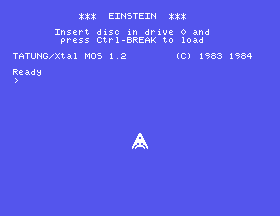
Read the data against the picture before moving on: the first sixteen bytes are the ship's whole left half, top to bottom, and the second sixteen are its right. That is the order the hardware wants, and the reason the listing labels the quadrants.
Bit 0 of register 1 doubles the drawing of every sprite - each pattern pixel becomes a 2x2 block on screen:
        LD A,225        ; 224 + 1: every sprite drawn double size
        OUT (9),A
        LD A,129
        OUT (9),A
An 8x8 pattern now covers 16x16 pixels of screen. Nothing in VRAM changes - same 8 bytes, same attribute entry, same top-left positioning - the chip simply draws each pixel twice as wide and twice as tall, so the result is exactly the shape you designed, chunkier.
Set both bits - 227 - and a 16x16 group is drawn at 32x32: an eighth of the screen's width, from 32 bytes of pattern and one attribute entry. Magnification is the cheap half of that deal, and it looks it: designs keep their layout but every edge doubles. For a boss or a title screen it is free size; for a hero, most games prefer the real pixels of plain 16x16.
The size bit only makes squares. A rocket is tall, a train is wide, and for those there is a technique older than the register: build the shape from more than one sprite. Each sprite is independent, positioned to the pixel, so two sprites drawn edge to edge read as one object. A body at (120, 120) covers columns 120-127; put its other half at (128, 120) and the pixels are adjacent - there is no seam because there is nothing between them.
Stacked vertically it makes a tall shape, and it buys two things the size bit cannot sell:
Here is exactly that - a white rocket with a yellow flame, from two 8x8 sprites (leave register 1 alone this time; these are ordinary small sprites):
        ORG 256

        ; --- two patterns: body, then flame
        LD A,0
        OUT (9),A
        LD A,88
        OUT (9),A
        LD HL,rocket
        LD B,16
pat:    LD A,(HL)
        OUT (8),A
        INC HL
        DJNZ pat

        ; --- two sprites, stacked
        LD A,0
        OUT (9),A
        LD A,123
        OUT (9),A
        LD HL,attrs
        LD B,9
lp:     LD A,(HL)
        OUT (8),A
        INC HL
        DJNZ lp
        JP $

attrs:  DEFB 120,120,0,15       ; body: white
        DEFB 128,120,1,11       ; flame: light yellow, directly below
        DEFB 208

rocket: ; body
        DEFB 00011000b
        DEFB 00111100b
        DEFB 00111100b
        DEFB 01111110b
        DEFB 01111110b
        DEFB 11111111b
        DEFB 11011011b
        DEFB 10011001b
        ; flame
        DEFB 01011010b
        DEFB 01111110b
        DEFB 01111110b
        DEFB 00111100b
        DEFB 00111100b
        DEFB 00011000b
        DEFB 00010000b
        DEFB 00001000b
What you should see: an 8x16 rocket - white hull with fins, yellow flame underneath, no gap at the join. The body's Y of 120 puts its rows at 121-128; the flame's Y of 128 continues at 129 exactly.

Two rules for composites:
Move every part together. The shape exists only in the coordinates. One routine should place the whole object from a single position - body at (x, y), flame at (x, y+8) - so the parts cannot drift.
Hide a part with colour 0, not with Y = 208. Transparent is a sprite that is still processed but invisible - write the flame's colour byte as 0 and the rocket coasts. Writing 208 into its Y switches off every sprite after it in the table, which is rather more than a flame.
And the cost, which is where the shape's direction matters: a vertical stack puts its parts on different scan lines, so the rocket spends no more of any line's four slots than a single sprite would. A horizontal pair spends two slots on every line it crosses - two side-by-side saucers and one bullet, and something on that line is already not drawn. Wide composites are the expensive kind.
A sprite has one colour byte, so a sprite is one colour - but nothing says a character has to be one sprite. Put two sprites at the same position and the VDP layers them: S19's rule that the lower-numbered sprite draws in front is now a tool rather than a fact. The front layer's set pixels show in its colour; wherever it has zeros, the layer behind shows through.
Design the layers as complements - each pixel of the picture belonging to exactly one layer - and the pair reads as a single two-colour image:
        ORG 256

        ; --- two patterns: eyes, then body
        LD A,0
        OUT (9),A
        LD A,88
        OUT (9),A
        LD HL,alien
        LD B,16
pat:    LD A,(HL)
        OUT (8),A
        INC HL
        DJNZ pat

        ; --- two sprites, same position: lower number in front
        LD A,0
        OUT (9),A
        LD A,123
        OUT (9),A
        LD HL,attrs
        LD B,9
lp:     LD A,(HL)
        OUT (8),A
        INC HL
        DJNZ lp
        JP $

attrs:  DEFB 120,120,0,15       ; eyes: white, in front
        DEFB 120,120,1,3        ; body: light green, behind
        DEFB 208

alien:  ; eyes - only the pixels the body leaves open
        DEFB 00000000b
        DEFB 00000000b
        DEFB 00100100b
        DEFB 00000000b
        DEFB 00000000b
        DEFB 00000000b
        DEFB 00000000b
        DEFB 00000000b
        ; body - eye holes punched out
        DEFB 00111100b
        DEFB 01111110b
        DEFB 11011011b
        DEFB 11111111b
        DEFB 10111101b
        DEFB 10100101b
        DEFB 00100100b
        DEFB 01000010b
What you should see: a small green creature at (120, 121) with two white
eyes. Look at the two patterns against each other: the body's third row is
11011011 and the eye row is 00100100 - each 1 in one is a 0 in the
other. The eyes sit in holes the body leaves open.
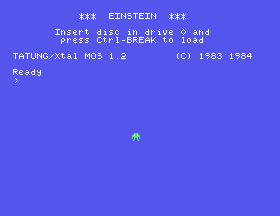
This layering, the side-by-side pair and the stack are all the same idea - several attribute entries pretending to be one object, moved together - and they combine: professional games on this chip built their heroes from a 16x16 group plus an overlay layer for the second colour.
The bill is the line budget. Every layer is a sprite, and overlaid layers sit on the same scan lines by definition. A two-layer character spends two of a line's four slots; two two-layer characters side by side spend all four, and a bullet crossing them vanishes. Layers are the most expensive pixels in the machine - spend them on the hero, not the crowd.
Everything S19 established still holds, at every size:
20.1 - Your own character. Design a 16x16 character of your own on squared paper, split it into the four quadrant blocks in the order the hardware wants, and put it on screen. Keep the drawing: converting it is most of the work of sprite-making, and you will do it many times.
20.2 - Two frames. Build a second version of your character at group 4 - arms up instead of down, flame long instead of short. Its pattern data is 32 more bytes; switching the sprite between the two costs one attribute byte. Flip between them in a loop with a delay, and you have animation.
20.3 - A tall ship. Rebuild S20's ship as an 8x24 composite: three 8x8 sprites stacked, the exhaust in its own colour. Write one routine that places all three from a single (x, y).
20.4 - Shade it. Give your 20.1 character a second layer: pick out its highlights - an eye, a visor, a lamp - into a new pattern, punch them out of the original, and overlay the two in different colours.
| Symptom | Cause |
|---|---|
| No sprite at all, attributes correct | The pattern group was never written. Groups step by four, and an unwritten group up in the control-code range is blank - there is nothing to see, rather than something wrong. |
| The sprite's quarters are swapped or scrambled | The quadrants were stored in reading order. Left column first: top-left, bottom-left, top-right, bottom-right. |
| Every sprite changed size, not just one | As designed. Bits 0 and 1 of register 1 are modes for the whole machine, not per-sprite settings. |
| The sprite is the right shape but blocky | The magnify bit is set. 227 where you meant 226. |
| Sprites vanish when big ones line up | Still four per line, and 16x16 sprites are on sixteen lines at once. |
| Hiding one part of a composite hid several sprites | Its Y was parked at 208, which stops the whole list there. Hide a part with colour 0. |
S21. Taking the controls. A rocket that sits still is scenery. The game loop - read the keys, move the variables, redraw the sprites - is the skeleton every game hangs off, and it comes with one structural rule that decides whether your program survives its own success.
This form is protected by reCAPTCHA, and the Google Privacy Policy and Terms of Service apply.
