module
4

In S3 you gave Turbo a name to work on and opened its editor, and it was empty. Now you fill it: a whole program, four lines long, which Turbo turns into machine code and runs. You will also get it wrong on purpose, because the moment Turbo refuses a program is the moment you most need to know how to read it - and Turbo is very good at telling you.
Here is the program:
program Hello;
begin
  Writeln('Hello, Einstein');
end.
Every Pascal program has this shape.
program Hello; says that this is a program, and gives it a name. The semicolon ends that part.begin and end enclose what the program does. Everything between them is carried out, in order, when the program runs.end is the end of the whole program. Turbo reads no further.Writeln('Hello, Einstein'); is the one thing this program does. It is a statement - an instruction - and Writeln means "write a line": print what is in the brackets, then move to the start of the next line. The text to print goes between single quotes.The two spaces in front of Writeln are for you, not for Turbo. They show at a glance that the line belongs inside the begin and end, and as programs grow that is the thing you will most want to see.
Start Turbo, answer Y, and press W and give the work file the name HELLO, as in S3. Press E for the editor, and then press CAPS LOCK once, so that you get small letters.
Now type the program a line at a time, pressing ENTER at the end of each. Watch the status line at the top as you go: Line and Col follow the cursor. After each ENTER, give the editor a moment before you type the next line: it is busy for about a second, and a key pressed then can be lost.
Two things happen that you might not expect.
The editor remembers your indent. When you press ENTER after Writeln('Hello, Einstein');, the cursor does not go back to column 1. It goes to column 3, under the W - the word Indent on the status line means this is switched on. It saves a great deal of typing in a long program, where most lines are indented like the one before. Here, you want end. back at the left, so press DELETE twice before you type it.
DELETE rubs out the character before the cursor - which is what you want when you have mistyped, and the first thing to reach for. On an empty, indented line, it just moves the cursor left.
To move along a line without rubbing anything out, hold CONTROL and press S to go left, or D to go right. The arrow keys will not do it: in MAME they are the Einstein's ← → ↑ keys, which type [, ] and ^ (S3). The Einstein's horizontal cursor key, Tab in MAME, moves right as well, and left with SHIFT. CTRL-X moves down a line; S5 has the rest of the editor's moves.
When the four lines are in, the screen looks like this:
      Line 5    Col 1   Insert    Indent
program Hello;
begin
  Writeln('Hello, Einstein');
end.
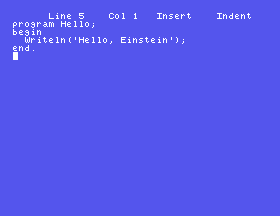
Keep every line inside the screen's 40 columns. If you type past the right-hand edge, the editor slides the whole screen sideways to follow you, which is disconcerting and makes the rest of your program hard to see. Every program in this course fits.
Leave the editor with CTRL-K CTRL-D. The text stays in memory - press SPACE and the menu's Text: line shows how many bytes of it there are. Now press R, for Run:
Compiling
  4 lines

Code:    57 bytes (8068-80A1)
Free: 27482 bytes (80A2-EBFC)
Data:     3 bytes (EBFD-EC00)

Running
Hello, Einstein

>
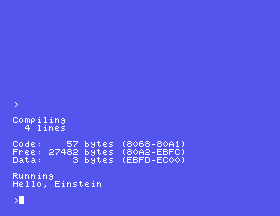
Read it from the top. Compiling is Turbo turning your four lines into Z80 machine code. Code is how big that machine code is - 57 bytes. Data is the memory the program has for its own use, and Free is what is left over. Then Running, and your program does the one thing it knows: Hello, Einstein. The > is the menu waiting for you again.
Press S, for Save:
Saving A:HELLO.PAS
Now it is on the disc. Press D and ENTER and HELLO.PAS is in the list; it will still be there after you restart the Einstein, and W HELLO will bring it back. S6 is all about keeping your work. For now, one rule: press S before you press R whenever you have typed something you would not want to type again.
Now break it. Go back into the editor with E; the cursor is at the top, on line 1. Hold CONTROL and press X twice - CTRL-X moves down a line - so that you are on line 3. Then CTRL-D seven times, until the status line says Col 8 and the cursor is on the l of Writeln, and press DELETE. The e before the cursor goes, and the line reads Writln. Leave with CTRL-K CTRL-D, and press R:
Compiling
  3 lines

Error 41: Unknown identifier or syntax error. Press <ESC>
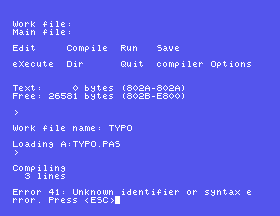
Turbo got three lines in, met a word it did not know, and stopped. It gives the error a number, 41, and says in words what kind of trouble it is: Unknown identifier means a name it has never heard of - which Writln is.
Now press ESC. You are back in the editor, and the cursor is on the mistake: the status line says Line 3 Col 3, the W of Writln. Press CTRL-D four times, onto the l, and type e - the editor is in Insert mode, so it goes in before the l and pushes the rest along. CTRL-K CTRL-D, R, and it runs.
That is the whole cycle, and you will go round it all your programming life: edit, run, read the message, ESC, fix, run. The message says what is wrong; the cursor says where. Between them there is rarely much searching to do.
program Hello;
begin
  Writeln('Hello, Einstein');
end.
Starting from
Turbo freshly started, Y to error messages, the work file set to HELLO with W, and the editor empty. CAPS LOCK pressed once.
What you should see
After CTRL-K CTRL-D and R: Compiling, 4 lines, the Code, Free and Data lines, Running, and then:
Hello, Einstein
Make each change in the editor, leave with CTRL-K CTRL-D, and press R. Before you press it, decide what will happen.
Writeln line, so that it ends 'Hello, Einstein'). Will Turbo accept it?end. instead. What does Turbo say, and where does ESC put the cursor?PROGRAM HELLO;, BEGIN, WRITELN, END. - but leave 'Hello, Einstein' as it is. Does it compile, and what does it print?4.1 Change the program so that it prints your own name.
4.2 Write a program that prints a four-line verse, one line of the verse to each Writeln. Every line of the program must fit the screen.
4.3 Write a program that prints 12 * 12 on one line and the answer on the next. You will need one Writeln with quotes and one without.
Worked solutions are in Appendix II.
| Symptom | Cause |
|---|---|
Error 41: Unknown identifier or syntax error | A word Turbo does not know - usually a misspelling. ESC puts the cursor on it. |
Error 1: ';' expected | Two statements with no semicolon between them. ESC puts the cursor at the start of the second. |
Error 55: String constant exceeds line | A closing quote is missing, so the text runs off the end of the line. ESC puts the cursor at the end of that line. |
Error 91: Unexpected end of source | The full stop after the last end is missing. |
The arrow keys type [, ] and ^ | In MAME they are the Einstein's ← → ↑ character keys. Move with CTRL-S and CTRL-D. |
| The first letter or two of a line are missing | You typed them straight after ENTER, while the editor was still busy. Put them back, and pause a moment after each ENTER. |
end. comes out indented | Auto-indent put the cursor under the line before. DELETE takes it back to the left. |
| The whole screen jumps sideways | You typed past column 40. Keep lines shorter than the screen is wide. |
| Everything is in capitals | CAPS LOCK was on. Turbo does not mind, but the text between quotes will print in capitals. |
A Pascal program is program, a name and a semicolon, then begin, the statements, and end.. You type it into the editor, where DELETE rubs out and CTRL-S and CTRL-D move; leave with CTRL-K CTRL-D, run with R, save with S. When Turbo cannot compile it, it says what and ESC shows where.
S5, Changing Your Mind - the rest of the editor: moving about a longer program, inserting and deleting whole lines, and finding things.
This form is protected by reCAPTCHA, and the Google Privacy Policy and Terms of Service apply.
