module
3

Turbo Pascal is not a prompt you type lines at. It is a menu, and everything you do starts from it: naming the program you are working on, writing it, running it, keeping it, and leaving. Each command is a single key.
This section goes round the menu once, slowly, before there is any Pascal to get in the way - and then finds the keys Pascal needs, several of which are not where your fingers expect.
Boot the disc, type TURBO at 0: and press ENTER, as in S2. When it asks Include error messages (Y/N)?, press Y. The menu appears:
Logged drive: A

Work file:
Main file:

Edit     Compile  Run   Save

eXecute  Dir      Quit  compiler Options


Text:     0 bytes (802A-802A)
Free: 26581 bytes (802B-E800)

>
If you have a real Einstein, the same: the course disc, TURBO, ENTER, Y.
From the top:
A, the Einstein's own drive.> at the bottom is Turbo waiting for a key.A command is one key, with no ENTER after it, and it does not matter whether you press it as a capital or a small letter. Press a key that is not a command - SPACE is the usual one - and Turbo simply draws the menu again. That is useful, because some commands leave their answers on the screen and the menu scrolls away; SPACE always brings it back.
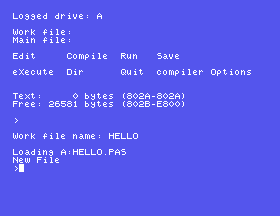
Press W, for Work file. Turbo asks:
Work file name:
Type HELLO and press ENTER. Turbo answers:
Loading A:HELLO.PAS
New File
Three things happened there. Turbo put A: in front of the name - the drive - and .PAS after it, which is the type every Pascal program's file has. It looked on the disc for HELLO.PAS, did not find one, and told you so with New File: nothing is lost, it just means you are starting with an empty page. And from now on, HELLO is what Turbo is working on. Press SPACE:
Logged drive: A

Work file: A:HELLO.PAS
Main file:
Every name on the disc is eight characters or fewer, with a three-letter type after the dot - MC-MOD01.INC, TURBO.COM. Keep your own names to that.
Press D, for Dir. Turbo asks for a mask:
Dir mask:
ENTER alone means "everything", and you get the list you saw in S2. A mask narrows it: * stands for any name, so *.INC lists only the files whose type is INC:
Dir mask: *.INC
MC-MOD01 INC : MC-MOD03 INC
MC-MOD05 INC : MC-MOD02 INC
MC-MOD04 INC : MC-MOD00 INC

Bytes Remaining On A: 80k
HELLO.PAS is not in the list yet, however you ask. Turbo has the name, but there is nothing in it, and nothing has been written to the disc. S4 changes that.
Press E, for Edit. The menu disappears, and you have an almost empty screen with one line across the top:
Line 1 Col 1 Insert Indent
This is Turbo's editor, where programs are written, and the line at the top is its status line: the cursor is on line 1 of your text, in column 1. S4 is about what happens here. For now, just get out again: hold CONTROL and press K, let go, then hold CONTROL and press D. In MAME: CONTROL is Ctrl.
The screen shows a lone >. You are back at the menu, which has not been redrawn; press SPACE to see it.
That pair of keys - CONTROL-K, CONTROL-D - is how you leave the editor, and you will press it hundreds of times. Written down, it looks like CTRL-K CTRL-D.
If you press E before you have named a work file, Turbo asks for the name first, and then opens the editor.
Press Q, for Quit, and you are back at the disc operating system's 0:.
If you have typed anything since the work file was last saved, Turbo does not just go. It asks:
Workfile A:HELLO.PAS not saved. Save (Y/N)?
Y writes it to the disc first - you see Saving A:HELLO.PAS - and then quits. N quits without saving, and what you typed is gone. Read that question every time it appears; it is the last chance.
While the MAME window is in front, your keyboard is the Einstein's, and MAME lays the Einstein's keys over yours by position. Letters, digits and most punctuation are where you expect. A handful are not, and Pascal uses several of them on almost every line.
| To type | On the Einstein | In MAME |
|---|---|---|
' (Pascal's quote) | SHIFT and 7 | SHIFT and 7 |
; and + | the key marked ; +, plain and shifted | the ; key, plain and shifted |
: and * | the key marked : *, plain and shifted | the ' key, plain and shifted |
= | the = key | = |
- (minus) | SHIFT and the = key | SHIFT and = |
_ | the key marked - | the - key |
( and ) | SHIFT and 8, SHIFT and 9 | SHIFT 8 and SHIFT 9 - one key to the left of where a modern keyboard has them |
< and > | SHIFT and ,, SHIFT and . | the same |
[ and ] | the keys marked ← and → | the Left and Right arrows |
{ and } | SHIFT with ← and → | SHIFT with the Left and Right arrows |
^ | the key marked ↑ | the Up arrow |
@ | SHIFT and 0 | SHIFT and 0 |
Two things in that table need saying out loud.
The keys marked with arrows type characters. The Einstein has two grey cursor keys at the right-hand end of the QWERTY row, and three other keys marked with a single arrow. Those three are character keys: ← is [, → is ] and ↑ is ^, characters Pascal needs, which is lucky, because it means they are easy to type. In MAME they are your Left, Right and Up arrows, which is why the arrow keys do not move the cursor in Turbo's editor. S4 shows what does, and Appendix IV has the cursor keys.
Some characters look different on the Einstein's screen. The machine draws [ as a left arrow, ] as a right arrow and ^ as an up arrow - the arrows printed on the keys that type them - and { and } as a quarter and three quarters. Pascal uses { and } to mark notes to the reader, so you will see a lot of quarters. They are the right characters; only the drawing differs. This course prints them as [ ] ^ { }.
At a real Einstein, the middle column is all you need. Appendix IV has the whole keyboard in one place, for both.
The Einstein starts with CAPS LOCK on, so everything you type comes out in capitals. Turbo Pascal does not mind: WRITELN and Writeln are the same word to it. It does keep the capitals or small letters of anything you put between quotes, because that is text you want printed.
This course writes its programs in small letters, with capitals where they help the eye, the way the Turbo Pascal manual does. Press CAPS LOCK once after starting Turbo and you get the same; press it again for capitals. The menu's command keys work either way.
No Pascal yet - this section's "program" is a walk round the menu. At the menu, press each of these in turn:
W  HELLO  ENTER       name the work file
SPACE                 the menu again
D  ENTER              the directory
E                     open the editor
CTRL-K  CTRL-D        leave it
SPACE                 the menu again
Q                     quit
Starting from
A fresh boot, TURBO, and Y.
What you should see
After HELLO: Loading A:HELLO.PAS and New File. After SPACE, the menu with Work file: A:HELLO.PAS. After D and ENTER, the files on the disc - no HELLO.PAS among them - and Bytes Remaining On A: 80k. After E, an empty screen with Line 1 Col 1 Insert Indent across the top. After CTRL-K CTRL-D, a lone >; after SPACE, the menu. After Q, the 0: prompt, with no question asked, because you typed nothing in the editor.
Z, say. What does Turbo do?hello. What name does Turbo use?Q. Answer N to the question. Then start Turbo again and look at the directory. Is HELLO.PAS there?3.1 Make your own name the work file. What two lines does Turbo answer, and what does the menu's Work file: line say afterwards?
3.2 List only MicroCalc's .INC files, and then only the .COM files.
3.3 Start Turbo twice, once answering Y to the first question and once N, and write down Free: each time. How many bytes do the error messages take?
Worked solutions are in Appendix II.
| Symptom | Cause |
|---|---|
| A key does nothing at the menu except redraw it | It is not a command. The command keys are the capital letters in the menu's words. |
| You pressed ENTER after a command letter and the menu redrew | Commands need no ENTER. The letter did the work; the ENTER was a key that is not a command. |
| The menu has scrolled off the screen | Press SPACE. |
The arrow keys type [, ] and ^ in the editor | In MAME your Left, Right and Up arrows are the Einstein's ← → ↑ character keys. They do not move the cursor; the diamond does (S4, S5). |
| Everything you type is in capitals | CAPS LOCK is on, as the machine starts. Press it once. |
Q asks about saving and you are not sure | Say Y. A saved file you did not need costs a little disc; an unsaved one you did need costs the evening. |
The menu is where you work from, and each command is one key: W names your work file, D looks at the disc, E opens the editor and CTRL-K CTRL-D leaves it, Q quits and offers to save. SPACE redraws the menu. On the Einstein the keys marked ← → ↑ type [ ] ^, the quote is SHIFT and 7, and minus is SHIFT and =.
S4, Your First Program - typing a program into the editor, running it, and what Turbo says when it cannot make sense of it.
This form is protected by reCAPTCHA, and the Google Privacy Policy and Terms of Service apply.
