module
41

An answer to every exercise in the course, each of them run on the machine. Yours does not have to match. If it does what the exercise asked, it is right.
Try the exercise first. A solution you have read is a great deal less use than one you have fought for.
3.1 Press W, type your name - here ADA - and ENTER. Turbo answers:
Loading A:ADA.PAS
New File
Press SPACE, and the menu's second line reads Work file: A:ADA.PAS. Turbo has added the drive and the .PAS type, found no file of that name on the disc, and started you on an empty one.
3.2 Press D, type *.INC and ENTER:
Dir mask: *.INC
MC-MOD01 INC : MC-MOD03 INC
MC-MOD05 INC : MC-MOD02 INC
MC-MOD04 INC : MC-MOD00 INC

Bytes Remaining On A: 80k
and then D, *.COM, ENTER:
Dir mask: *.COM
TURBO    COM : WAREHOUS COM

Bytes Remaining On A: 80k
Two - Turbo Pascal itself, and the finished game. The * stands for any name at all.
3.3 With Y, the menu says Free: 26581 bytes; with N, Free: 28043 bytes. The error messages take the difference: 1,462 bytes.
4.1
program Me;
begin
  Writeln('Ada Lovelace');
end.
prints
Ada Lovelace
Only the text between the quotes needed to change. Giving the program a new name in its first line is good manners rather than necessary.
4.2
program Verse;
begin
  Writeln('Roses are red,');
  Writeln('Violets are blue,');
  Writeln('Turbo is quick');
  Writeln('And so are you.');
end.
prints
Roses are red,
Violets are blue,
Turbo is quick
And so are you.
Each Writeln ends its line, so each line of the verse comes out on a line of its own. The semicolons go between the statements; the last one, before end, could be left off.
4.3
program Sum;
begin
  Writeln('12 * 12');
  Writeln(12 * 12);
end.
prints
12 * 12
144
Inside quotes, 12 * 12 is text, and Turbo prints it exactly. Outside them it is a sum, and Turbo works it out first.
5.1 CTRL-Q CTRL-A, Hello ENTER, Howdy ENTER, GN ENTER. Both Hellos change and hello does not - the search is exact about capitals. CTRL-K CTRL-D and R:
Howdy
hello
Goodbye
Howdy again
5.2 Put the cursor at the start of the Writeln('one'); line (CTRL-X twice from the top) and press CTRL-K CTRL-B. Move down one line with CTRL-X, to the start of Writeln('two');, and press CTRL-K CTRL-K: the block is the whole one line. Go down to the start of the end. line (CTRL-X twice) and press CTRL-K CTRL-V. The program is now
program Order;
begin
  Writeln('two');
  Writeln('three');
  Writeln('one');
end.
and prints
two
three
one
5.3 W HELLO, E. CTRL-X twice, to the start of the Writeln line; CTRL-K CTRL-B. CTRL-X once, to the start of end.; CTRL-K CTRL-K. Now press CTRL-K CTRL-C three times without moving the cursor: each copy goes in at the cursor, in front of end.. Run it:
Hello, Einstein
Hello, Einstein
Hello, Einstein
Hello, Einstein
Seven lines of program for four lines of output. There is a better way, and it is S13.
6.1 W HELLO, then O, C, Q, and C:
Compiling  --> A:HELLO.COM
  4 lines
Q to leave Turbo, and at the prompt:
0:HELLO
Hello, Einstein
6.2 S to save it as VERSE. Close MAME and start it again (or switch the Einstein off and on), TURBO, Y, then W VERSE. Turbo answers Loading A:VERSE.PAS with no New File, and E shows it just as you left it.
6.3 At the 0: prompt, DIR shows which .BAK files there are. For each:
0:ERA HELLO.BAK
0: HELLO   .BAK?Y       Erased
DIR again: the .BAK files are gone and the .PAS files are still there.
7.1
program Minutes;
begin
  Writeln('Minutes in a day: ',
          24 * 60);
end.
Minutes in a day: 1440
7.2
program Seconds;
begin
  Writeln('Seconds in a day: ',
          24 * 60 * 60);
end.
Seconds in a day: 20864
It is wrong. The right answer is 86,400, which is far past 32767. The sum wrapped round - 86,400 less 65,536 is 20,864 - and Turbo said nothing. There is no way to print 86,400 as an integer; S9's other kind of number can hold it.
7.3
program Sweets;
begin
  Writeln('Each child: ', 100 div 7);
  Writeln('Left over: ', 100 mod 7);
end.
Each child: 14
Left over: 2
8.1
program Age;
var
  Age: Integer;
begin
  Age := 12;
  Writeln('Next year you will be ',
          Age + 1);
end.
Next year you will be 13
A program and a variable may share a name, as here.
8.2
program Swap;
var
  A, B, Spare: Integer;
begin
  A := 1;
  B := 2;
  Spare := A;
  A := B;
  B := Spare;
  Writeln('A is ', A, ' and B is ', B);
end.
A is 2 and B is 1
A := B on its own would lose what was in A, so it is put somewhere safe first.
8.3
program Count;
var
  Count: Integer;
begin
  Count := 0;
  Count := Count + 1;
  Count := Count + 1;
  Count := Count + 1;
  Writeln(Count);
end.
3
9.1
program Average;
var
  Total: Integer;
begin
  Total := 7 + 8 + 10;
  Writeln('Average: ', Total / 3:0:2);
end.
Average: 8.33
Total is an integer, but / always gives a real, so :0:2 can print it. div would have given 8.
9.2
program Seconds;
var
  Seconds: Real;
begin
  Seconds := 24.0 * 60 * 60;
  Writeln('Seconds in a day: ',
          Seconds:0:0);
end.
Seconds in a day: 86400
24.0 makes the whole sum a real one, so it never has to fit in an integer.
9.3
program Celsius;
var
  F, C: Real;
begin
  F := 100;
  C := (F - 32) * 5 / 9;
  Writeln(F:0:0, 'F is ', C:0:1, 'C');
  Writeln('or about ', Round(C), 'C');
end.
100F is 37.8C
or about 38C
10.1
program Join;
var
  Both: string[20];
begin
  Both := 'Turbo' + ' ' + 'Pascal';
  Writeln(Both, ' has ', Length(Both),
          ' characters');
end.
Turbo Pascal has 12 characters
The space counts.
10.2
program Ends;
var
  Word: string[20];
begin
  Word := 'Warehouse';
  Writeln('First: ', Word[1]);
  Writeln('Last: ',
          Word[Length(Word)]);
end.
First: W
Last: e
Length(Word) is the position of the last character, whatever the word.
10.3
program Swap;
var
  Full, First, Last: string[30];
  Space: Integer;
begin
  Full := 'Albert Einstein';
  Space := Pos(' ', Full);
  First := Copy(Full, 1, Space - 1);
  Last := Copy(Full, Space + 1, 30);
  Writeln(Last, ', ', First);
end.
Einstein, Albert
The first name is everything before the space, the surname everything after it; asking Copy for 30 characters simply takes the rest.
11.1
program Add;
var
  A, B: Integer;
begin
  Write('Two numbers: ');
  Readln(A, B);
  Writeln('Sum: ', A + B);
end.
Two numbers: 3 4
Sum: 7
11.2
program Celsius;
var
  F: Real;
begin
  Write('Fahrenheit? ');
  Readln(F);
  Writeln((F - 32) * 5 / 9:0:1, 'C');
end.
Fahrenheit? 100
37.8C
A real variable takes a whole number as an answer as happily as 2.5.
11.3
program Word;
var
  W: string[20];
begin
  Write('A word: ');
  Readln(W);
  Writeln('Letters: ', Length(W));
  Writeln('Starts: ', UpCase(W[1]));
end.
A word: einstein
Letters: 8
Starts: E
12.1
program OddEven;
var
  N: Integer;
begin
  Write('A number: ');
  Readln(N);
  if N mod 2 = 0 then
    Writeln(N, ' is even')
  else
    Writeln(N, ' is odd');
end.
A number: 7
7 is odd
12.2
program Larger;
var
  A, B: Integer;
begin
  Write('Two numbers: ');
  Readln(A, B);
  if A > B then
    Writeln('Larger: ', A)
  else
    Writeln('Larger: ', B);
end.
Two numbers: 3 9
Larger: 9
If they are equal, it prints B, which is the same number.
12.3
program Grade;
var
  Mark: Integer;
begin
  Write('Mark out of 100: ');
  Readln(Mark);
  case Mark of
    70..100: Writeln('Grade A');
    50..69: Writeln('Grade B');
    0..49: Writeln('Grade C');
  else
    Writeln('Not a mark');
  end;
end.
Mark out of 100: 75
Grade A
and with 120, Not a mark.
13.1
program Countdown;
var
  I: Integer;
begin
  for I := 10 downto 1 do
    Write(I, ' ');
  Writeln('Lift off!');
end.
10 9 8 7 6 5 4 3 2 1 Lift off!
13.2
program SumTo;
var
  N, I, Sum: Integer;
begin
  Write('Add up to: ');
  Readln(N);
  Sum := 0;
  for I := 1 to N do
    Sum := Sum + I;
  Writeln('Total: ', Sum);
end.
Add up to: 100
Total: 5050
Past about 255 the total goes over 32767 and wraps round (S7).
13.3
program Stars;
var
  Row, I: Integer;
begin
  for Row := 1 to 5 do
  begin
    for I := 1 to Row do
      Write('*');
    Writeln;
  end;
end.
*
**
***
****
*****
The inner loop runs Row times - once on the first row, five times on the last.
14.1
program Halves;
var
  N: Integer;
begin
  Write('Start at: ');
  Readln(N);
  while N > 1 do
  begin
    N := N div 2;
    Write(N, ' ');
  end;
  Writeln;
end.
Start at: 100
50 25 12 6 3 1
while, because if the number is 1 already there is nothing to do.
14.2
program InRange;
var
  N: Integer;
begin
  repeat
    Write('A number from 1 to 10: ');
    Readln(N);
  until (N >= 1) and (N <= 10);
  Writeln('Thank you: ', N);
end.
A number from 1 to 10: 42
A number from 1 to 10: 5
Thank you: 5
repeat, because the question must be asked at least once.
14.3
program Counter;
var
  Count: Integer;
  Ch: Char;
begin
  Writeln('Press a key to stop');
  Count := 0;
  repeat
    Count := Count + 1;
  until KeyPressed;
  Read(Kbd, Ch);
  Writeln('Counted to ', Count);
end.
Press a key to stop
Counted to 2113
The number depends on how long you wait - about two thousand a second. Wait more than fifteen seconds or so and it passes 32767 and wraps round (S7).
15.1
program Greets;
type
  Str20 = string[20];

procedure Greet(Name: Str20);
begin
  Writeln('Hello, ', Name, '!');
end;

begin
  Greet('Ada');
  Greet('Albert');
  Greet('Einstein');
end.
Hello, Ada!
Hello, Albert!
Hello, Einstein!
15.2
program InOrder;
var
  X, Y: Integer;

procedure Order(var A, B: Integer);
var
  T: Integer;
begin
  if A > B then
  begin
    T := A; A := B; B := T;
  end;
end;

begin
  X := 9; Y := 4;
  Order(X, Y);
  Writeln(X, ' ', Y);
  X := 2; Y := 5;
  Order(X, Y);
  Writeln(X, ' ', Y);
end.
4 9
2 5
Two statements may share a line, separated by semicolons, when they belong together.
15.3
program Tri;

procedure Row(N: Integer; C: Char);
var
  I: Integer;
begin
  for I := 1 to N do Write(C);
end;

procedure Triangle(H: Integer);
var
  I: Integer;
begin
  for I := 1 to H do
  begin
    Row(I, '#');
    Writeln;
  end;
end;

begin
  Triangle(4);
end.
#
##
###
####
16.1
program Cubes;

function Cube(N: Integer): Integer;
begin
  Cube := N * N * N;
end;

begin
  Writeln(Cube(3), ' ', Cube(10));
end.
27 1000
16.2
program Evens;
var
  I: Integer;

function IsEven(N: Integer): Boolean;
begin
  IsEven := N mod 2 = 0;
end;

begin
  for I := 1 to 6 do
    if IsEven(I) then Write(I, ' ');
  Writeln;
end.
2 4 6
The comparison N mod 2 = 0 is itself true or false, so it can be the answer directly.
16.3
{$A-}
program SumUp;

function Sum(N: Integer): Integer;
begin
  if N = 0 then Sum := 0
  else Sum := N + Sum(N - 1);
end;

begin
  Writeln(Sum(100));
end.
5050
The same answer as S13's loop.
17.1
program Turns;
type
  Direction = (North, East, South,
               West);
var
  D: Direction;
  I: Integer;

function TurnRight(D: Direction)
  : Direction;
begin
  if D = West then TurnRight := North
  else TurnRight := Succ(D);
end;

begin
  D := North;
  for I := 1 to 6 do
  begin
    Write(Ord(D), ' ');
    D := TurnRight(D);
  end;
  Writeln;
end.
0 1 2 3 0 1
Succ(West) would run off the end of the type, so West is dealt with first.
17.2
{$R+}
program Marks;
type
  Mark = 0..100;
var
  M: Mark;
begin
  M := 99;
  Writeln(M);
  M := M + 2;
  Writeln(M);
end.
99

Run-time error 91, PC=004E
Program aborted
101 is not a Mark, and with {$R+} Turbo stops the program at that assignment. Without {$R+} it would print 101.
17.3
program Size;
const
  Width = 20;
  Height = 16;
begin
  Writeln('Squares: ', Width * Height);
end.
Squares: 320
18.1
program Vowels;
var
  W: string[20];
  I, N: Integer;
begin
  Write('A word: ');
  Readln(W);
  N := 0;
  for I := 1 to Length(W) do
    if UpCase(W[I]) in
       ['A', 'E', 'I', 'O', 'U'] then
      N := N + 1;
  Writeln('Vowels: ', N);
end.
A word: Einstein
Vowels: 4
and rhythm has none. UpCase means the set needs only capitals.
18.2
program Digit;
var
  Ch: Char;
begin
  Write('A key, then ENTER: ');
  Readln(Ch);
  if Ch in ['0'..'9'] then
    Writeln('a digit')
  else Writeln('not a digit');
end.
A key, then ENTER: 7
a digit
and x is not a digit. Readln into a Char takes one character.
18.3
program Both;
var
  I: Integer;
begin
  for I := 1 to 10 do
    if I in [1..6] * [4..9] then
      Write(I, ' ');
  Writeln;
end.
4 5 6
19.1
program Average;
const
  Marks: array[1..5] of Integer =
    (7, 8, 10, 6, 9);
var
  I, Total: Integer;
begin
  Total := 0;
  for I := 1 to 5 do
    Total := Total + Marks[I];
  Writeln('Average: ', Total / 5:0:1);
end.
Average: 8.0
19.2
program Reverse;
var
  N: array[1..5] of Integer;
  I: Integer;
begin
  for I := 1 to 5 do
  begin
    Write('Number ', I, ': ');
    Readln(N[I]);
  end;
  for I := 5 downto 1 do
    Write(N[I], ' ');
  Writeln;
end.
Number 1: 3
Number 2: 1
Number 3: 4
Number 4: 1
Number 5: 5
5 1 4 1 3
Readln reads straight into an element of the array.
19.3
program FindWorker;
type
  Str20 = string[20];
const
  Level: array[1..5] of Str20 = (
    '#######',
    '#     #',
    '# $ . #',
    '#  @  #',
    '#######');
var
  R: Integer;
begin
  for R := 1 to 5 do
    if Pos('@', Level[R]) > 0 then
      Writeln('Worker at row ', R,
        ', column ',
        Pos('@', Level[R]));
end.
Worker at row 4, column 4
A long statement may be broken over two lines anywhere a space could go.
20.1
program Points;
type
  Point = record
    X, Y: Integer;
  end;
var
  A, B: Point;
begin
  A.X := 2; A.Y := 3;
  B.X := 5; B.Y := 7;
  Writeln('Across ', B.X - A.X,
          ', down ', B.Y - A.Y);
end.
Across 3, down 4
20.2
program Scores;
type
  Str20 = string[20];
  Player = record
    Name: Str20;
    Score: Integer;
  end;
var
  P: array[1..3] of Player;
  I, Top: Integer;
begin
  P[1].Name := 'Ada';
  P[1].Score := 12;
  P[2].Name := 'Alan';
  P[2].Score := 17;
  P[3].Name := 'Grace';
  P[3].Score := 15;
  Top := 1;
  for I := 2 to 3 do
    if P[I].Score > P[Top].Score then
      Top := I;
  Writeln('Winner: ', P[Top].Name);
end.
Winner: Alan
Top remembers which player is best so far.
20.3
program OneLevel;
type
  Str20 = string[20];
  Level = record
    Name: Str20;
    Best: Integer;
  end;
const
  Start: Level =
    (Name: 'Starter'; Best: 9);
begin
  Writeln(Start.Name, ', best ',
          Start.Best);
end.
Starter, best 9
21.1
program Notes;
var
  T: Text;
  S: string[40];
begin
  Assign(T, 'NOTES.TXT');
  Rewrite(T);
  Writeln(T, 'Push every crate');
  Writeln(T, 'onto a goal.');
  Writeln(T, 'Never pull.');
  Close(T);
  Reset(T);
  while not Eof(T) do
  begin
    Readln(T, S);
    Writeln(S);
  end;
  Close(T);
end.
Push every crate
onto a goal.
Never pull.
21.2 The listing, with these lines added after the first Reset(F);:
  Seek(F, 1);
  Read(F, L);
  L.Best := 15;
  Seek(F, 1);
  Write(F, L);
  Seek(F, 0);
3 levels
Level 1 best 10
Level 2 best 15
Level 3 best 30
The second Seek(F, 1) is needed because Read moved on to record 2; the Seek(F, 0) goes back to the start for printing.
21.3
program Exists;
var
  F: file of Integer;
begin
  Assign(F, 'SCORES.DAT');
  {$I-}
  Reset(F);
  {$I+}
  if IOresult = 0 then
  begin
    Writeln('SCORES.DAT is there');
    Close(F);
  end
  else
    Writeln('No SCORES.DAT');
end.
No SCORES.DAT
The Close is only done when the file was opened.
22.1 The listing's type and Push and Pop, with this program:
var
  W: string[20];
  I: Integer;
begin
  Top := nil;
  W := 'WAREHOUSE';
  for I := 1 to Length(W) do
    Push(W[I]);
  while Top <> nil do Pop;
  Writeln;
end.
undo E undo S undo U undo O undo H undo
E undo R undo A undo W
The word comes out backwards: ESUOHERAW. A list like this is a stack - last in, first out.
22.2 The listing's type, Push and Pop, then:
function Count: Integer;
var
  P: MoveP;
  N: Integer;
begin
  N := 0;
  P := Top;
  while P <> nil do
  begin
    N := N + 1;
    P := P^.Next;
  end;
  Count := N;
end;

begin
  Top := nil;
  Push('U'); Push('R'); Push('D');
  Writeln('Moves kept: ', Count);
  Pop;
  Writeln;
  Writeln('Moves kept: ', Count);
end.
Moves kept: 3
undo D
Moves kept: 2
22.3
program AllAtOnce;
type
  MoveP = ^Move;
  Move = record
    Dir: Char;
    Next: MoveP;
  end;
var
  Start, P: MoveP;
  I: Integer;
begin
  Writeln('Free: ', MemAvail);
  Mark(Start);
  for I := 1 to 50 do New(P);
  Writeln('Free: ', MemAvail);
  Release(Start);
  Writeln('Free: ', MemAvail);
end.
Free: 26079
Free: 25879
Free: 26079
Fifty moves take 200 bytes, and Release gives all 200 back in one go.
23.1
program Middle;
begin
  ClrScr;
  GotoXY(15, 12);
  Write('Ada Lovelace');
  GotoXY(1, 20);
end.
The name appears on row 12, starting at column 15. The last GotoXY moves the cursor out of the way, so that Turbo's > does not land in the picture.
23.2
program PlaceBox;
var
  X, Y: Integer;
begin
  ClrScr;
  for X := 10 to 29 do
  begin
    GotoXY(X, 5); Write('#');
    GotoXY(X, 14); Write('#');
  end;
  for Y := 6 to 13 do
  begin
    GotoXY(10, Y); Write('#');
    GotoXY(29, Y); Write('#');
  end;
  GotoXY(1, 20);
end.
         ####################
         #                  #
         #                  #
         #                  #
         #                  #
         #                  #
         #                  #
         #                  #
         #                  #
         ####################
Twenty columns, 10 to 29; ten rows, 5 to 14. Two short statements may share a line.
23.3
program Count5;
var
  I: Integer;
begin
  ClrScr;
  for I := 5 downto 1 do
  begin
    GotoXY(20, 10);
    Write(I);
    Delay(1000);
  end;
  GotoXY(18, 10);
  Write('Go!  ');
  GotoXY(1, 20);
end.
The numbers replace each other in column 20 of row 10, a second apart, and then Go! - with two spaces after it, and starting two columns earlier - is written over the last one.
24.1
program Codes;
var
  Ch: Char;
begin
  Writeln('Press keys, Q to stop');
  repeat
    Read(Kbd, Ch);
    Write(Ord(Ch), ' ');
  until UpCase(Ch) = 'Q';
  Writeln;
end.
With A, UP, DOWN, 1 and Q (CAPS LOCK on):
Press keys, Q to stop
65 94 10 49 81
24.2
program Ticker;
var
  N: Integer;
  Ch: Char;
begin
  ClrScr;
  GotoXY(1, 1);
  Write('Any key stops me');
  N := 0;
  repeat
    N := N + 1;
    GotoXY(10, 5);
    Write(N);
  until KeyPressed;
  Read(Kbd, Ch);
  GotoXY(1, 20);
end.
The count climbs in the same place, row 5, until a key stops it. The key is read afterwards so that it does not reach Turbo's menu.
24.3 The listing, with the case changed to:
    case UpCase(Ch) of
      'E', '^': if Y > 2 then
                  Y := Y - 1;
      'X', #10: if Y < 23 then
                  Y := Y + 1;
      'S', '[': if X > 1 then
                  X := X - 1;
      'D', ']': if X < 39 then
                  X := X + 1;
    end;
Pressing S twenty-five times from column 20 leaves the walker at column 1. Row 1 holds the instructions and row 24 is the bottom line (S23), so the walker keeps to rows 2 to 23.
Your results will differ from these: that is what Randomize is for.
25.1
program Letter;
var
  I: Integer;
begin
  Randomize;
  for I := 1 to 10 do
    Write(Chr(Ord('A') + Random(26)));
  Writeln;
end.
OMUQWAFTVO
25.2
program Coins;
var
  I, Heads: Integer;
begin
  Randomize;
  Heads := 0;
  for I := 1 to 100 do
    if Random(2) = 0 then
      Heads := Heads + 1;
  Writeln('Heads: ', Heads,
          '  Tails: ', 100 - Heads);
end.
Heads: 53 Tails: 47
25.3
program Sevens;
var
  I, Sevens: Integer;
begin
  Randomize;
  Sevens := 0;
  for I := 1 to 1000 do
    if (Random(6) + 1) +
       (Random(6) + 1) = 7 then
      Sevens := Sevens + 1;
  Writeln('Sevens in 1000 throws: ',
          Sevens);
end.
Sevens in 1000 throws: 163
Six of the thirty-six ways two dice can fall make seven, so about a sixth of the throws - some 167 in a thousand - is what to expect.
26.1
program Look;
var
  B: array[0..7] of Byte;
  A, I, J, V: Integer;
  Ch: Char;
begin
  Write('Character? ');
  Read(Kbd, Ch);
  Writeln(Ch);
  A := $1800 + Ord(Ch) * 8;
  Port[9] := A mod 256;
  Port[9] := A div 256;
  for I := 0 to 7 do
    B[I] := Port[8];
  for I := 0 to 7 do
  begin
    V := B[I];
    for J := 1 to 8 do
    begin
      if V >= 128 then
        Write('#')
      else
        Write('.');
      V := (V * 2) mod 256;
    end;
    Writeln('  ', B[I]);
  end;
end.
Pressing A:
Character? A
........  0
...#....  16
..#.#...  40
.#...#..  68
.#####..  124
.#...#..  68
.#...#..  68
........  0
Each row is drawn by looking at the top bit (128 or more) and then doubling the number, mod 256, to bring the next bit to the top.
26.2
program Pieces;
type
  Pattern = array[0..7] of Byte;
const
  Box: Pattern =
    ($FC,$84,$CC,$B4,$B4,$CC,$84,$FC);
  Brick: Pattern =
    ($FC,$24,$24,$FC,$90,$90,$FC,$24);
  Man: Pattern =
    ($30,$30,$78,$B4,$30,$48,$48,$CC);
var
  I: Integer;

procedure Define(Code: Integer;
                 Shape: Pattern);
var
  A, I: Integer;
begin
  A := $1800 + Code * 8;
  Port[9] := A mod 256;
  Port[9] := A div 256 + $40;
  for I := 0 to 7 do
    Port[8] := Shape[I];
end;

begin
  Define(128, Box);
  Define(129, Brick);
  Define(130, Man);
  for I := 1 to 7 do
    Write(Chr(129));
  Writeln;
  Writeln(Chr(129), ' ', Chr(130),
          Chr(128), '  ', Chr(129));
  for I := 1 to 7 do
    Write(Chr(129));
  Writeln;
end.
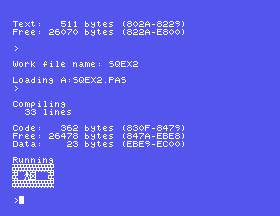
26.3
program Bytes;
var
  N, A: Integer;
begin
  N := 1000;
  A := Addr(N);
  Writeln('Low byte:  ', Mem[A]);
  Writeln('High byte: ', Mem[A + 1]);
  Writeln('High * 256 + Low = ',
          Mem[A + 1] * 256 + Mem[A]);
end.
Low byte:  232
High byte: 3
High * 256 + Low = 1000
From S27 on, each exercise changes the game as it stands at the end of its section. The solutions show only the changes, and where they go; everything else stays as it was.
27.1 Add I, J, K to the program's variables:
N, R, C, I, J, K: Integer;
and after DrawAll; in the main program:
  K := 0;
  for I := 1 to Rows do
    for J := 1 to Cols do
      if L.Grid[I, J] = Crate then
        K := K + 1;
  GotoXY(1, 1);
  Write('Crates: ', K);
For the first level: Crates: 1.
27.2 One possible level. Count becomes 3; Names gets a third name (a comma after 'Two Crates'):
    'Two Crates',
    'Corner Shop');
and Plans a third level after the second (whose '')) becomes ''),):
   (' #####',
    '##   #',
    '#. $ #',
    '#  $.#',
    '# @ ##',
    '#####',
    '',
    ''));
with N := 3; to draw it. This one can be finished in 10 moves. When you design your own, make sure it can be finished: count the crates and the goals - there must be as many of each - and check that every crate can be reached from the side it has to be pushed from.
27.3 After DrawAll;:
  GotoXY(1, 1);
  Write('Worker at row ', R,
        ', column ', C);
Worker at row 4, column 4.
28.1 Add I, J to the variables (N, R, C, I, J: Integer;), and a line to the case in the main program:
      '^', '[', ']', #10: Go(Ch);
      ' ': begin
             I := R;
             J := C;
             R := L.StartR;
             C := L.StartC;
             Show(I, J);
             Show(R, C);
           end;
The old square is kept in I and J so that it can be redrawn once the worker has left it.
28.2 In Go, after Show(R, C);:
    GotoXY(1, 1);
    Write('Row ', R, ' Col ', C, ' ');
The space at the end rubs out a digit left over from a longer number.
28.3 Four more lines in the case:
      'E': Go('^');
      'X': Go(#10);
      'S': Go('[');
      'D': Go(']');
Go is handed the arrow's character, so nothing else changes. The case tests UpCase(Ch), so CAPS LOCK does not matter.
29.1 Add Pushes to the program's variables (N, R, C, Pushes: Integer;), set it to 0 at the start of the main program (Pushes := 0;), and in Go, after Drop(NR + DR, NC + DC);:
    Pushes := Pushes + 1;
    GotoXY(1, 1);
    Write('Pushes ', Pushes);
29.2 Before Go:
function Cornered(R0, C0: Integer)
  : Boolean;
begin
  Cornered :=
    ((L.Grid[R0-1, C0] = Wall) or
     (L.Grid[R0+1, C0] = Wall)) and
    ((L.Grid[R0, C0-1] = Wall) or
     (L.Grid[R0, C0+1] = Wall));
end;
In Go, add FR, FC to its variables, and after Drop(NR + DR, NC + DC);:
    FR := NR + DR;
    FC := NC + DC;
    if (L.Grid[FR, FC] = Crate) and
       Cornered(FR, FC) then
    begin
      GotoXY(1, 2);
      Write('Stuck!');
    end;
On the first level, LEFT, UP, RIGHT, UP, LEFT pushes the crate into the top left corner, and Stuck! appears. A crate on a goal is a Stored, so a crate cornered on a goal is not stuck. (There are other ways for a crate to be stuck for ever - against a wall with no goal along it, for one - that this does not see.)
29.3 Before the main program:
function Home: Integer;
var
  I, J, K: Integer;
begin
  K := 0;
  for I := 1 to Rows do
    for J := 1 to Cols do
      if L.Grid[I, J] = Stored then
        K := K + 1;
  Home := K;
end;
and in the main loop, after the case's end;:
    GotoXY(1, 1);
    Write('On goals ', Home);
30.1 In the main loop, just before if Left = 0 then:
    GotoXY(1, 23);
    Write('Crates left ', Left);
30.2 A line in the case:
      'N': begin
             N := N + 1;
             if N > Count then
               N := 1;
             Start;
           end;
30.3 In Won, the last four lines become:
  N := N + 1;
  if N > Count then
  begin
    GotoXY(17, 2);
    Write('All done!');
    Read(Kbd, K);
    Ch := 'Q';
  end
  else
    Start;
end;
Setting Ch to 'Q' ends the main loop: until UpCase(Ch) = 'Q' is the next thing it checks. To test it, start with N := 6;, and finish the last level.
31.1 In DrawAll, the top line becomes:
  Write('Level ', N, ' of ', Total,
        ': ', L.Name);
Level 1 of 6: First Steps.
31.2 A program of its own, with the game's constants and types for a level:
program LevList;
const
  Rows = 10;
  Cols = 16;
type
  Tile = (Wall, Floor, Goal, Crate,
          Stored);
  Str20 = string[20];
  Board = array[1..Rows, 1..Cols]
    of Tile;
  Level = record
    Name: Str20;
    Grid: Board;
    StartR, StartC: Integer;
    Best: Integer;
  end;
var
  F: file of Level;
  L: Level;
  K: Integer;
begin
  Assign(F, 'LEVELS.DAT');
  Reset(F);
  K := 0;
  while not Eof(F) do
  begin
    Read(F, L);
    K := K + 1;
    Writeln(K, ': ', L.Name);
  end;
  Close(F);
end.
1: First Steps
2: Two Crates
3: The Bend
4: Crossroads
5: The Stores
6: Loading Bay
31.3
program AddLevel;
const
  Rows = 10;
  Cols = 16;
type
  Tile = (Wall, Floor, Goal, Crate,
          Stored);
  Str20 = string[20];
  Board = array[1..Rows, 1..Cols]
    of Tile;
  Level = record
    Name: Str20;
    Grid: Board;
    StartR, StartC: Integer;
    Best: Integer;
  end;
var
  F: file of Level;
  L: Level;
begin
  Assign(F, 'LEVELS.DAT');
  Reset(F);
  Read(F, L);
  L.Name := 'First Again';
  L.Best := 0;
  Seek(F, FileSize(F));
  Write(F, L);
  Writeln(FileSize(F), ' levels');
  Close(F);
end.
It prints 7 levels. The game, run afterwards, shows Level 1 of 7 (with 31.1), and after the sixth level comes the seventh, First Again: the game goes by FileSize, so it needed no change at all.
32.1 Add Pushes: Integer; to the variables. In Status, after the Best line:
  GotoXY(28, 23);
  Write('Pushes ', Pushes, '  ');
In Start, after Moves := 0;, add Pushes := 0;, and in Go, after Drop(NR + DR, NC + DC);, add Pushes := Pushes + 1;. The first level takes 2 pushes.
32.2 In Status, the Best line becomes:
  GotoXY(16, 23);
  if L.Best = 0 then
    Write('Best -   ')
  else
    Write('Best ', L.Best, '   ');
32.3
program ClearBst;
const
  Rows = 10;
  Cols = 16;
type
  Tile = (Wall, Floor, Goal, Crate,
          Stored);
  Str20 = string[20];
  Board = array[1..Rows, 1..Cols]
    of Tile;
  Level = record
    Name: Str20;
    Grid: Board;
    StartR, StartC: Integer;
    Best: Integer;
  end;
var
  F: file of Level;
  L: Level;
  K: Integer;
begin
  Assign(F, 'LEVELS.DAT');
  Reset(F);
  for K := 0 to FileSize(F) - 1 do
  begin
    Seek(F, K);
    Read(F, L);
    L.Best := 0;
    Seek(F, K);
    Write(F, L);
  end;
  Close(F);
  Writeln('Best scores cleared');
end.
Best scores cleared. It reads each record, changes only Best, and writes the record back in its place - the same care as Won takes.
33.1 A line in the main program's case:
      'Z': while Undo <> nil do
             Back;
33.2 In the main loop, just before if Left = 0 then:
    GotoXY(28, 23);
    Write('Free ', MemAvail, '   ');
Each move takes the figure down by 4, and U puts the 4 back: a Move takes 4 bytes of the heap.
33.3 Redo keeps undone moves on a second list, Redo, instead of disposing of them, and replays them with Go. The changes:
Undo: MoveP; becomes Undo, Redo: MoveP;, and the main program sets Redo := nil; after Undo := nil;.Forget is given the list to empty:procedure Forget(var List: MoveP);
var
P: MoveP;
begin
while List <> nil do
begin
P := List;
List := List^.Next;
Dispose(P);
end;
end;
and Start calls Forget(Undo); and Forget(Redo);. - At the end of Back, instead of Dispose(P);, the move goes onto Redo:
    P := Undo;
    Undo := Undo^.Next;
    P^.Next := Redo;
    Redo := P;
Back, a new procedure:procedure Again;
var
P: MoveP;
K: Char;
begin
if Redo <> nil then
begin
P := Redo;
Redo := Redo^.Next;
K := P^.Key;
Dispose(P);
Go(K);
end;
end;
case, a new move forgets whatever could be redone, and Y redoes: '^', '[', ']', #10:
begin
Forget(Redo);
Go(Ch);
end;
'Y': Again;
Go makes a fresh record on Undo as usual, so a redone move can be undone again. Push the crate, U, U, then Y, Y: the crate is pushed again and Moves is back to 4.
34.1 Where gets a variable Reached, and after Fill(R, C);:
  Reached := 0;
  for I := 1 to Rows do
    for J := 1 to Cols do
      if Seen[I, J] then
        Reached := Reached + 1;
  GotoXY(1, 2);
  Write('Reach ', Reached);
and after Read(Kbd, K);, to rub it out again:
  GotoXY(1, 2);
  ClrEol;
The first level: Reach 14 - fifteen squares inside the walls, less the crate's.
34.2 In Where, between Fill(R, C); and the key:
  for I := 2 to Rows - 1 do
    for J := 2 to Cols - 1 do
      if (L.Grid[I, J] in
           [Crate, Stored]) and
         (Seen[I - 1, J] or
          Seen[I + 1, J] or
          Seen[I, J - 1] or
          Seen[I, J + 1]) then
      begin
        At(I, J);
        Write('!!');
      end;
and the redraw after the key includes the crates:
  for I := 1 to Rows do
    for J := 1 to Cols do
      if Seen[I, J] or
         (L.Grid[I, J] in
           [Crate, Stored]) then
        Show(I, J);
The loops start at 2 and stop one short of the edge, so that I - 1 and J + 1 never leave the board.
34.3 As 34.1, counting only reached squares that are Goal:
      if Seen[I, J] and
         (L.Grid[I, J] = Goal) then
        Reached := Reached + 1;
with Write('Empty goals ', Reached);. The first level: 1.
35.1 A line in the main program's case:
      'A': begin
             ReadLevel;
             L.Name := 'New level';
             L.Best := 0;
             Total := Total + 1;
             N := Total;
             SaveLevel;
             Start;
           end;
With N one past the last level, SaveLevel's Seek(F, N - 1) is the end of the file, and the Write adds a record there. The game shows Level 7: New level; press E to change it.
35.2 Before Edit:
function Balanced: Boolean;
var
  I, J, Crates, Goals: Integer;
  T: Tile;
begin
  Crates := 0;
  Goals := 0;
  for I := 1 to Rows do
    for J := 1 to Cols do
    begin
      T := L.Grid[I, J];
      if T in [Crate, Stored] then
        Crates := Crates + 1;
      if T in [Goal, Stored] then
        Goals := Goals + 1;
    end;
  Balanced := Crates = Goals;
end;
and in Edit, after Show(ER, EC);:
    if (UpCase(K) = 'S') and
       not Balanced then
    begin
      GotoXY(1, 1);
      Write('Crates and goals differ');
      K := ' ';
    end;
Changing K to a space means the until does not see an S, so the editor carries on. A Stored crate counts as both a crate and a goal.
35.3 A line in Edit's case, using its I and J:
      'C': for I := 1 to Rows do
             for J := 1 to Cols do
             begin
               L.Grid[I, J] := Floor;
               Show(I, J);
             end;
36.1 One design - a crate with a thick rim and a cross:
  Box: Pattern = (
    $00,$7C,$7C,$60,$50,$48,$44,$44,
    $00,$F8,$F8,$18,$28,$48,$88,$88,
    $48,$50,$60,$7C,$7C,$00,$00,$00,
    $48,$28,$18,$F8,$F8,$00,$00,$00);
......|......
.#####|#####.
.#####|#####.
.##...|...##.
.#.#..|..#.#.
.#..#.|.#..#.
.#...#|#...#.
.#...#|#...#.
------+------
.#..#.|.#..#.
.#.#..|..#.#.
.##...|...##.
.#####|#####.
.#####|#####.
......|......
......|......
......|......
36.2 Title gets a variable K: Integer, and before the question:
  GotoXY(33, 4);
  Write('Best');
  for K := 1 to Total do
  begin
    N := K;
    ReadLevel;
    GotoXY(33, 4 + K);
    Write(K, ' ', L.Best);
  end;
N is set just so that ReadLevel reads level K; the question sets it again.
36.3 Won gets a variable I: Integer, and its first two lines become:
  for I := 1 to 5 do
  begin
    GotoXY(1, 2);
    Write('               ');
    Delay(200);
    GotoXY(1, 2);
    Write('Level complete!');
    Delay(200);
  end;
37.1 W LEVLIST; O, C, Q if Turbo is not already in Com-file mode; C. Compiling --> A:LEVLIST.COM, with Code: 159 bytes. Then Q, and LEVLIST at 0: lists the six levels and returns to 0:.
37.2 D before compiling showed Bytes Remaining On A: 66k, and after, 50k: WARE.COM takes 16k. (Your figures depend on what else is on your disc; the difference is what matters.)
37.3
| Code | Free | |
|---|---|---|
| Memory | 6763 bytes | 8961 bytes |
WARE.COM | 6763 bytes | 43849 bytes |
The code is the same program, so the same size. Free grows because a .COM has the machine to itself: in memory, Turbo, its editor and your source text are all there too.
38.1 In MC40: CTRL-D to B1, then 5 ENTER, DOWN, 7 ENTER, DOWN, 9 ENTER, DOWN, and (B1>B3) ENTER. B4 shows 21.00, and the status line B 4 Formula:.
38.2 /, S, SUMS, ENTER. MicroCalc adds .MCS itself (its GetFileName puts '.' and the type on the end), so the file is SUMS.MCS - DIR shows it. Run MicroCalc again, and /, L, SUMS, ENTER brings the sheet back.
38.3 Commands has 'C': Clear;, and the comment beside it says module 01 - MC-MOD01.INC.
39.1
program Lid;
var
  X, I: Integer;
begin
  X := 5;
  for I := 1 to 5 do
    inline($21/X/$34);
  Writeln('X is ', X);
end.
X is 10
The bytes run once each time round the loop, like any other statement.
39.2 and 39.3 are yours. For 39.2, write down what the manual says will happen before you run anything - that way the machine can prove you wrong.
This form is protected by reCAPTCHA, and the Google Privacy Policy and Terms of Service apply.
