module
2
Before reading the MOS it helps to know what it is driving. An 8-bit home computer is a handful of chips on one board, and nearly everything interesting about the MOS comes from how those chips are wired together: what sits at which address, which chip owns which port, and what happens when two things want the same address.
At the centre is a Z80A. You know it from the assembly course: eight 8-bit registers that pair into 16-bit ones, a stack, and an instruction set that can read and write memory and talk to ports.
Two numbers define what the Z80 can reach:
LD has one of these addresses.IN and OUT. Writing to port 9 and writing to memory address 9 are different things that happen to share a number.The Einstein has RAM across the whole 64K. Your programs run in it from 0100h; the MOS keeps its working storage near the top, from FB00h.
It also has the ROM: 8,192 bytes - 8K - that hold the MOS. A ROM keeps its contents with the power off, which is why it exists at all: when you switch on, RAM is empty, and the processor needs some program already in place to run.
That raises a question an 8-bit designer cannot avoid. If RAM fills all 64K of addresses, where does the ROM go? The Einstein's answer is to put it at the same addresses as the bottom of RAM and switch between them: port 24h flips the bottom 32K, 0000h-7FFFh, between ROM and RAM. With the ROM switched in, addresses 0000h-1FFFh read the MOS. With RAM switched in, they read whatever your program put there. S4 is about what that costs and how the MOS lives with it.
Everything that is not memory is a chip with a range of ports:
| Ports | Chip | What it is for |
|---|---|---|
| 00h-07h | AY-3-8910 sound generator | sound, and - unusually - reading the keyboard |
| 08h-0Fh | TMS9129 video display processor (VDP) | everything on screen |
| 10h-17h | 8251 USART | the serial port |
| 18h-1Fh | WD1770 floppy disc controller | the disc drives |
| 20h-25h | single control ports | interrupt masks, the alpha-lock light, drive select, and 24h, the ROM/RAM switch |
| 28h-2Bh | Z80 CTC (counter/timer) | the serial baud rate, and a clock that ticks once a second |
| 30h-33h | Z80 PIO | the printer and the user port |
| 38h | ADC0844 analogue-to-digital converter | the analogue inputs |
The VDP is a good example of the pattern. It has its own 16K of memory for the screen, which the Z80 cannot address at all; the only way in is through ports 8 and 9. Every character the MOS prints ends up as bytes pushed out of port 8.
You can talk to a chip directly, without the MOS, with two OUTs. This writes the VDP's register 7, whose low four bits are the colour behind everything on screen:
        ORG 256

        LD A,08h        ; the value: colour 8, medium red
        OUT (9),A
        LD A,87h        ; 80h + the register number, 7
        OUT (9),A
        RET
A VDP register is written as two bytes to port 9: the value first, then 80h plus the register's number.
Build and run
Press Run, as in the assembly course.
What you should see
The whole screen turns medium red behind the text, and the register display and > appear as usual - your program returned to the MOS.
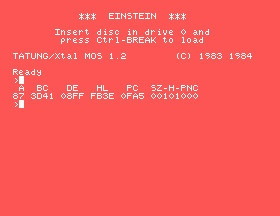
Nothing in the MOS was involved in the colour change. Your program spoke to the chip, and the chip did it. Most of the MOS is exactly this, wrapped up so that a program does not need to know the ports.
The Einstein is a Z80 with RAM across its 64K, an 8K ROM that shares the bottom of the address space with RAM, and a chip at each range of ports. A program can drive any chip directly; the MOS exists so that it does not have to.
S3 asks the question this section left hanging: when you switch on, the RAM is empty - so what does the Z80 run first, and what must that program do?
This form is protected by reCAPTCHA, and the Google Privacy Policy and Terms of Service apply.
