module
17

The Turbo course's screen was forty columns of characters and nothing else. HiSoft Pascal can draw: lines, points, polygons, circles and filled shapes, in colour - a handful of procedures written for the Einstein and built into the language. There is nothing to switch on; you draw on the same screen your text is on.
Drawing works in points, not characters: 256 across, numbered 0 to 255, and 192 up, 0 to 191. Up, not down: (0,0) is the bottom left corner, and (255,191) the top right - the other way up from GOTOXY's rows.
ORIGIN(X,Y) moves (0,0) somewhere else - ORIGIN(128,96) puts it in the middle of the screen - and everything drawn afterwards is measured from there.
DRAW(X1,Y1,X2,Y2,T)
draws a line from (X1,Y1) to (X2,Y2). The last number is the kind of line:
T | Line |
|---|---|
| 0 | solid |
| 1 | rubs out - draws in the background |
| 2, 3, 4 | three dash patterns - and the gaps rub out whatever was there |
PLOT(TRUE,X,Y) lights one point and PLOT(FALSE,X,Y) puts it out. POINT(X,Y) is a function: TRUE if that point is lit.
POLY(CHORDS,START,FINISH,CX,CY,RX,RY,STEP,T)
draws a polygon round the centre (CX,CY), RX across and RY up from it. The angles run from 0 to 1023 for a whole turn; with START and FINISH the same, you get the whole shape. STEP sets the number of sides - 1024 DIV the number you want, so 256 gives four sides and 341 gives three - and a small step, 32 or less, gives something round. CHORDS TRUE draws lines from the centre to the ends; T is the kind of line, as for DRAW.
The start angle decides which way up the shape stands, because it is where the first corner goes. Four sides from 128 stand square; the same four sides from 0 stand on a corner, as a diamond.
FILL(X,Y) fills outwards from (X,Y) until it meets lit points, in the colour set by GCOL. Inside a closed shape it fills the shape. Anywhere else it fills everything it can reach - over your text as well.
GCOL(F,B) sets the colour of what is drawn after it, from the same sixteen colours as TCOL (S14). Four of them, on the screen's ordinary blue: GCOL(7,4) cyan, GCOL(9,4) light red, GCOL(11,4) light yellow, and GCOL(15,4) back to white.
PAGE clears the drawing along with the text.
Three shapes in a row, each one a POLY filled in its own colour. Only the step - and, for the square, the start angle - is different between them.
10 (*$C-*)
20 PROGRAM PICTURE;
30 VAR C:CHAR;
40 BEGIN
50 PAGE;
60 WRITELN('THREE SHAPES');
70 DRAW(16,40,240,40,0);
80 GCOL(11,4);
90 POLY(FALSE,128,128,48,88,32,32,256,0);
100 FILL(48,88);
110 GCOL(7,4);
120 POLY(FALSE,256,256,128,88,36,36,341,0);
130 FILL(128,88);
140 GCOL(9,4);
150 POLY(FALSE,0,0,208,88,34,34,32,0);
160 FILL(208,88);
170 GCOL(15,4);
180 REPEAT C:=INCH UNTIL C<>CHR(0);
190 PAGE
200 END.
Line 70 is the white rule. Then each shape takes three lines: a GCOL, a POLY, and a FILL started at the shape's own centre. Line 90's step of 256 gives four sides and its start of 128 stands them square; line 120's 341 gives three; line 150's 32 gives a round one. Line 180 waits for a key, so that the picture stays until you have looked at it; line 190 clears it away.
Starting from
PICTURE.ASC saved from XBAS; HPEIN PICTURE.
What you should see
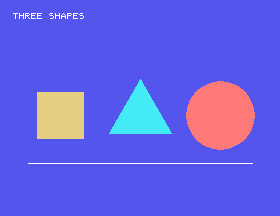
A key clears the screen and returns to 0:.
32 in line 150 to 256. Four sides, like the square - so why does it not stand the same way up?FILL(10,180). Where does the light red go, what stops it, and what happens to the title and to the triangle's sloping sides?17.1 Draw a target: three circles, one inside another, round the middle of the screen.
17.2 Make a star move across the screen: draw it, wait a moment, rub it out with line type 1, and draw it again a little further on.
Worked solutions are in Appendix II.
| Symptom | Cause |
|---|---|
| The picture is upside down | y counts up from the bottom: 191 is the top. |
| A line does not appear | It was drawn with type 1, which rubs out. |
| Colour floods the whole screen | FILL started outside a closed shape, or the shape has a gap. |
| A shape stays an outline | Its FILL is missing. |
| A shape stands on its corner | The start angle: four sides from 0 give a diamond, from 128 a square. |
| A circle comes out as a diamond or a square | The STEP is too big: 32 or less for round. |
DRAW, PLOT, POINT, POLY and FILL draw on the text screen, 256 by 192 points with (0,0) at the bottom left; ORIGIN moves (0,0). Line type 0 is solid and 1 rubs out. GCOL colours what is drawn; PAGE clears it.
S18, Sound - the Einstein's sound chip, one register at a time.
This form is protected by reCAPTCHA, and the Google Privacy Policy and Terms of Service apply.
