module
3

HELLO ran on the 256 without a change, in S2, and so does much TC-01 code. But a few things a TC-01 program might quietly rely on are different, and one of them crashes. This section is the list. Check a program against it before you move it across, and you won't be surprised.
In the assembly course (S7 and S12) a program started with SP at FCEDh and returned to 0769h. On the 256 neither is fixed: both depend on how the program was started. Loaded at the MOS prompt, for instance, it starts with SP at FCF3h and returns to 070Bh, and the first Run from the extension gives a different return address again. Code that only pushes, pops, calls and returns doesn't care. Code that looks at SP's value, or reads the return address, needs changing.
There is more room below it. From a prompt load the stack takes 200 bytes, where on the TC-01 100 bytes worked and 176 reset the machine. But go too far and the 256 does not reset as the TC-01 does. The screen stays as it was and the program never comes back. If a 256 program seems to hang, a runaway stack is worth suspecting. If you need a known amount of stack, set SP yourself.
The assembly course's sprite programs write register 1 with values such as 224 (E0h) or 226. Bit 5 of that value, 20h, turns on the video chip's frame interrupt. On the TC-01 nothing comes of it. On the 256 the interrupt reaches the Z80, and MOS isn't expecting it: the program is thrown back to MOS at the moment the register is written, to a fresh Ready, and memory it was using can be overwritten.
The fix is to leave bit 5 clear: write 192 (C0h) instead of 224, and 194 instead of 226. Everything else in those values works as before. In S7 you'll turn the interrupt on deliberately, with a handler of your own.
The TC-01's video chip has eight registers, 0 to 7. Send it a register write with a larger number and it can land on one of those eight instead: a second byte of FFh, which would mean register 127, changes register 7 there, and so does BFh. The 256's chip has registers numbered up to 46, and the same bytes leave its register 7 alone. Code that sent such a number on the TC-01, by accident or design, does something different on a 256: give it the real register number.
Colour numbers mean the same colours: 4 is dark blue, 6 dark red, 15 white. But the 256 makes them from its palette, and its shades are different. The start-up blue is (36,36,255) where the TC-01's is (84,85,237), and colour 8 is (255,36,36) against (252,85,84). Black and white are identical. If your game's look depends on a colour, check it on the 256. S6 shows how to set any colour you like.
The 256's frame rate depends on the line-standard switch you met in S2: 50 Hz at 625 lines, 60 Hz at 525. A TC-01 game that counts frames for its timing runs a fifth faster at 60. Bit 2 of port 26h tells a program which way the switch is set. Port 26h is new: the TC-01 reads FFh there.
A program that reports the frame rate the machine is set to:
; S3: which line standard is this 256 switched to?
; Port 26h bit 2 is the line-standard switch: 1 = 625 lines, 50 Hz.

        ORG 256

        IN A, (26h)     ; read the switches
        BIT 2, A        ; the line-standard switch
        LD A, '6'       ; assume 60 Hz
        JR Z, show
        LD A, '5'       ; switch on: 50 Hz
show:   RST 8
        DEFB 158        ; print the first digit
        LD A, '0'
        RST 8
        DEFB 158        ; and the 0
        RET
What you should see
With the switch at 625 lines, as S2 set it:
Ready
>50
followed by the register display. Set the switch to 525 lines and run it again: >60.
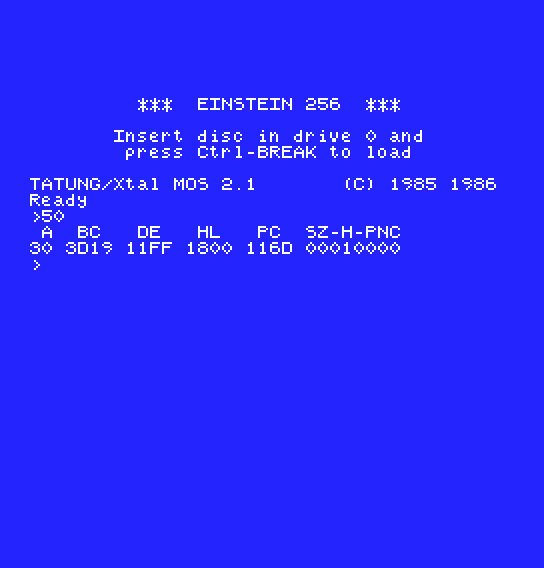
A game that must run at 50 whatever the switch says can set it itself. Writing 2 to register 9 makes the video chip produce 50 frames a second.
On the 256, the first status read a program makes at port 9 has bit 6 (the "too many sprites on a line" flag) set, and a sprite number in the low bits, even with no sprites on screen. One read clears bit 6. Read port 9 once and throw the value away before your game trusts bit 6. The bits the assembly course used, 5 (collision) and 7 (frame), behave as before.
MOS also leaves every sprite's Y at 192 (C0h) rather than 0. Their colour is 0 either way, so nothing shows, but don't count on zeros in the sprite table.
A TC-01 joystick routine reads the analogue converter at port 38h. The 256 has digital joysticks (S10). It answers at port 38h for TC-01 programs, but with only three values: 00h, 7Fh in the middle, or FFh, ready at once. Code that treats 80h as centre, or looks for values in between, needs adjusting. And the stick a TC-01 program calls joystick 1 is the 256's joystick B.
MOS pages its ROM in over the bottom 32K while a call runs. The 256's new call D6 (S4) copies a table of yours into the video chip, and if that table is below 8000h, it copies ROM instead. Keep data for the 256's new calls above 8000h. It's a good habit for any data you hand to MOS.
w is drawn one pixel line differently. Your own fonts are unaffected.224 to register 1, and run it on the 256 as it stands, then with 192. What happens to the program the first time, and what does the screen look like afterwards?| Symptom | Cause |
|---|---|
A TC-01 sprite program stops the moment it starts, back at Ready, with nothing it meant to draw on screen | Register 1 written with bit 5 set. Use 192/194 instead of 224/226 |
| A TC-01 routine that changed the backdrop with a register number above 7 no longer changes it | The 256 doesn't fold larger numbers onto register 7. Write register 7 as 87h |
| The program hangs with the screen unchanged | The stack ran away |
| A new 256 call puts nonsense into the video chip | Its data was below 8000h, so it read ROM |
You know what to check in a TC-01 program before it runs on a 256: - register 1's bit 5 - registers above 7 - the stack and SP - the colours' shades - 50 or 60 Hz - the first status read - joysticks through the ADC - where call data lives
From S4 on, the primer turns to what the 256 adds.
S4, The 256's Video Chip: what's new around the ports 8 and 9 you already know.
