module
2

Nothing new to install. The assembler, MAME and the VS Code extension from the assembly course all work with the 256. You need the 256's ROM, a newer version of the extension, and one setting to tell the extension which machine you're writing for.
MAME calls the Einstein 256 einst256. Its ROM set is einst256.zip, which holds a single 16K ROM, mos21.i008. Download it from MOS 2.1 for the Tatung 256 and put it beside the TC-01's:
~/roms/einstein.zip
~/roms/einst256.zip
Check it:
mame -verifyroms einst256
MAME should answer romset einst256 is good.
You need version 0.6.0 or later of the Tatung Einstein extension. If you installed an earlier one for the assembly course, download the new version from the Downloads page and install it the same way (Install from VSIX...). It replaces the old one.
Then tell it which machine to run. Open the Command Palette (View > Command Palette) and choose Einstein: Select Machine (TC-01 / Einstein 256), then Einstein 256. The same choice is in the menu you get by clicking the extension's item in the status bar.
If you keep this primer's programs in their own folder, you can make that folder always use the 256. Create .vscode/settings.json in it, containing:
{
    "einstein.machine": "einst256"
}
The assembly course's folder carries on running the TC-01.
Inside every 256 is a switch that picks the TV standard: 625 lines at 50 Hz, as in Britain, or 525 lines at 60 Hz. It decides how many frames a second the video chip produces, so a game that counts frames runs a fifth faster at 60.
The extension sets it to 50 Hz for you. The setting is Einstein: Line Standard (einstein.lineStandard), and its default is 50Hz. Everything in this primer assumes 50 Hz, so leave it there. S3 shows how a program can tell which way the switch is set.
Open the assembly course's first program, or type it in again:
        ORG 256        ; Start of the program in memory

        LD A, 'H'      ; Load the letter 'H' into register A
        RST 8          ; Call a system routine
        DEFB 158       ; Tell the system to print the character in A

        LD A, 'E'
        RST 8
        DEFB 158

        LD A, 'L'
        RST 8
        DEFB 158

        LD A, 'L'
        RST 8
        DEFB 158

        LD A, 'O'
        RST 8
        DEFB 158

        RET            ; Return to prompt (end of program)
Press Run, exactly as before.
What you should see
The status bar reads Einstein 256: Running, and the 256 starts:
         ***  EINSTEIN 256  ***

       Insert disc in drive 0 and
        press Ctrl-BREAK to load

TATUNG/Xtal MOS 2.1       (C) 1985 1986
Ready
>HELLO
followed by MOS's register display and another >.
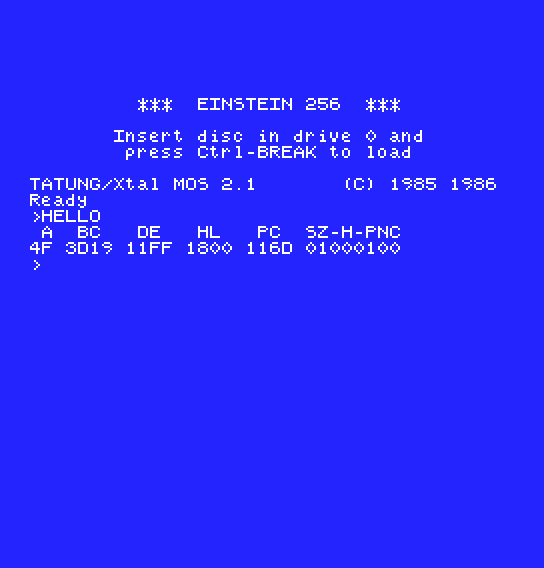 The program you wrote for the TC-01 runs without a change. The register values are whatever MOS left behind, so they won't match the TC-01's, and they can differ between the first Run and later ones. Only A, still holding the
 O (4F), is yours.
Two other things look different. The window is bigger, because the 256's picture is drawn at twice the scale. The text is the same font at the same resolution, just drawn twice as large. And the blue is deeper. The background is colour 4, as on the TC-01, but the 256's colour 4 is a different shade. In S6 you'll learn to change it.
The 256 has two joystick ports, A and B (S10). The emulator the extension runs calls them P1 and P2, and stands keys in for them: by default the arrow keys are joystick A's directions and Left Ctrl is its fire button. To see or change the keys, click the Einstein window, press Tab, and open Input (this Machine). A real joystick plugged into your computer works too.
You won't need a disc for anything in this primer: the extension puts each program straight into memory, as it did on the TC-01. But the 256 has its own DOS, XtalDOS 2.05E, on the 256 System 5 master disc, and it won't start on a TC-01. To look at it, start MAME yourself with a copy of the disc in drive 0:
mame -rompath ~/roms einst256 -window -flop1 256MAST.DSK
         ***  EINSTEIN 256  ***

XtalDOS 2.05E       (C) Xtal 1983-87
0:
DIR lists its sixteen files: BACKUP, COPY, XBAS, XSM and the rest. A .COM of your own copied onto the disc runs by name from 0: and returns there, as under the TC-01's DOS.
60Hz and run HELLO. The window changes shape. Which way, and what might that tell you about the two TV standards? Set it back to 50Hz afterwards.| What you see | What it means |
|---|---|
mos21.i008 NOT FOUND (tried in einst256), then Fatal error: Required files are missing, the machine cannot be run. | MAME found no usable einst256.zip. Check the filename and the ROM folder. |
The banner says *** EINSTEIN *** and MOS 1.2 | The extension is still set to the TC-01. Select the Einstein 256. |
| No Select Machine command in the Command Palette | The extension is older than 0.6.0. Install the new version. |
S3, Bringing TC-01 Code Across: the short list of things that behave differently.
