module
4

So far the machine has answered you in words. This section gets it to draw.
The thing that draws is called the turtle, and the whole idea of it is that you do not tell it where to go on the screen; you tell it to move forward, or turn, as though you were the one walking. It is a surprisingly different way to think about a picture, and it is why a beginner can draw something interesting in four lines.
Dr Logo starts on a text screen, and switches to a drawing one the moment you draw anything. You do not have to ask.
You can ask anyway, and it is worth doing:
ss
short for split screen: drawing on top, and a few lines at the bottom where what you type still appears. That is the screen you get by drawing, so ss mostly serves to say out loud which screen a program expects. ts, for text screen, puts it back the way it was.
Then:
cs
for clear screen. That wipes the drawing and puts the turtle back in the middle of the screen, pointing up. It is worth getting into the habit of starting with cs, because the turtle stays wherever your last instruction left it, and a drawing that begins from somewhere unexpected is confusing in a way that is hard to spot.
Four instructions, each taking a number:
| Type | Short for | What it does |
|---|---|---|
fd 50 | forward | Moves 50 steps in the direction it is facing, drawing as it goes |
bk 50 | back | Moves 50 steps backwards, still drawing |
rt 90 | right | Turns 90 degrees to the right. Does not move |
lt 90 | left | Turns 90 degrees to the left. Does not move |
A step is a pixel. fd 50 draws a line fifty pixels long. The drawing area is 256 pixels across and 192 down, and the turtle starts in the middle of it, so you have about 128 steps to play with in any direction before you run out of screen.
Turning does not draw anything. That catches people out: rt 90 on its own looks as though nothing has happened, and nothing has, except that the next fd will go in a different direction.
ss
cs
fd 50
rt 90
fd 50
rt 90
fd 50
rt 90
fd 50
Starting from
A fresh boot, at the ? prompt. The ss and cs at the top mean this listing does not care what you were doing before it.
What you should see
A square with sides of fifty steps, drawn up and to the right of where the turtle started, with the turtle sitting at the bottom left corner of it pointing left. Underneath, in the text window, the last few lines you typed.
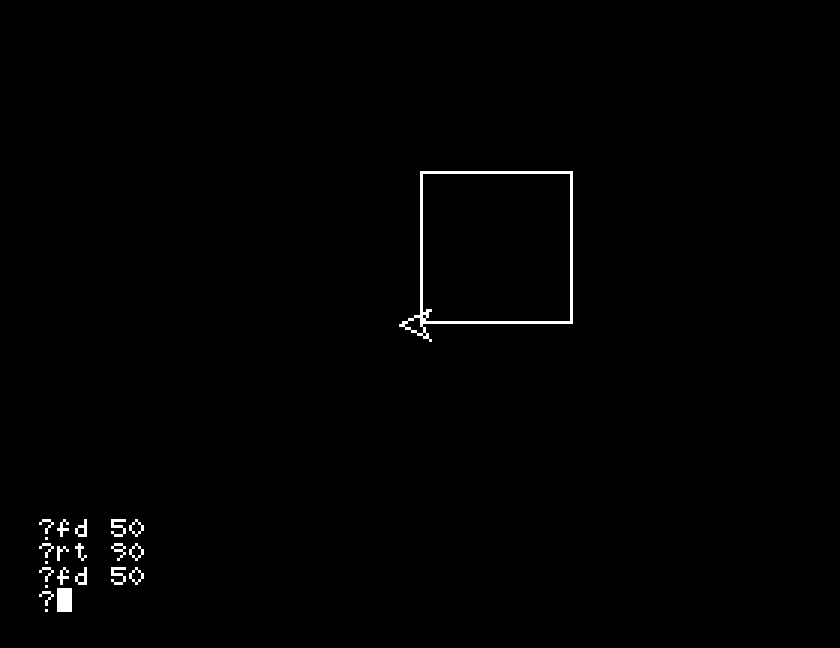
Nine lines for a square is clumsy, and you may have noticed that four of them are the same and three more are the same as each other. S5 fixes that.
fd 50 to fd 25. Before you run it, work out what the shape will look like and where the turtle will finish. Then run it.rt 90 to lt 90. The square is the same size; so what is different about it, and why?ht on a line of its own straight after cs, then run the whole thing again. Something disappears. What was it, and was it ever part of your drawing?| Symptom | Cause |
|---|---|
You type fd 50 and nothing appears | The turtle may be off the screen from an earlier drawing, or the pen may be up. cs puts both right. |
| The drawing starts somewhere odd, or on top of an old one | The turtle is wherever you last left it. cs before you start. |
| A line runs off the top and stops | You have reached the edge. There are only about 95 steps above the middle. S8 covers what happens there. |
rt 90 seems to do nothing | It turned. Turning does not draw; the next fd is where you will see it. |
ss gives you a screen to draw on and cs clears it and sends the turtle home. fd and bk move the turtle and draw; rt and lt turn it without drawing. One step is one pixel, and the turtle starts in the middle of a screen 256 by 192.
S5, doing it more than once: the same square in two lines instead of nine.
This form is protected by reCAPTCHA, and the Google Privacy Policy and Terms of Service apply.
