module
3

A computer from 1984 will not guess what you meant. Dr Logo waits for you to type a line, and then does exactly what that line says, which is wonderful when the line is right and baffling for a minute or two when it is not.
This section gets you to the point where the machine is listening, and gets it to say something back.
Start the Einstein with the Dr Logo disc in the first drive, as S2 set up. The machine boots from that disc and hands you the disc operating system, which announces itself and leaves a prompt:
        ***  EINSTEIN  ***
TATUNG/XtalDOS 1.31        (C) 1983 1984
If instead you get a screen inviting you to press Ctrl-BREAK to load, press it, and the disc operating system comes up as above.
Dr Logo is a program on that disc, and you ask for it by name. Type:
LOGO
and press ENTER.
Then wait. Loading takes about three quarters of a minute, and for much of that the screen sits still or goes black. That is normal. You will see a sign-on message naming the version, the words Please Wait, and then the screen clears and leaves a single character in the top left corner:
?
That question mark is Dr Logo asking what you would like. Everything in this course happens at it.
Type a word and it appears next to the ?. Nothing else happens yet: the machine is not reading over your shoulder as you go. It waits until you press ENTER, and only then looks at what you wrote.
That gap is useful. If you mistype, press DEL and the last character disappears. You can hold it down and take the whole line back.
Letters come out in lower case. Hold SHIFT for a capital, or press CAPS LOCK to get capitals until you press it again.
Dr Logo uses square brackets constantly, and there is no square bracket key on an Einstein. Three keys give you characters that are not printed on them:
| Press this key | You get |
|---|---|
| the ← key, at the end of the QWERTY row | [ |
| the → key, at the end of the ASDF row | ] |
| SHIFT and the ½ key | \ |
SHIFT and the = key | - |
That last one catches everybody. The key with - printed on it gives an underscore, not a minus, and Dr Logo will not know what to do with it.
In MAME the ← and → keys are your Left and Right arrows. They are not the Einstein's cursor keys, which are the two grey keys beside them (Tab and the Down arrow in MAME); S10 says what those do.
Learn those three now. You will want the first two in about a minute, and hunting for a [ that does not exist is a dispiriting way to spend an evening.
pr is short for print. Give it something to print and it puts it on the screen.
The something is usually a list: a run of words inside square brackets. Type this, using the ← and → keys for the brackets:
pr [hello from the einstein]
Starting from
A fresh boot, at the ? prompt. This section's line needs nothing that came before it.
What you should see
The line you typed, and underneath it the same words without the brackets, and then a new ? waiting for the next thing:
?pr [hello from the einstein]
hello from the einstein
?
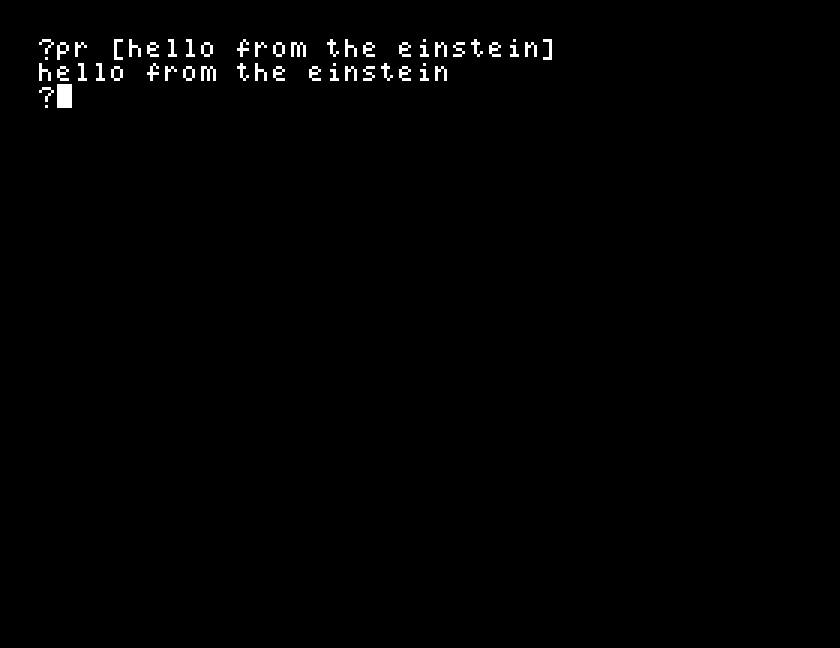
The brackets told Dr Logo where the list started and stopped. They are not part of what you wanted printed, and pr does not print them.
When you have had enough, type:
bye
and Dr Logo hands you back to the disc operating system. It takes a few seconds, and the screen goes blank on the way. Only then is it safe to switch the machine off.
pr to show and run the line again. Both print your words. What is different, and which one told you something about the line that pr hid?hello on its own, with no pr in front of it, and press ENTER. What does Dr Logo make of a word it has never met? Read the reply carefully: the wording tells you something about how it will treat every new word you invent later.pr [hello from the einstein, the same line, but leave the closing bracket off, and press ENTER. Does Dr Logo complain? What does the answer tell you about where it decides a list has ended?| Symptom | Cause |
|---|---|
Pressing [ does nothing at all, no character, no complaint | There is no bracket key. Use the ← key for [ and the → key for ]: in MAME, the Left and Right arrows. |
I don't know how to hello | The first word of a line is the thing to do, and this is not a word Dr Logo knows. pr is. |
| Everything comes out in capitals | CAPS LOCK is on. Press it again. |
The machine sits doing nothing after you type LOGO | It is loading. Give it three quarters of a minute before you worry. |
You get a > prompt and Ready, not A: or similar | The machine has not loaded the disc operating system. Press Ctrl-BREAK. |
| A line prints, but the words run together or come out oddly spaced | The spaces you type inside brackets are not kept. A list holds words, not the gaps between them. |
Dr Logo waits at a ? for a line, and acts on it when you press ENTER. pr prints a list of words, and the square brackets that mark the list are on the ← and → keys. bye gets you out.
S4, the turtle's first move: where the drawing happens, and how to get to it.
You have printed a list, but nothing has been said about what a list is, or why Dr Logo wants brackets round it rather than quotes or nothing at all. That question is worth holding on to; it comes back in the sections on words and lists, and the answer is most of what makes this language unusual.
This form is protected by reCAPTCHA, and the Google Privacy Policy and Terms of Service apply.
