module
21
A game is a loop: show the player where they are, ask what they want to do, work out what they meant, do it, and go round again - until the game is over. This section writes that loop, and makes the first thing the player can do: walk.
50 REPEAT
70 INPUT LINE "WHAT NOW",C$
80 PROCPARSE(C$)
90 PROCDO
110 UNTIL OVER%
Five lines, and the rest of the game hangs off them. INPUT LINE asks WHAT NOW? and takes whatever is typed. PROCPARSE works out what it means. PROCDO does it. And the loop goes round until OVER% is not 0 - which is how anything in the game can end it: set OVER%.
The gaps in the line numbers are deliberate. Lines 60 and 100 will come later.
PROCPARSE is S18's verb and noun, as a procedure: it splits the command at its first space into V$ and N$. They are not LOCAL, so PROCDO can see them.
PROCDO decides what to do with them. For now it knows three things:
INSTR("NESW",V$) gives 1 for N, 2 for E and so on - exactly the direction numbers of the map - and 0 for anything else.LOOK shows the room again.QUIT sets OVER%, and the loop ends.Anything else gets I DON'T UNDERSTAND. S25 will teach it a great deal more.
Each check ends with ENDPROC, so once one has matched, the rest are skipped.
PROCMOVE(D%) looks up the exit in direction D%. If it is 0, there is no way that way. If it leads to the bridge (room 4) and there is no power, the door is sealed - POWER% is 0 for now, and S26 is how you change that. Otherwise, R% becomes the new room, and PROCLOOK shows it.
LOAD "ADV1". Add these lines, and change line 1060:
50 REPEAT
70 INPUT LINE "WHAT NOW",C$
80 PROCPARSE(C$)
90 PROCDO
110 UNTIL OVER%
1060 R%=1:POWER%=0:OVER%=0
1300 DEF PROCMOVE(D%)
1310 IF E%(R%,D%)=0 THEN PRINT "YOU CAN'T GO THAT WAY.":ENDPROC
1320 IF E%(R%,D%)=4 AND POWER%=0 THEN PRINT "THE BRIDGE DOOR IS SEALED SHUT.":ENDPROC
1330 R%=E%(R%,D%):PROCLOOK
1340 ENDPROC
1800 DEF PROCPARSE(C$)
1810 LOCAL S%
1820 S%=INSTR(C$," ")
1830 IF S%=0 THEN V$=C$:N$="" ELSE V$=LEFT$(C$,S%-1):N$=MID$(C$,S%+1)
1870 ENDPROC
1900 DEF PROCDO
1910 D%=INSTR("NESW",V$):IF LEN(V$)=1 AND D%>0 THEN PROCMOVE(D%):ENDPROC
1920 IF V$="LOOK" THEN PROCLOOK:ENDPROC
1987 IF V$="QUIT" THEN OVER%=3:ENDPROC
1990 PRINT "I DON'T UNDERSTAND."
1995 ENDPROC
Starting from
LOAD "ADV1" from S20. When it works, SAVE "ADV2".
What you should see
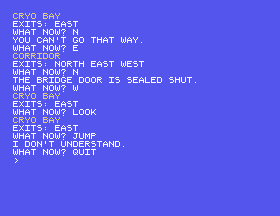
Try N, E, N, W, LOOK, JUMP and QUIT:
CRYO BAY
EXITS: EAST
WHAT NOW? N
YOU CAN'T GO THAT WAY.
WHAT NOW? E
CORRIDOR
EXITS: NORTH EAST WEST
WHAT NOW? N
THE BRIDGE DOOR IS SEALED SHUT.
WHAT NOW? W
CRYO BAY
EXITS: EAST
WHAT NOW? LOOK
CRYO BAY
EXITS: EAST
WHAT NOW? JUMP
I DON'T UNDERSTAND.
WHAT NOW? QUIT
>
NORTH instead of N. What happens, and why? (S25 will fix it.)R%=1:POWER%=1:OVER%=0 and walk north from the corridor. Where are you now?21.1 Make Q quit, as well as QUIT.
21.2 Make L do the same as LOOK.
Worked solutions are in Appendix II.
| Symptom | Cause |
|---|---|
Every command is I DON'T UNDERSTAND. | Check line 1910 - and CAPS LOCK: the game only knows capitals until S25. |
NORTH is not understood | Only the single letters are, for now. |
No PROC | An ENDPROC is missing, or line 130's END. |
| The game will not stop | QUIT - or ESC, which stops any program. |
REPEAT ... UNTIL OVER% is the game: ask with INPUT LINE, split with PROCPARSE, act with PROCDO. PROCMOVE follows the map, and the bridge door waits for power. Save it as ADV2.
S22, Looking - describing each room, in words that fit the screen.
This form is protected by reCAPTCHA, and the Google Privacy Policy and Terms of Service apply.
