module
16
A game that does exactly the same thing every time is a puzzle you solve once. A little chance - which way a door jams, what the console says when it flickers - makes it worth playing twice. BBC BASIC can make up numbers nobody can predict.
RND(6) is a whole number from 1 to 6, picked at random - a dice roll. Every time the program reaches it, a new one.
PRINT RND(6)
Any number will do in the brackets: RND(2) is 1 or 2, a coin toss; RND(4) picks one of four rooms; RND(100) a percentage.
RND(1) is different. It gives a fraction, somewhere from 0 up to (but not including) 1 - 0.204120999, say. Very small ones print in E notation, as S7 showed.
Straight after BBC BASIC starts, before you have RUN anything, RND is not random at all: PRINT RND(6) at the > gives 1, and again, and again. The first RUN wakes it up. In a program you will never notice; trying dice at the >, you will.
Sometimes you want the "random" numbers to come out the same each time - to test a program, say, and see the same thing happen twice. A negative number in the brackets does that: X=RND(-1) sets the numbers going from a fixed start, and every run from then on gives the same sequence. Take the line out, and they are random again.
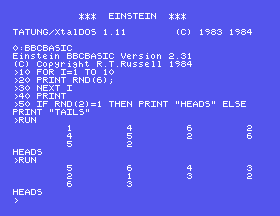
10 FOR I=1 TO 10
20 PRINT RND(6);
30 NEXT I
40 PRINT
50 IF RND(2)=1 THEN PRINT "HEADS" ELSE PRINT "TAILS"
Starting from
A fresh boot, or NEW.
What you should see
Ten dice rolls, each a number from 1 to 6, and a coin toss. Yours will be different - and different again each time you RUN it:
>RUN
         1         4         6         2
         4         5         2         6
         5         2
HEADS
>RUN
         5         6         4         3
         2         1         3         2
         6         3
HEADS
>
RUN, type PRINT RND(6);RND(6);RND(6). What do you get?5 X=RND(-1) and RUN twice. Compare the two runs. Then take line 5 out and run twice more.PRINT RND(1) (no semicolon). What sort of numbers are these?16.1 Toss a coin ten times and print H or T for each, all on one line.
16.2 Roll a dice 600 times and count the sixes. About how many would you expect?
16.3 Read DRIFT's four rooms from DATA into an array, and print YOU WAKE IN THE followed by one of them, picked at random.
Worked solutions are in Appendix II.
| Symptom | Cause |
|---|---|
RND(6) keeps giving 1 at the > | Nothing has been RUN since BBC BASIC started. |
| The same numbers every run | There is a RND with a negative number in the program, fixing the sequence. |
| A count inside a loop comes out wrong | A NEXT on the same line as an IF is skipped when the test is false. Put NEXT on its own line. |
RND(n) is a whole number from 1 to n; RND(1) a fraction below 1. A negative number fixes the sequence so it repeats. Before the first RUN, RND is not random.
S17, Naming Your Own Commands - procedures and functions, the part of BBC BASIC that makes a long program readable.
This form is protected by reCAPTCHA, and the Google Privacy Policy and Terms of Service apply.
