module
4
Everything in S3 happened the moment you pressed ENTER. That is useful for trying things out, but a program is a set of instructions the machine keeps and carries out later, in order, as many times as you like.
In BBC BASIC, what decides "kept" from "now" is a number at the front of the line.
Type this at the >:
10 PRINT "STORED"
Nothing happens. No output, just the > again.
Now type it without the number:
PRINT "STORED"
and the word appears at once.
A line that begins with a number is stored as part of a program. A line that does not is done immediately. That is the whole rule, and it is why every listing in this course has numbers down the left.
To see what is stored, type:
LIST
and to carry it out:
RUN
The numbers decide the order the lines run in - not the order you typed them. Type line 30 before line 20 and BBC BASIC files it in its proper place; LIST shows the program in number order, always.
That is why programs are numbered in tens. It leaves room. If you find you need a line between 20 and 30, you have 21 to 29 to put it in, and you have not had to retype anything else.
Line numbers can be anything from 1 to 65535.
Typing a line with a number that already exists replaces it. Typing a number with nothing after it deletes that line. So you can correct line 20 by typing the whole of line 20 again.
That is the whole of it for now. Retyping a line to change one character gets old quickly, and S5 is about the better ways.
NEW throws the program away. LIST shows nothing afterwards.
It does not ask. But BBC BASIC has a second chance built in: type OLD straight afterwards and the program comes back, exactly as it was. The catch is "straight afterwards" - once you have typed a new line, OLD has nothing to bring back, and says nothing about it either.
So: NEW before you start something new; OLD if you wish you had not.
A program that reaches the end of its last line simply stops, and the > comes back. One that never reaches an end is stopped with ESC, as S2 said: BBC BASIC reports Escape at line and the line it had got to, and the program is still there.
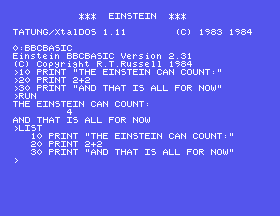
10 PRINT "THE EINSTEIN CAN COUNT:"
20 PRINT 2+2
30 PRINT "AND THAT IS ALL FOR NOW"
Starting from
A fresh boot, or NEW if you have been typing something else.
What you should see
Type the three lines, then RUN:
>RUN
THE EINSTEIN CAN COUNT:
         4
AND THAT IS ALL FOR NOW
>
Type LIST afterwards and the program is still there, with its line numbers lined up on the right of a five-wide column:
>LIST
   10 PRINT "THE EINSTEIN CAN COUNT:"
   20 PRINT 2+2
   30 PRINT "AND THAT IS ALL FOR NOW"
>
LIST. What order are they in, and why?20 on its own and press ENTER, then LIST. What happened?NEW, then LIST. Then type OLD and LIST again. What did NEW really do?4.1 Write a program of three lines that prints your name, then your favourite number, then the number doubled - working the doubling out in the program rather than typing the answer.
4.2 Change it so a line prints between the name and the number, without renumbering anything.
4.3 Numbers do not have to go up in tens. Write a five-line program using 5, 6, 7, 8 and 9. What have you lost by doing that?
Worked solutions are in Appendix II.
| Symptom | Cause |
|---|---|
| Your program runs in the wrong order | The line numbers, not the order you typed them, decide. LIST shows the true order. |
| A line you meant to add replaced another | Two lines with the same number are one line: the second one you typed wins. |
| Nothing happens when you type a line | It began with a number, so it was stored rather than done. RUN it, or leave the number off. |
A line numbered 0 ran at once and is not in the LIST | Line numbers start at 1. A line typed with 0 in front is done immediately, like one with no number. |
A program you wanted has gone after NEW | Type OLD - straight away, before you type anything else. |
| A program runs and will not stop | Press ESC. In MAME: Esc. |
A number at the front means "keep this"; no number means "do it now". Numbers decide the order, so leave gaps. LIST shows the program, RUN runs it, NEW throws it away and OLD brings it back. ESC stops it.
S5, Changing Your Mind - correcting a line without typing the whole of it again, and the commands that make typing a program in bearable.
This form is protected by reCAPTCHA, and the Google Privacy Policy and Terms of Service apply.
