module
3
A computer from 1984 will not guess what you meant. BBC BASIC waits for you to type a line, and when you press ENTER it does exactly what that line says - which is wonderful when the line is right and baffling for a minute when it is not.
It always tells you which. This section gets you to the point where you can read its replies, type the characters that are not where your keyboard says they are, and get out cleanly.
Boot the disc, and at 0: type BBCBASIC and press ENTER, as in S2. BBC BASIC signs on and gives you its >, with the cursor after it.
If you have a real Einstein, the same: your BBC BASIC disc, BBCBASIC, ENTER.
Nothing happens until you press ENTER. You can type as much as you like, and until ENTER the line is just characters on the screen. Press DELETE and the last character is rubbed out; type again and it is replaced. When the line reads as you want it, ENTER hands it to BBC BASIC.
In MAME, DELETE is Backspace and ENTER is Return.
BBC BASIC starts with CAPS LOCK on, and this course leaves it on.
That matters more here than it might elsewhere, because BBC BASIC only knows its words in capitals. PRINT is a word it knows; print is not. With CAPS LOCK on you cannot get this wrong, since everything you type is a capital - even if you hold SHIFT.
You can have small letters when you want them, inside quotes: press CAPS LOCK, and PRINT "hello" - with the capitals of PRINT typed with SHIFT - prints hello. Press CAPS LOCK again to go back. The course keeps to capitals throughout, and so does the game.
Type this and press ENTER:
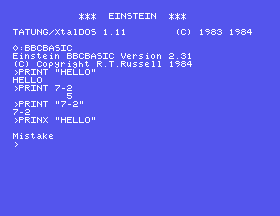
PRINT "HELLO"
The word comes back on the next line, and then the >:
>PRINT "HELLO"
HELLO
>
The first is what you asked for. The > is BBC BASIC saying it has done it and is waiting for the next line. The > follows every line, and you stop noticing it within the hour.
Now this:
PRINX "HELLO"
>PRINX "HELLO"

Mistake
>
PRINX is not a word BBC BASIC knows, so it does not do anything, says so, and - notice - gives you the > again. An error costs you nothing but the line. You will see Mistake a great deal, and it always means the same thing: BBC BASIC did not recognise what you typed as anything it can do. A misspelt word, a word in small letters, a key that gave a character you did not mean. Look at the line, find it, type it again.
There are other messages for other troubles, and they are just as plain. Every one comes after a blank line, so it stands out. Ask for something impossible:
PRINT 1/0
Division by zero
The line was perfectly good BBC BASIC; it asked for a sum that has no answer. Different problem, different message, and the > again afterwards.
PRINT is the word for "show me". What it shows depends on what follows.
Text in double quotes is shown exactly as it is - PRINT "HELLO" gives HELLO. A sum without quotes is worked out first and the answer is shown:
PRINT 7-2
5
The answer sits over on the right, nine spaces in; that is where BBC BASIC puts a number it prints on its own, and S7 explains why. And the same thing in quotes is text again, and is not worked out:
PRINT "7-2"
7-2
That is the whole difference between quotes and no quotes, and it runs through everything that follows. Inside quotes, BBC BASIC copies. Outside them, it calculates.
While the MAME window is in front, your keyboard is the Einstein's, and MAME lays the Einstein's keys over yours by position. The letters, digits and most punctuation are where you expect. A handful are not, and this section uses two of them already.
| To type | On the Einstein | In MAME |
|---|---|---|
" | SHIFT and 2 | SHIFT and 2, whatever your 2 says |
- (minus) | SHIFT and the = key | SHIFT and = |
( and ) | SHIFT and 8, SHIFT and 9 | SHIFT 8 and SHIFT 9 - one key to the left of where a modern keyboard has them |
: and * | the key marked : *, plain and shifted | the ' key, plain and shifted |
; and + | the key marked ; +, plain and shifted | the ; key, plain and shifted |
= | the = key | = |
@ | SHIFT and 0 | SHIFT and 0 |
_ | the key marked - | the - key |
The one that catches everybody is minus. The key with - on it gives an underscore, and PRINT 7_2 prints 7 and then stops with No such variable, because it took _2 for the start of a name. Minus is SHIFT and =.
The Einstein's cursor keys are the grey pair at the right-hand end of the QWERTY row, not the three keys with a single arrow on them, which type [, ] and ^. S5 shows the keys that move the cursor. Appendix IV has the whole keyboard in one place, for both.
PRINT "HELLO"
PRINT 7-2
PRINT "7-2"
PRINX "HELLO"
Four separate lines, each followed by ENTER.
Starting from
A fresh boot, with BBC BASIC just started.
What you should see
>PRINT "HELLO"
HELLO
>PRINT 7-2
         5
>PRINT "7-2"
7-2
>PRINX "HELLO"

Mistake
>
print "hello" in small letters. What does BBC BASIC say, and why? Now type PRINT with SHIFT held for each letter and "hello" without - what comes out, and in what case?PRINT "HELLO and leave the closing quote off. Does BBC BASIC mind?PRINT on its own and press ENTER. What do you get, and is it an error?3.1 Print your own name.
3.2 Print 2+2 worked out, and then print it as text, on two lines.
3.3 Print TWOWORDS from two separate quoted words on one PRINT line, using a semicolon between them. Then find out what PRINT 10/4 gives.
Worked solutions are in Appendix II.
BBC BASIC has a command for going back to the disc operating system:
*BYE
0: comes back. Typing BBCBASIC there starts BBC BASIC again - and although it looks as if anything you had typed in is gone, it is not quite: type OLD straight away and your program comes back. S4 has more about OLD, and S6 shows how to keep a program properly. Until then, *BYE is how you finish, and closing the MAME window, or switching a real Einstein off, does the same - except that nothing comes back from those.
| Symptom | Cause |
|---|---|
Mistake | BBC BASIC did not recognise the line. A misspelt word, a word in small letters (CAPS LOCK is off), or the wrong key. |
PRINT 7_2 prints 7 and then No such variable | The key marked - types an underscore. Minus is SHIFT and =. |
Your " key gives some other character | Your keyboard's legends do not apply. " is SHIFT and 2. |
Missing " | A quote was opened and not closed. |
Division by zero | You asked for a number divided by zero. The line was fine; the sum was not. |
Type a line, press ENTER, read the reply. The > means done; Mistake means BBC BASIC did not recognise the line, and costs nothing. Keywords are capitals, so keep CAPS LOCK on. PRINT shows text in quotes as it is and works out anything outside them. Minus is SHIFT and =. *BYE leaves.
S4, Your First Program - numbering lines so the machine keeps them, and running them in order.
This form is protected by reCAPTCHA, and the Google Privacy Policy and Terms of Service apply.
