module
6

Everything you have typed so far has been in the machine's memory, and memory lasts exactly as long as the power does. Switch the Einstein off, or close the emulator window, which is the same thing, and it is all gone.
That is a real risk on this machine, and not only at the end of a session. A program that runs away with itself cannot be stopped by any key under the emulator, so the only way out is to restart the machine, taking everything unsaved with it. Saving is the habit that makes that an annoyance instead of a disaster.
It takes one word.
SAVE "FIRST"
The program in memory is written to the disc under that name. BASIC adds .XBS for you, you will see it in a moment, and answers Ready.
That is all there is to it. Do it whenever you have typed something you would mind losing, and do it before you run anything with a loop in it.
DIR
lists the disc:
Drive 0
 :*XBAS    .COM :*GAME    .XBS
 :*XC      .COM :*XR      .COM
 :*GAME    .XBI : FIRST   .XBS
 :*INTRO   .XBS :*DEMO    .XBS
...
Two files to a line, the name padded out to eight characters and the extension to three. XBAS.COM is BASIC itself; the .XBS files are BASIC programs. Most of them are the ones Tatung shipped with the machine in 1984; you can LOAD and read any of them, and GAME is the game this course builds, finished, in case you ever want to see where you are going. XC.COM, XR.COM and GAME.XBI are a compiler for BASIC and the game compiled with it; S33 uses them.
The * means the file is locked, and cannot be changed or deleted. Everything that came on the disc is locked; FIRST is yours, so it has a space instead.
DIR does not tell you how much room is left. For that, leave BASIC with DOS, type DIR at the 0: prompt, and the disc operating system's own listing ends with a line like 124k Size, 64k Free, 190k Total. Then XBAS to come back, remembering that comes back to a fresh BASIC, with your program gone, so save first.
LOAD "FIRST"
reads the program back. Whatever was in memory is replaced.
Two things worth knowing, both of which will catch you out otherwise:
The name must match exactly, including its capitals. BASIC stores the name as you typed it. SAVE "small" makes a file called small, and LOAD "SMALL" then gives No File Error; they are different names. Since CAPS LOCK is on when BASIC starts, this happens when you have turned it off to type a message and forgotten to turn it back on. If a LOAD cannot find something you are sure you saved, DIR and look at the case.
LOAD does not clear your variables. It replaces the program but leaves every value alone, so a variable left over from whatever you were doing before is still there. RUN clears them, so this rarely matters, but if you LOAD something and then poke at it with direct commands, be aware the old values are still about.
A LOAD that fails changes nothing: the program you had is still in memory.
ERA "FIRST"
deletes the file. There is no asking and no undoing, and it is one letter away from things you meant to keep; so read the name before you press ENTER.
You can rename instead:
REN "FIRST" TO "SECOND"
Note TO, not a comma; a comma is a Syntax Error.
There is a VERIFY command, and it looks as though it should check that a save worked. It does not. It answers Ready whatever you give it, against a program that has been changed since, against an empty memory, even against a file that is not a BASIC program at all. It never reports a mismatch, so it tells you nothing.
If you want to know that a save worked, DIR and see the name there.
Type this in, save it, and look at the disc:
10 PRINT "SAVED AND SOUND"
20 PRINT 6*7
then
SAVE "FIRST"
DIR
Now prove it. Restart the Einstein, close the MAME window and start it again, or switch a real machine off and on, and boot back into BASIC. Then:
LIST
LOAD "FIRST"
LIST
RUN
Starting from
A fresh boot, with the course disc in the drive.
What you should see
Before the restart, DIR shows your file among the disc's own, with a space where their * is:
Drive 0
 :*XBAS    .COM :*GAME    .XBS
 :*XC      .COM :*XR      .COM
 :*GAME    .XBI : FIRST   .XBS
After the restart, the first LIST prints nothing at all; the machine has forgotten everything, and then:
LOAD "FIRST"
Ready
LIST
    10 PRINT "SAVED AND SOUND"
    20 PRINT 6*7
Ready
RUN
SAVED AND SOUND
 42
Ready
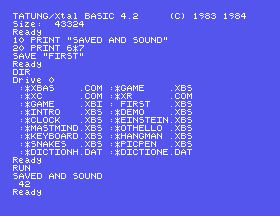
That empty LIST is the point of the whole section: the program came back from the disc, not from memory.
TRY, add a second line, and save it as TRY again. Then NEW and LOAD "TRY". Which version do you get, and did BASIC ask you about it?A=99, then LOAD "TRY", then PRINT A. Is A still there? Should it be?LOAD "NOTTHERE", a name you have never used. Read the error, and then LIST. What happened to the program you had?6.1 Save a program under your own name, restart the Einstein, and load it back. Do not skip the restart; it is the only thing that proves anything.
6.2 LOAD "DEMO", one of the 1984 programs on the disc, and LIST it. It stops at each screenful and waits: SPACE shows the next, ESC stops. You will not understand all of it yet. Find one line you do understand, and one thing you would like explained. (Do not RUN it: it takes over the machine and you cannot stop it.)
6.3 Save a program with a lower-case name deliberately, then try to load it with capitals, then load it properly.
Worked solutions are in Appendix II.
| Symptom | Cause |
|---|---|
Bad Data Error when you save | You are running from a .dsk disc image, which MAME cannot write to. Use the course disc, which is an .mfi. See S2. |
No File Error from LOAD | The name does not match exactly. Check the spelling, and the capitals, which count. DIR shows what is really there. |
File Locked | Everything that came on the disc is locked, and shows * in DIR. Choose your own name. |
| A file you saved yesterday is not there | It was saved to a different disc image, or the emulator was started with a different -flop1. |
| Your newer program was replaced by an older one | Saving over a name replaces it silently. There is no warning and no second copy. |
A variable has an old value after a LOAD | LOAD leaves variables alone. RUN clears them. |
| Everything is gone after a restart | Nothing was saved. SAVE before you run anything that loops. |
SAVE "NAME" writes the program to the disc as NAME.XBS, LOAD "NAME" brings it back, DIR shows what is there, ERA deletes and REN ... TO ... renames. Names must match exactly, capitals included. Saving over a name replaces it without asking. VERIFY proves nothing. Save before you run.
S7, Sums: what BASIC can work out, in what order, and the surprising ways it writes an answer down.
This form is protected by reCAPTCHA, and the Google Privacy Policy and Terms of Service apply.
