module
5

You will mistype things. Everybody does, and on a machine where a program is typed in by hand it matters more than it sounds: a forty-line program is a lot of typing to repeat because of one wrong letter.
Xtal BASIC is better equipped for this than you might expect. There is a real editor built into it, and three commands that take the tedium out of numbering.
Before you press ENTER, the line is just characters on the screen and you can change them.
| Key | What it does |
|---|---|
| DELETE | rubs out the character to the left |
| CTRL-H | moves left without rubbing out, so you can type over |
| CTRL-U | clears from the cursor to the end of the line |
| CTRL-X | clears the whole line and starts again |
In MAME: DELETE is Backspace, and CTRL is Ctrl (Control on a Mac, not Command).
The Einstein has two cursor keys, not four arrow keys. They are the grey pair at the right-hand end of the QWERTY row. The horizontal one moves the cursor right, or left with SHIFT held, and does exactly what CTRL-D and CTRL-H do. The three keys with a single arrow printed on them are character keys: the ← key types [, the → key types ] and the ↑ key types ^. If you press one by accident you will see the character appear.
In MAME: the horizontal cursor key is your Tab key (Shift and Tab for left), and your Left, Right and Up arrows are the three character keys. Appendix IV has the whole story.
This is the part worth learning properly, because it turns a retype into three keystrokes.
LIST your program. The lines are on the screen. Now move the cursor onto one of them and change it:
| Key | What it does |
|---|---|
| CTRL-K, or SHIFT and the vertical cursor key | moves the cursor up a row |
| CTRL-J, or the vertical cursor key | moves it down a row |
| CTRL-D, or the horizontal cursor key | moves it right a column |
| CTRL-H, or SHIFT and the horizontal cursor key | moves it left a column |
In MAME: the vertical cursor key is your Down arrow and the horizontal one is Tab.
Move to the wrong character, type the right one over it, and press ENTER. BASIC reads the whole line off the screen, wherever the cursor happens to be on it, and stores it in place of the old one.
It does not matter that the line on screen was put there by LIST rather than by you. What is on the screen is what gets stored.
Afterwards, clear the screen with CTRL-L. The cursor is left sitting on the listing, and anything you type next lands on top of it. Typing LIST there does not list; it merges with the text under it and gives you a Syntax Error about a line you did not write. CTRL-L wipes the screen and leaves the program alone.
Typing 10, 20, 30 at the start of every line gets dull. AUTO does it:
AUTO
BASIC prints 10 and waits. Type the rest of the line and press ENTER, and it prints 20. And so on.
AUTO 100,5 starts at 100 and goes up in fives.
Getting out of AUTO is the awkward bit. ESC does not do it; everything you type afterwards still becomes a program line, overwriting whatever is already there. The way out is to rub out the number BASIC just offered (CTRL-X clears the line) and press ENTER.
Be careful with an empty line at an offered number, too: pressing ENTER on its own deletes any line that already has that number.
Once you have squeezed lines into 21, 22 and 23 and run out of room, RENUM tidies the whole program up:
RENUM
renumbers from 10 in tens. RENUM 100,5 starts at 100 and steps by 5.
It fixes the jumps as well. A GOTO 20 pointing at the line that has just become 105 is rewritten to GOTO 105, and the same for GOSUB, IF ... THEN and ON ... GOTO. You have not met those yet, they are S11 and S13, but when you do, this is one less thing to worry about.
A number on its own deletes one line, as S4 showed. For a range:
DEL 110,115
deletes lines 110 to 115 inclusive. DEL 110,110 deletes just that one.
Two traps. DEL 110 with a single number is a Range Error; it will not guess what you meant. And DEL on its own, with no numbers at all, deletes the first line of your program, silently. It is an easy thing to type by accident.
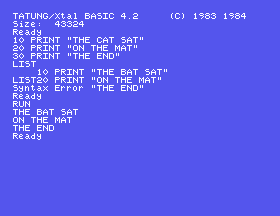
Type these three lines, deliberately getting line 10 wrong:
10 PRINT "THE CAT SAT"
20 PRINT "ON THE MAT"
30 PRINT "THE END"
Now LIST, and make it a bat instead of a cat without retyping the line:
C of CAT.Starting from
A fresh boot, or NEW.
What you should see
After the edit, LIST shows line 10 changed and the other two untouched, and RUN gives:
THE BAT SAT
ON THE MAT
THE END
Ready
RENUM 100,5 and LIST. What have the line numbers become? Add 40 GOTO 20 to the original program first, and look at what line 40 says after the renumber.AUTO, put two lines in, and get out of it again. Then try getting out with ESC instead and see what happens to the next thing you type.5.1 Type a four-line program using AUTO, then get out of AUTO cleanly.
5.2 Renumber that program to start at 1000 in steps of 10, and check with LIST.
5.3 Use the screen editor to change one word in the middle of line 1020 without retyping the line. Then delete lines 1010 and 1020 in one command.
Worked solutions are in Appendix II.
| Symptom | Cause |
|---|---|
[, ] or ^ appears when you press an arrow key | The keys marked ← → ↑ are character keys. The cursor keys are the grey pair beside them, or use CTRL-H, CTRL-D, CTRL-K and CTRL-J. In MAME, Tab and the Down arrow are the cursor keys, and the other arrows type the characters. |
A command you typed after editing gives a strange Syntax Error | You typed it on top of listed text and the two ran together. CTRL-L to clear the screen first. |
| You are still getting line numbers offered after ESC | ESC does not leave AUTO. Clear the offered number with CTRL-X and press ENTER. |
A line vanished while you were using AUTO | An empty line at an offered number deletes the line with that number. |
Range Error from DEL | DEL wants two numbers: DEL 110,115, or DEL 110,110 for one line. |
| The first line of your program has gone | You typed DEL with no numbers. |
| The line you edited did not change | ENTER has to be pressed while the cursor is on that line. |
Before ENTER: DELETE, CTRL-H, CTRL-U, CTRL-X. After ENTER: LIST, move to the line with CTRL-K and CTRL-D, type over it, press ENTER, then CTRL-L. AUTO numbers lines for you and is left by rubbing out the offered number. RENUM tidies the numbers and fixes the jumps. DEL a,b deletes a range; and bare DEL eats your first line.
S6, Keeping Your Work: putting a program on the disc so that switching the machine off stops being a disaster.
This form is protected by reCAPTCHA, and the Google Privacy Policy and Terms of Service apply.
