module
45
.png)
Optional. Nothing in the main course depends on it.
In the main course you look at the Einstein's screen: your program prints something, and when it finishes the machine shows its registers. That is how the Einstein itself works, and it is all you need. This appendix looks one level deeper - at your program sitting in memory, and at the registers changing one instruction at a time - using the Assembly Lab, the Einstein that runs in your web browser. The lab's own guide, Using the Assembly Lab, covers every control in it; here you only need a few.
Open the lab, choose Open an Example, then S3, The Program - the HELLO program you wrote in S3. Then:
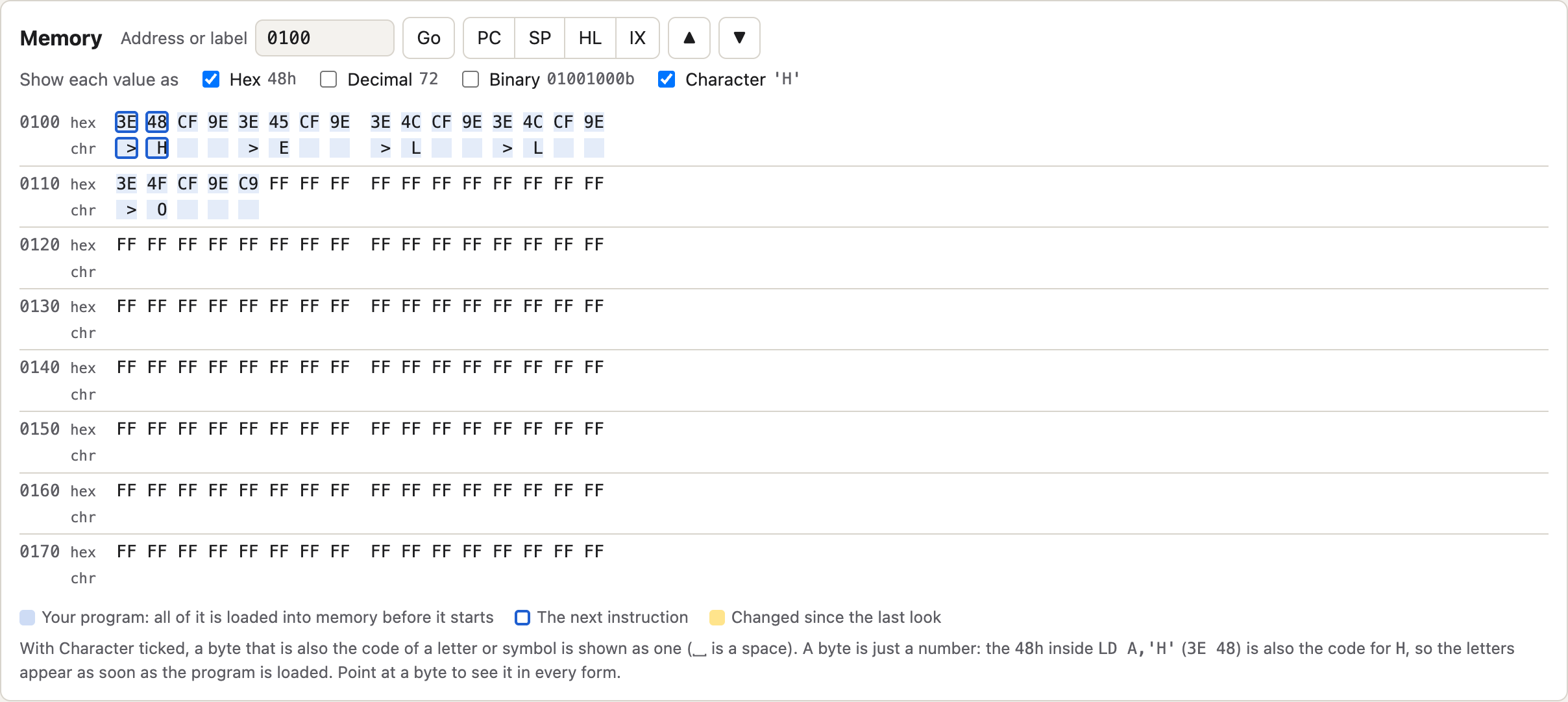
Memory starts at address 0100 - 256, where every program in this course
begins. The tinted bytes are your program:
0100  3E 48 CF 9E  3E 45 CF 9E  3E 4C CF 9E  3E 4C CF 9E
0110  3E 4F CF 9E  C9
Put that beside the source and it lines up exactly:
| Source | Bytes |
|---|---|
LD A,'H' |
3E 48 |
RST 8 |
CF |
DEFB 158 |
9E |
RET |
C9 |
Four lines of source, repeated five times with a different letter, then a
RET: twenty-one bytes in all. That is the whole of HELLO as far as the Z80
is concerned. Everything else - the labels, the spacing, the comments - was
for you, and the assembler threw it away.
You have not pressed Next Step yet, but H, E, L, L and O are
already showing in the Character row.
The whole program is put into memory before its first instruction runs.
LD A,'H' becomes 3E 48, and 48h - 72 - is the character code for H.
It is the same byte whether you call it "the number in the instruction" or
"the letter H". The lab's Character row looks at every byte and, where the
number is the code of a letter or symbol, shows that symbol. It has no idea
which bytes you meant as letters.
> signsEvery 3E has a > under it. 3Eh is 62, and 62 is the character code
for > - the same symbol as the Einstein's prompt.
This is the most useful thing in the appendix: a byte is just a number.
3E is not "an instruction" or "a >" on its own. It is an instruction
when the Z80 runs it, and a > when something prints it. Nothing in memory
marks the difference. What a byte is depends only on what reads it.
The Z80 is no different. It runs whatever byte the program counter reaches,
whether you meant it as code or not. If execution ever wanders into data -
a jump to the wrong label, a missing RET - the Z80 will run your text as
instructions, and the results look random because, as far as you are
concerned, they are.
RST 8 and DEFB 158 show nothingThey are there, as CF and 9E - 207 and 158. Both are above 127, and on
the Einstein those codes are graphics characters, not letters (Appendix I).
The lab's Character row shows only letters, digits and punctuation, so it
leaves them blank. It also shows a standard character set, so for the ten
codes where the Einstein's own characters differ, listed in Appendix I, the
Einstein's screen shows something else.
There is a second point hiding here. DEFB does not make an instruction at
all: it puts one byte of data into your program, right there. The 9E
after each CF is not run by the Z80 as an instruction. RST 8 calls the
Einstein's own routine, the routine reads the byte that follows to find out
which job you want - 158, print the character in A - and then carries on
from the byte after it. The data sits in the middle of the code, and it is
safe only because the routine skips over it.
The four ticks - Hex, Decimal, Binary, Character - are four ways of writing the same number. Point at any byte in the lab and it shows you all four:
| Hex | Decimal | Binary | Character |
|---|---|---|---|
48h |
72 | 01001000 |
H |
3Eh |
62 | 00111110 |
> |
C9h |
201 | 11001001 |
(none) |
Nothing changes in the machine when you tick a different box. The byte is eight bits; the rest is how you would like it written down. Hex is the usual choice because two hex digits are exactly one byte. The lab's Numbers panel converts as you type, and lets you flip the bits one at a time.

Press Next Step once. A becomes 48h and PC becomes 0102h, both
highlighted because they changed. PC has moved on two bytes, past 3E 48,
to the RST 8.
Now look at the flags. Z - the zero flag - is probably 1. But the value
just loaded was 48h, which is not zero. Why does it say the result was
zero?
Because LD does not touch the flags. They record the last instruction that
sets them - CP from S6, for one - and LD is not one of those. What you are seeing is whatever the
flags held before your program started. They are not wrong; they are
answering a question about an earlier instruction.
That matters when you write a test. LD A,0 followed by JR Z,... does
not ask whether the value you just loaded is zero. It asks about whatever
set the flags last. To test the loaded value, set the flags yourself first - with
CP 0, say - and then jump.
The Registers panel shows BC across the top and B and C beneath it.
They are the same sixteen bits. B is the top half of BC and C the
bottom half, as S10 explained: with BC at 3D41h, B is 3Dh and C is
41h. Change B and BC changes with it, because there was only ever one
register pair.
LD A,'Z' will assemble to.
Change the first letter of HELLO to Z, press Run in Steps, and check
the Memory panel.> signs in the Character row before the program runs. How many
should there be, and why?RET. Which registers changed along the way, and
which did your program never touch?CP 0 straight after the first LD A,'H' and step past it. What does
Z say now, and why is it different from before?