About
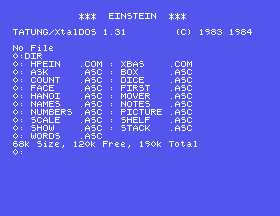
This is the disc image the site's HiSoft Pascal Primer is written against. Mount it in MAME and it boots to the DOS prompt, with HiSoft Pascal and the Einstein's own BASIC ready to use - and room to keep what you write.
What Is on It
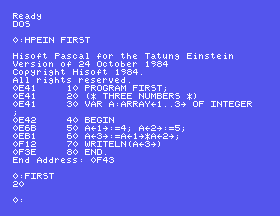
- HPEIN.COM, HiSoft Pascal for the Tatung Einstein, "Version of 24 October 1984" - the compiler, exactly as on HiSoft's disc in the library.
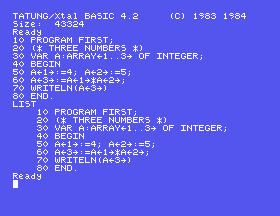
- XBAS.COM, Xtal BASIC 4.2 from the Einstein System Master. HiSoft Pascal has no editor of its own; its manual says to type your Pascal into XBAS, and the primer does just that.
- Seventeen .ASC files, every program from the primer's sections, ready to compile.
- 120K of free space for your own work.
Why It Is an .mfi and Not a .dsk
MAME will not write to a .dsk image: XBAS answers Bad Data Error when you save. The .mfi format is MAME's own, and MAME does write to it, so anything you save is still there next time.
Using It
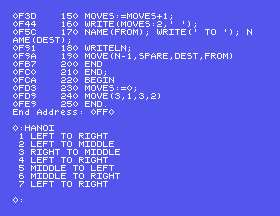
mame -rompath ~/roms einstein -flop1 ~/einstein/hisoftpascal.mfi -windowThe Einstein boots to TATUNG/XtalDOS 1.31, says No File (take no notice), and gives the 0: prompt. To try a program from the primer, type HPEIN HANOI, wait for the compiler's listing, then type HANOI. To write your own, type XBAS, enter your Pascal as numbered lines, SAVE "NAME.ASC", DOS, and HPEIN NAME.
Three things worth knowing before you start:
- Type a question mark in XBAS and it becomes the word PRINT, even inside quotes. Write
CHR(63)instead. - Compiling a program a second time asks
File exists - Delete?AnswerY, or typeHPEIN NAME;Y. - Wait for the
0:prompt before typing the next command: keys typed while the disc is busy are lost.
Real Hardware
This image exists for emulation; on a real Einstein, HiSoft's disc and the System Master's XBAS are all you need. Nothing on this page has been tried on a real machine.
How It Was Made
It is HiSoft's disc from the library, rebuilt on a freshly formatted image with the same boot tracks and DOS, with XBAS added from the System Master and the primer's programs saved in XBAS's own form.
Gallery