module
21

BEACON4 is the whole game, but it starts in the middle of the Turbo screen and stops without a word. This last game section adds a title, an ending and a count of moves, and then makes BEACON a program of its own that anyone can run from the 0: prompt.
Title clears the screen, places a few lines with GotoXY, and waits for a key with Read(Kbd, Ch), as the Turbo course's S36 did for Warehouse. Moves counts every command typed. When the loop ends, the game says *** THE END *** if the lamp was lit, and the number of moves either way.
The variables gain:
  Moves: Integer;
  Ch: Char;
Start gains Moves := 0; after Quit := False;. Before the main program, add Title:
procedure Title;
begin
  ClrScr;
  GotoXY(15, 6);
  Writeln('B E A C O N');
  GotoXY(5, 9);
  Writeln('A storm. A dark lighthouse.');
  GotoXY(5, 10);
  Writeln('A ship running for the rocks.');
  GotoXY(9, 15);
  Write('Press a key to begin');
  Read(Kbd, Ch);
  ClrScr;
end;
And the main program becomes:
begin
  Load;
  Start;
  Title;
  Look;
  repeat
    Write('> ');
    GetLine(Line);
    Moves := Moves + 1;
    if Parse(Line) then
      if V = 0 then
        Writeln('There is no verb in that.')
      else if (V in [10..17]) and
              (N1 = 0) then
        Writeln('What do you want to ',
                Line, '?')
      else
        Act;
  until Won or Quit;
  Writeln;
  if Won then
    Writeln('*** THE END ***');
  Writeln('You took ', Moves, ' moves.');
  Close(Msg);
end.
Starting from
BEACON4, read into a new work file BEACON5. Save before you run.
What you should see
The title:
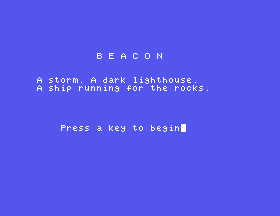
then a key, and the beach. Play it through, and the ending:
... turns away from the rocks. You have
saved her.

*** THE END ***
You took 31 moves.
(31 the way Appendix II plays it.)
At the menu, press O for the compiler options, then C for Com-file, then Q. Now C compiles BEACON5 to a file on the disc:
Compiling --> A:BEACON5.COM
Quit Turbo with Q, and at 0: type BEACON5. The title appears, without Turbo anywhere. The disc's own BEACON.COM was made exactly this way.
Compiled to a .COM, the game has far more room: Turbo reports Free: 44039 bytes, against 10,991 when it was compiled to memory with its source alongside. The file is 13,824 bytes on the disc. Most of that is the same in every .COM: the Turbo course's four-line HELLO compiles to 8,064 bytes.
BEACON uses the better of each pair part one and part two compared, and here is why:
| Job | BEACON uses | Instead of | Because |
|---|---|---|---|
| Reading the command | a key at a time (S4) | Readln | DELETE works, capitals as you type, nothing too long |
| Splitting | Pos, Copy, Delete (S6) | walking the line | faster: 3.3 seconds against 5.3 for 500 lines |
| Recognising | whole words, with tokens (S7, S8) | first letters | no two words confused; short forms are extra entries |
| Finding a word | binary search of a sorted table (S9) | a straight search | at most six comparisons for 55 words |
| Storing text | a typed file and Seek (S13) | text in the program, a text file, packing | no wait, and the program holds no prose |
The program grew with it: 502 bytes of code in BEACON1, 2,421 with the parser, 4,152 with things, 5,554 with the puzzles and 5,844 finished. The whole of BEACON's prose, 2,652 characters, is in none of them.
Title, take out the last ClrScr. What happens to the title when the game begins?GotoXY(15, 6) to GotoXY(1, 1).Moves := Moves + 1; inside if Parse(Line) then, so that only understood commands count (you will need a begin and end round the two statements). Type FROB, N, Q: how many moves?21.1 At the end, print how many of the four puzzles were solved, using Ord of each flag: Ord(False) is 0 and Ord(True) is 1.
21.2 Ask Play again (Y/N)? at the end, and start a new game on Y.
21.3 Compile your answer to 21.2 to a .COM, and run it from 0:.
Worked solutions are in Appendix II.
A title, an ending and a count of moves finish BEACON, and the Options menu makes it a .COM that runs at 0: with 44K to spare. Every technique in it was chosen by measuring it against another on the Einstein, and its words, all 2,652 characters of them, live on the disc.
S22, Where You Go From Here.
This form is protected by reCAPTCHA, and the Google Privacy Policy and Terms of Service apply.
