module
35

Six levels will not last long. The last piece of the game proper is a way to make more: an editor, inside the game itself. Press E, and the level on the screen becomes something you can draw on. Put down walls, crates and goals, place the worker, press S - and the level is saved in LEVELS.DAT, ready to play the moment you leave.
The editor is a loop of its own, inside the game's loop. While it runs, the keys mean different things:
| Key | In the editor |
|---|---|
| Arrows | move the cursor |
# | wall |
$ | crate |
. | goal |
* | crate on a goal |
| SPACE | floor |
@ | put the worker's start here |
| S | save the level and leave |
| ESC | leave without saving |
The cursor does the pointing. At puts it on a square, and while Read(Kbd, K) waits for the next key, the Einstein shows it there as a block. There is nothing to draw: the cursor is the editor's pointer.
Each key changes one square of L.Grid and Show redraws that square. The arrows move the cursor, but not off the board - the if on each stops it at the edge.
@ moves the worker's start. It changes L.StartR and L.StartC, and also R and C, so that he is drawn in his new place - and Show redraws the square he has left.
The symbols are on the Einstein's own keys (Appendix IV shows where @ and * are, and which keys they are in MAME).
When the loop ends, the editor looks at the key that ended it. S saves: the best score is set to 0 - a best score from the old level means nothing on a new one - and SaveLevel writes the level over its old record. ESC saves nothing.
Either way, Edit ends with Start, which reads the level back from the file. After S, that is the level you have just made; after ESC, it is the level as it was, and your changes are thrown away.
Edit begins with Start too, so you always edit the level as it is stored, never the half-played one on the screen. Then it draws the level again, this time not centred but at the top left of the whole grid - LeftCol 5, TopRow 3, and Wide and High as big as the grid goes - so that every square of all sixteen columns and ten rows is on the screen to be built on, not just the ones the level uses now. When you leave, Start centres it again.
Start WARE9 from WARE8.
In DrawAll, the bottom line gains E - and is now too long for one Write that fits the editor's screen, so it takes two:
  Write('U undo W where R restart ');
  Write('E edit Q quit');
After Where, add Edit:
procedure Edit;
var
  ER, EC, I, J: Integer;
  K: Char;
begin
  Start;
  ClrScr;
  LeftCol := 5;
  TopRow := 3;
  Wide := Cols;
  High := Rows;
  Squares;
  GotoXY(1, 23);
  Write('Edit: # $ . * @ SPACE');
  GotoXY(1, 24);
  Write('S save, ESC leave');
  ER := R;
  EC := C;
  repeat
    At(ER, EC);
    Read(Kbd, K);
    case K of
      '^': if ER > 1 then ER := ER - 1;
      #10: if ER < Rows then
             ER := ER + 1;
      '[': if EC > 1 then EC := EC - 1;
      ']': if EC < Cols then
             EC := EC + 1;
      '#': L.Grid[ER, EC] := Wall;
      ' ': L.Grid[ER, EC] := Floor;
      '.': L.Grid[ER, EC] := Goal;
      '$': L.Grid[ER, EC] := Crate;
      '*': L.Grid[ER, EC] := Stored;
      '@': begin
             I := R;
             J := C;
             R := ER;
             C := EC;
             L.StartR := R;
             L.StartC := C;
             Show(I, J);
           end;
    end;
    Show(ER, EC);
  until (UpCase(K) = 'S') or (K = #27);
  if UpCase(K) = 'S' then
  begin
    L.Best := 0;
    SaveLevel;
  end;
  Start;
end;
And in the main program's case:
'E': Edit;
Starting from
WARE8 from S34, read into a new work file WARE9. Make the changes, CTRL-K CTRL-D, S, R.
What you should see
Press E. The level is redrawn fresh, the two lines of editor keys appear under it, and the cursor sits on the worker. Move it with the arrows and type the symbols:
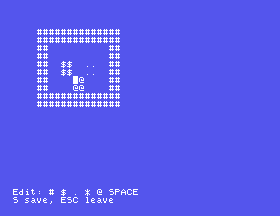
ESC puts everything back as it was. S saves your changes, and the level starts again with them in it - and Best 0.
Keep a level possible. It needs as many crates as goals, the worker inside the walls, and every crate reachable from the side it must be pushed from. The editor does not check.
L.Best := 0;. Finish level 1, then edit it - put a wall beside the worker - and save. What does Best say, and is it still true?Start; at the very end of Edit. Put a crate beside the worker and press ESC. What is left on the screen, and is the crate really there?until line to until UpCase(K) = 'S';. What does ESC do now?35.1 Make A, in the game, add a new level at the end of the file - a copy of the current one called New level - and go to it, ready to edit.
35.2 Refuse to save a level whose crates and goals do not match: print Crates and goals differ and stay in the editor.
35.3 Make C, in the editor, clear the whole board to floor, to design a level from nothing.
Worked solutions are in Appendix II.
| Symptom | Cause |
|---|---|
| A symbol key does nothing | Its character in the case is not the one the key types. Check each against the listing. |
| ESC does not leave | The until does not test for #27. |
| An edited level has an old best score | L.Best := 0; is missing before SaveLevel. |
| The editor's lines stay on the screen afterwards | Edit does not end with Start. |
| A saved level cannot be finished | It was made that way: count the crates and the goals, and check each crate can be pushed where it must go. |
E switches the game into a second loop, where the arrows move the cursor and the symbol keys change the square under it. S sets the best score to 0 and saves the level over its record; ESC saves nothing. Start, before and after, makes sure the editor works on the stored level and that play resumes from the file.
S36, Finishing Touches - a title screen, and crates, walls and a worker that look like crates, walls and a worker.
This form is protected by reCAPTCHA, and the Google Privacy Policy and Terms of Service apply.
