module
33

One careless push, and a crate is in a corner for good. So far the only cure is R and start again - which, forty moves into a level, hurts. Every game of this kind lets you take moves back, one at a time, as far as you like. That is what S22's list was for.
To take a move back, the game needs to know two things about it: which way the worker went, and whether he pushed a crate. That is a small record:
MoveP = ^Move;
Move = record
  Key: Char;
  Pushed: Boolean;
  Next: MoveP;
end;
Key is the arrow that made the move - Delta can turn it back into a direction. Next points at the move before, so the moves form a list, newest first, starting from the pointer Undo. It is S22's list, used for the job it was built for.
Each move costs four bytes. There is room for thousands.
At the end of every step, Go makes a new Move with New, fills it in, and puts it at the front of the list:
New(P);
P^.Key := Key;
P^.Pushed := Pushed;
P^.Next := Undo;
Undo := P;
Pushed is set to True in the same if that does the pushing.
Back takes the newest move off the front of the list and does it in reverse. The worker steps back the way he came. If the move was a push, the crate comes back too: it is lifted from the square beyond, and dropped on the square the worker has just left - one step ahead of where he now stands.
Delta(Undo^.Key, DR, DC);
R := R - DR;
C := C - DC;
if Undo^.Pushed then
begin
  Lift(R + 2 * DR, C + 2 * DC);
  Drop(R + DR, C + DC);
end;
Then the move is taken off the list and its memory given back with Dispose, and Moves goes down by one.
When a level starts - at the beginning, with R, or after a win - the moves of the last level mean nothing. Forget empties the list, disposing of every move in it, and Start calls it. Without it, the list would grow for as long as the game was played, and U could take back a move from a level you were no longer playing.
Start WARE7 from WARE6.
In the type part, after Level's end;:
  MoveP = ^Move;
  Move = record
    Key: Char;
    Pushed: Boolean;
    Next: MoveP;
  end;
Add Undo to the variables, after Wide, High: Integer;:
Undo: MoveP;
In DrawAll, the bottom line now lists U, in place of the arrows:
Write('U undo R restart Q quit');
Before Start, add Forget:
procedure Forget;
var
  P: MoveP;
begin
  while Undo <> nil do
  begin
    P := Undo;
    Undo := Undo^.Next;
    Dispose(P);
  end;
end;
and in Start, after Moves := 0;:
Forget;
Go becomes:
procedure Go(Key: Char);
var
  DR, DC, NR, NC: Integer;
  P: MoveP;
  Pushed: Boolean;
begin
  Delta(Key, DR, DC);
  NR := R + DR;
  NC := C + DC;
  Pushed := False;
  if (L.Grid[NR, NC] in
       [Crate, Stored]) and
     (L.Grid[NR + DR, NC + DC] in
       [Floor, Goal]) then
  begin
    Lift(NR, NC);
    Drop(NR + DR, NC + DC);
    Pushed := True;
  end;
  if L.Grid[NR, NC] in [Floor, Goal]
  then
  begin
    R := NR;
    C := NC;
    Show(R - DR, C - DC);
    Show(R, C);
    Moves := Moves + 1;
    Status;
    New(P);
    P^.Key := Key;
    P^.Pushed := Pushed;
    P^.Next := Undo;
    Undo := P;
  end;
end;
After Go, add Back:
procedure Back;
var
  DR, DC: Integer;
  P: MoveP;
begin
  if Undo <> nil then
  begin
    Delta(Undo^.Key, DR, DC);
    R := R - DR;
    C := C - DC;
    if Undo^.Pushed then
    begin
      Lift(R + 2 * DR, C + 2 * DC);
      Drop(R + DR, C + DC);
    end;
    Show(R + DR, C + DC);
    Show(R, C);
    P := Undo;
    Undo := Undo^.Next;
    Dispose(P);
    Moves := Moves - 1;
    Status;
  end;
end;
In the main program, before OpenFile;, the list must start empty:
Undo := nil;
and the case gets a line:
'U': Back;
Starting from
WARE6 from S32, read into a new work file WARE7. Make the changes, CTRL-K CTRL-D, S, R.
What you should see
U undo among the keys. Push the first crate one square - LEFT, LEFT, UP, RIGHT - then press U. The worker steps back and the crate comes with him, and Moves drops from 4 to 3:
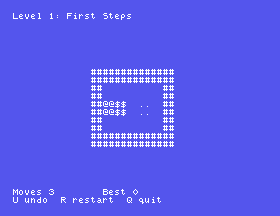
Keep pressing U and the whole level unwinds to where it started, then U does nothing more.
Back, take out Drop(R + DR, C + DC);. Push the crate, then undo. Where has the crate gone - and what does the game make of that?Start, take out Forget;. Take two steps LEFT, press R, then U. Where does the worker go, and what does Moves say?Go, change P^.Pushed := Pushed; to P^.Pushed := False;. Push the crate and undo.33.1 Make Z take back every move, all the way to the start of the level.
33.2 Show Free and MemAvail on the line under the board, after every key. How much does a move cost, and what does undo give back?
33.3 Add redo: Y puts back the last move undone, as many times as U was pressed - until a new move is made, which forgets them.
Worked solutions are in Appendix II.
| Symptom | Cause |
|---|---|
| Undo leaves the crate where it was | Pushed is never set to True, or never stored in the record. |
| A crate vanishes on undo | Back lifts the crate but never drops it. |
U after R moves the worker somewhere odd, and Moves goes below 0 | Start does not call Forget, so the old level's moves are still in the list. |
Run-time error FF after a very long game | The list is never emptied: Dispose is missing from Forget or Back. |
| The game goes wrong at the first U | Undo := nil; is missing, so the list does not start empty. |
Every step makes a Move record with New - the arrow and whether a crate was pushed - and puts it at the front of the list. Back takes the front one, walks the worker back, brings the crate back if there was one, and Disposes the record. Forget empties the list whenever a level starts.
S34, Where Can I Reach - a procedure that calls itself, to show every square the worker can walk to.
This form is protected by reCAPTCHA, and the Google Privacy Policy and Terms of Service apply.
