module
18

MOS's screen on the TC-01 is 40 characters wide. That's fine for a score, but cramped for a shop, a ship's status, an inventory or a high-score table. The 256 can show 80 columns, and MOS can print there for you. This section puts a game's trading screen up in 80 columns, with a status bar along the bottom, and puts MOS's own screen back afterwards.
The 80-column mode is called Text 2. It is R#0 = 04h, the same value as Graphics 3 in S8, with bit 4 of R#1 set. It shows 80 columns by 24 rows of characters 6 dots wide and 8 high.
Its patterns are the font. Text 2 can use MOS's own font, at 1800h, with R#4 = 03h, so you don't need to load one.
You can set Text 2 by writing the registers yourself, but then it is yours alone: MOS's printing doesn't follow it, and you must put every character into video memory by hand. There's an easier way.
MOS 2.1 has a call that sets a screen mode for you, SETMOD, MCAL 92 (S4). You put a number in HL and call it:
| HL | Screen |
|---|---|
| 0 | Graphics II, 32 columns |
| 1 | Graphics II, 40 columns (the start-up screen) |
| 2 | Text 2, 80 columns |
| 3-6 | Graphics 6 at 32, 40, 64 or 80 columns (S12) |
        LD HL, 2
        RST 8
        DEFB 92h        ; SETMOD: 80 columns, cleared
SETMOD sets the mode's registers and clears the screen, and MOS prints in the new mode. From then on RST 8 / DEFB 158 prints in 80 columns, and carriage return and line feed work as you know them. A number above 6 changes nothing and returns with the carry flag set.
To go back, call SETMOD with HL = 1. That gives you MOS's start-up screen, Graphics II at 40 columns, cleared and ready to print.
You can try it before writing any code: type S2 at the > prompt, and S1 to come back. The S command is the same thing.
In Text 2, MOS keeps its video memory like this:
| Address | What |
|---|---|
| 0000h-077Fh | the name table: the screen's text itself, 80 bytes a row |
| 1800h-1FFFh | the font |
| 2000h- | the blink table |
The name table is the text. Row r, column c is the byte at r x 80 + c, and the byte is the character's code. The whole screen is 1,920 bytes, twice the 960 of a 40-column screen.
That makes the screen easy to write directly, as you did with Graphics II's name table in the assembly course. A status bar along the bottom row starts at 23 x 80 = 1840, 0730h. Set the address in page 0, then send 80 bytes:
        LD HL, 23*80    ; row 23, column 0
        LD A, L
        OUT (9), A
        LD A, H
        OR 64           ; a write address
        OUT (9), A
        LD HL, bar
        LD BC, 80*256+8
        OTIR            ; the whole row
It's the way to put something in a fixed place, such as a status bar, while MOS prints the rest.
s18-menu.asm: a trading screen for a space game. MOS prints the menu and a cargo table side by side, which wouldn't fit in 40 columns. The program writes a status bar straight into the bottom row, waits for a key, goes back to 40 columns, and tells you which key it was.
; S18: an 80-column menu screen.
;
; MOS's SETMOD call (MCAL 92) with HL = 2 switches to Text 2: 80 columns
; by 24 rows, cleared, with MOS printing there as usual. The program
; prints a menu through MOS, then writes a status bar straight into the
; bottom row of the name table. It waits for a key, puts MOS's 40-column
; screen back with SETMOD HL = 1, and says which key was pressed.

        ORG 256

        LD HL, 2
        RST 8
        DEFB 92h                ; SETMOD: Text 2, 80 columns, cleared

        LD HL, menu
        CALL puts               ; the menu, printed by MOS

; --- the status bar: row 23 of the name table, straight into VRAM
        DI
        XOR A
        OUT (9), A
        LD A, 128+14
        OUT (9), A              ; R#14 = 0: VRAM page 0
        LD HL, 23*80            ; row 23, column 0 (0730h)
        LD A, L
        OUT (9), A
        LD A, H
        OR 64
        OUT (9), A              ; write address
        LD HL, bar
        LD BC, 80*256+8         ; 80 characters, a whole row
        OTIR
        EI

        RST 8
        DEFB 9Ch                ; MOS: wait for a key, code in A
        LD (key), A

        LD HL, 1
        RST 8
        DEFB 92h                ; SETMOD: Graphics II, 40 columns

        LD HL, chose
        CALL puts
        LD A, (key)
        RST 8
        DEFB 9Eh                ; the key itself
        RET

; --- puts: print the text at HL, up to a 0 byte
puts:   LD A, (HL)
        OR A
        RET Z
        RST 8
        DEFB 9Eh                ; MOS: print A (call 158)
        INC HL
        JR puts

key:    DEFB 0

menu:   DEFB 13, 10
        DEFM "                    G A L A C T I C   T R A D E R"
        DEFB 13, 10, 13, 10
        DEFM "    1  Launch                          Cargo hold    Fuel   Credits"
        DEFB 13, 10
        DEFM "    2  Buy cargo                       ----------    ----   -------"
        DEFB 13, 10
        DEFM "    3  Sell cargo                      Ore      12    84%    12,400"
        DEFB 13, 10
        DEFM "    4  Refuel                          Grain     5"
        DEFB 13, 10
        DEFM "    5  Galaxy chart                    Machines  0"
        DEFB 13, 10, 13, 10
        DEFM "    Press 1 to 5"
        DEFB 0

;        0         1         2         3         4         5         6         7
;        01234567890123456789012345678901234567890123456789012345678901234567890123456789
bar:    DEFM " Docked at ORBIS    Day 14     Legal status: CLEAN     Hold 17 of 20 tonnes     "

chose:  DEFM "You chose "
        DEFB 0
Two details:
OTIR sends 80 whatever is there, so a shorter string would put the first bytes of chose on the screen. The ruler in the comment above bar is there to count with.Build and run it as in S2.
What you should see
The screen clears to 80 columns. The title is spaced across the top, the menu on the left, and the cargo, fuel and credits table beside it, to column 67. Along the bottom row is the status bar, Docked at ORBIS at the left and Hold 17 of 20 tonnes ending near the right-hand edge.
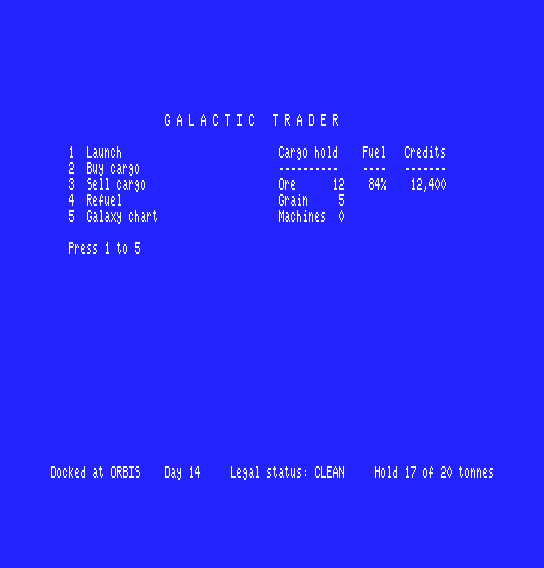
Press 2. The screen clears back to MOS's 40-column screen and shows
You chose 2
followed by the register display and the > prompt.
23*80 to 0. Where does it go, and what happens to the title?LD HL, 2 to LD HL, 0. How does the menu look now, and where does the status bar end up?LD HL, 7. SETMOD now changes nothing. What do you expect to see when the program writes its 80 bytes at 0730h, and why?You can switch the 256 to 80 columns with one MOS call, print there exactly as you print in 40, and write the name table directly for anything that must stay put. SETMOD with HL = 1 puts MOS's own screen back. A menu, a shop or a status screen that never fitted the TC-01 now fits in one line.
S19, A Game for the 256: everything from S5 onwards, in one game.
