module
6

In the assembly course's S18 you met the TC-01's sixteen colours. They were fixed: colour 6 was dark red, and if you wanted a deeper red you were out of luck. The 256 keeps the sixteen colour numbers, but you decide what each one looks like. And because changing a colour is only two bytes, you can change it while the game runs. Every cell drawn in that colour, and the border if it is that colour, changes at once, without touching a byte of the screen.
Everything you learned in S18 still holds. The colour table, the sprites' colour bytes and the backdrop in register 7 all use the numbers 0 to 15, and colour 0 is still transparent. What's new is the palette: a table of sixteen entries inside the video chip, one per colour number, that says what the number looks like on screen.
Each entry holds a red, a green and a blue level, each from 0 to 7. That gives 8 x 8 x 8 = 512 possible colours, of which you can show any sixteen at once. The levels come out like this:
| Level | 0 | 1 | 2 | 3 | 4 | 5 | 6 | 7 |
|---|---|---|---|---|---|---|---|---|
| Brightness (of 255) | 0 | 36 | 73 | 109 | 146 | 182 | 219 | 255 |
You set an entry in two steps. Write the entry's number to register 16, as you'd write any register. Then send two bytes to the new palette port, 0Ah:
first byte:   0 R R R 0 B B B     red in bits 6-4, blue in bits 2-0
second byte:  0 0 0 0 0 G G G     green in bits 2-0
So pure red, level 7 and nothing else, is 70h then 00h. White is 77h then 07h. A middling grey, level 3 all round, is 33h then 03h.
        LD A, 4
        OUT (9), A
        LD A, 128+16    ; register 16 = 4: entry 4 next
        OUT (9), A
        LD A, 70h
        OUT (0Ah), A    ; red 7, blue 0
        XOR A
        OUT (0Ah), A    ; green 0
That turns every colour-4 pixel on the screen red. Cost: six instructions, four port writes, and no video memory at all.
After the second byte, the chip moves on to the next entry by itself. Send another pair and it lands in entry 5, then 6, and so on. So a whole palette is register 16 = 0, then 32 bytes in a row, which is one OTIR:
        XOR A
        OUT (9), A
        LD A, 128+16    ; register 16 = 0: start at entry 0
        OUT (9), A
        LD HL, palette  ; 32 bytes: two for each entry, 0 to 15
        LD B, 32
        LD C, 0Ah
        OTIR
A game keeps its palette as a 32-byte table, and loading a new one, for a new level or a night-time scene, costs this and nothing more. Interrupts should be off while you do it: an interrupt routine of yours that also wrote register 16 would leave the rest of the OTIR going into the wrong entries.
The 256 starts with this palette, and MCAL BE puts it back. These are the colours S3 described as "the same 16, in different shades":
| Colour | Bytes | Red, green, blue | Colour | Bytes | Red, green, blue |
|---|---|---|---|---|---|
| 0 | 00h, 0 | 0, 0, 0 (transparent) | 8 | 71h, 1 | 255, 36, 36 |
| 1 | 00h, 0 | 0, 0, 0 | 9 | 73h, 3 | 255, 109, 109 |
| 2 | 11h, 6 | 36, 219, 36 | 10 | 61h, 6 | 219, 219, 36 |
| 3 | 33h, 7 | 109, 255, 109 | 11 | 64h, 6 | 219, 219, 146 |
| 4 | 17h, 1 | 36, 36, 255 | 12 | 11h, 4 | 36, 146, 36 |
| 5 | 27h, 3 | 73, 109, 255 | 13 | 65h, 2 | 219, 73, 182 |
| 6 | 51h, 1 | 182, 36, 36 | 14 | 55h, 5 | 182, 182, 182 |
| 7 | 27h, 6 | 73, 219, 255 | 15 | 77h, 7 | 255, 255, 255 |
Start your own palettes from this table and change only the entries you need. Then anything you've drawn in the usual colours, including MOS's text in colour 15, still looks as you expect.
Returning to MOS doesn't put the palette back by itself. A program that changes it and just returns leaves its colours at the prompt. Call MCAL BE (RST 8, DEFB 0BEh) before you return. It restores the start-up palette along with MOS's screen.
A fade is a palette entry stepped through its levels, one step every few frames. Fade entry 4 from black up to full blue, a level every fourth frame, and MOS's whole background rises out of the dark in 32 frames, about two thirds of a second. Fade every entry down to 0 together and the whole screen goes black, the classic end-of-level fade, without clearing a single byte.
The step has to be tied to the frame, or the fade's speed depends on how fast your code happens to run. This section times it the way you already know from the assembly course's S26: poll the frame flag, bit 7 of port 9. It works the same on the 256, and MOS's own interrupt doesn't touch it. One thing to watch: a program starts with the flag already set, so read port 9 once and throw the value away before the loop starts, or the first "frame" arrives at once.
Do the palette writes straight after waitframe, before the rest of the frame's work. S7 shows a better way to tie work to the frame.
Colour cycling makes things move without drawing anything. Paint a band of cells in four colours, 8, 9, 10 and 11, repeating across the screen. Then every few frames, shift the four shades along one entry: what entry 8 showed, entry 9 shows now, and so on round. The stripes appear to march sideways, though not one byte of the screen has changed. Water, lava, a conveyor belt, a glowing title: all are four palette entries and an OTIR of 8 bytes.
The neat way to shift them is to keep the four shades twice over in a list, and load four entries starting further along it each time:
reds:   red 7, red 5, red 3, red 1, red 7, red 5, red 3
         ^ phase 0
                ^ phase 1 ...
Any four in a row is then one OTIR from reds + phase * 2, with no wrapping code at all.
Colour 0 is transparent, as S18 taught: it shows the backdrop. On the 256 you can switch that off. Set bit 5 of register 8, called TP, and colour 0 shows its own palette entry like any other colour. Colour 0 becomes one more colour to draw with, instead of a hole in the picture.
MOS's screen background is colour 0, letting the blue backdrop through. Set palette entry 0 to red, write 2Ah to register 8, and the whole picture behind the text turns red while the border stays blue.
2Ah also has bit 1 set, which hides all sprites. MCAL BE puts that right on the way out: after it, colour 0 is transparent again and sprites show.
The program loads a palette of its own in one OTIR, fades MOS's background up from black and cycles four reds through a band across the bottom third of the screen. After 200 frames it calls BE and returns.
; S6: colours of your own - a fade and colour cycling on MOS's screen.
;
; The program loads a whole palette of its own in one OTIR, fades the
; background up from black, and cycles four reds through a band of
; stripes. It keeps time by polling the frame flag, as in the assembly
; course's S26, and hands the screen back to MOS after 200 frames.

        ORG 256

        ; --- the band: the bottom third of the screen, solid stripes
        DI
        LD A, 00h       ; VRAM 1000h: the bottom third's patterns
        OUT (9), A
        LD A, 10h+64
        OUT (9), A
        LD BC, 2048
pat:    LD A, 0FFh      ; every pixel in the foreground colour
        OUT (8), A
        DEC BC
        LD A, B
        OR C
        JR NZ, pat

        LD A, 00h       ; VRAM 3000h: their colours
        OUT (9), A
        LD A, 30h+64
        OUT (9), A
        LD HL, 0        ; HL counts the 2048 bytes
col:    LD A, L
        RRCA
        RRCA
        RRCA            ; the cell's column (8 bytes a cell) ...
        AND 3           ; ... mod 4
        ADD A, 8        ; colours 8, 9, 10, 11 across the band
        RLCA
        RLCA
        RLCA
        RLCA            ; foreground in the high nibble
        OR 1            ; background black
        OUT (8), A
        INC HL
        LD A, H
        CP 08h
        JR NZ, col

        ; --- the whole palette in one go: R#16 = 0, then 32 bytes
        XOR A
        OUT (9), A
        LD A, 128+16    ; R#16 = 0: start at entry 0
        OUT (9), A
        LD HL, palette
        LD B, 32        ; 16 entries, two bytes each
        LD C, 0Ah       ; the palette port
        OTIR
        EI

        IN A, (9)       ; throw away the flag MOS left set

        ; --- the main loop: once a frame
main:   CALL waitframe
        CALL fade
        CALL cycle
        LD HL, frames
        DEC (HL)
        JR NZ, main

        RST 8
        DEFB 0BEh       ; MOS: its screen and its palette back
        RET

; --- waitframe: return when the next frame begins (S26)
waitframe:
        IN A, (9)
        BIT 7, A
        JR Z, waitframe
        RET

; --- fade: every 4th frame, entry 4's blue one level brighter, up to 7
fade:   LD HL, fwait
        DEC (HL)
        RET NZ
        LD (HL), 4
        LD A, (level)
        CP 8
        RET Z           ; finished
        LD B, A         ; 0RRR0BBB: red 0, blue = level
        INC A
        LD (level), A
        LD A, 4
        OUT (9), A
        LD A, 128+16    ; R#16 = 4
        OUT (9), A
        LD A, B
        OUT (0Ah), A    ; red and blue
        XOR A
        OUT (0Ah), A    ; green 0
        RET

; --- cycle: every 4th frame, the four reds move along one entry
cycle:  LD HL, cwait
        DEC (HL)
        RET NZ
        LD (HL), 4
        LD A, (phase)
        INC A
        AND 3
        LD (phase), A
        ADD A, A        ; two bytes an entry
        LD E, A
        LD D, 0
        LD HL, reds
        ADD HL, DE      ; the shade entry 8 shows now
        LD A, 8
        OUT (9), A
        LD A, 128+16    ; R#16 = 8
        OUT (9), A
        LD B, 8         ; entries 8-11
        LD C, 0Ah
        OTIR
        RET

frames: DEFB 200        ; how long the program runs
fwait:  DEFB 4          ; frames to the next fade step
level:  DEFB 0          ; the background's blue level, 0-7
cwait:  DEFB 4          ; frames to the next cycling step
phase:  DEFB 0          ; which red entry 8 shows

; the palette: two bytes an entry, 0RRR0BBB then 00000GGG
palette:
        DEFB 00h, 0     ;  0 black
        DEFB 00h, 0     ;  1 black
        DEFB 11h, 6     ;  2 green
        DEFB 33h, 7     ;  3 light green
        DEFB 00h, 0     ;  4 the background: black, to fade up
        DEFB 27h, 3     ;  5 light blue
        DEFB 51h, 1     ;  6 dark red
        DEFB 27h, 6     ;  7 cyan
        DEFB 70h, 0     ;  8 red, level 7  - the band's four reds
        DEFB 50h, 0     ;  9 red, level 5
        DEFB 30h, 0     ; 10 red, level 3
        DEFB 10h, 0     ; 11 red, level 1
        DEFB 11h, 4     ; 12 dark green
        DEFB 65h, 2     ; 13 magenta
        DEFB 55h, 5     ; 14 grey
        DEFB 77h, 7     ; 15 white

; the four reds twice over, so any four in a row is one OTIR
reds:   DEFB 70h, 0, 50h, 0, 30h, 0, 10h, 0
        DEFB 70h, 0, 50h, 0, 30h, 0
The palette table is the start-up palette with two changes: entry 4 starts black, ready to fade, and entries 8 to 11 are four reds, levels 7, 5, 3 and 1.
Build and run it as in S2.
What you should see
The screen goes black at once, except MOS's white text and a band of red stripes across the bottom third. Over the next two thirds of a second the background rises through six shades of blue to a pure, bright blue (0, 0, 255), deeper than MOS's own.

Meanwhile the band's stripes, four reds from bright to almost black, march one column to the left every fourth frame, about twelve steps a second.
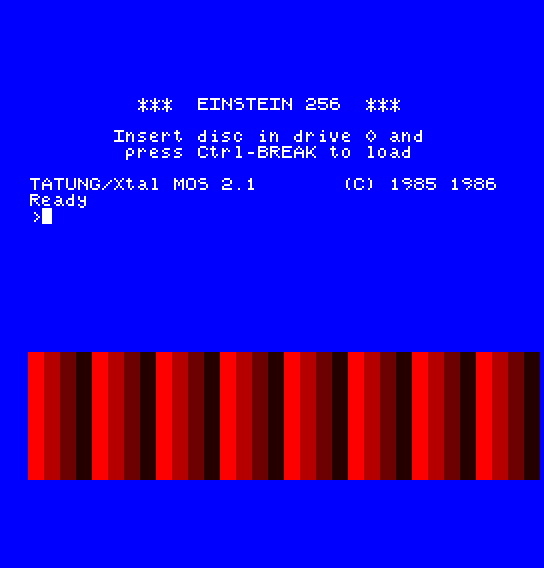
After four seconds the screen clears to MOS's usual blue, with the register display and the prompt.
CP 8 in fade to CP 4. Where does the fade stop, and what colour is the background then?cycle, change INC A to DEC A. Which way do the stripes move now, and why does AND 3 still keep phase in range?palette to 70h, 0 (red), and add the lines that write 2Ah to register 8 just after the OTIR. What turns red, and what stays blue?RST 8 / DEFB 0BEh before the RET. What does the prompt look like afterwards, and what puts it right?| Symptom | Cause |
|---|---|
| The colours are wrong at the prompt after your program ends | It returned without MCAL BE |
| Sprites vanish after you set TP | The value written to register 8 also set bit 1, which hides sprites |
You can set any of the sixteen colours to any of 512 shades: register 16 for the entry, two bytes to port 0Ah, or all sixteen in one OTIR. You know the palette the 256 starts with, and that BE restores it. A fade is an entry stepped through its levels, colour cycling a run of entries reloaded from a doubled list, and register 8's TP bit makes colour 0 solid.
S7, A Real Heartbeat: the frame interrupt. This section polled the frame flag, so the program could do nothing else while it waited. On the 256 the frame can come to you.
