module
26

Everything so far has worked. This section is about the times it does not, and it is the one to come back to rather than to read once.
Dr Logo is unusually good at telling you where it went wrong, if you read the message rather than just noticing that there is one.
score has no value in ask: if rl = :answer [pr [right] make "score :score + 1 stop]
Three parts, and it is worth taking them in order:
score has no value.in ask, the procedure it happened in.The last two only appear when the trouble is inside a procedure. At the prompt you get the complaint on its own.
Here are the ones you will meet, and what each actually means:
| Message | What it means |
|---|---|
I don't know how to <word> | A word that is not a primitive and not a procedure you have defined. Usually a typo, or a procedure you meant to define and did not. |
<name> has no value | A :name you never maked. |
Not enough inputs to <name> | A procedure or primitive called with fewer inputs than it takes. |
<name> doesn't like <value> as input | The right number of inputs, the wrong kind. Look at the value it names; it is often not the one you thought you passed. |
[<call>] didn't output to <name> | Something was used as a value but does not give one. A procedure needs op to hand something back. |
File <name> not found | load of a name that is not on the disc. Check with dir. |
File <name> already exists | save will not overwrite. Pick another name, or erasefile the old one. |
Disk is full | No room left. Note that the machine spells it Disk. |
Stopped! | You pressed ESC. Not an error; that is how you get out of a program that will not stop on its own. |
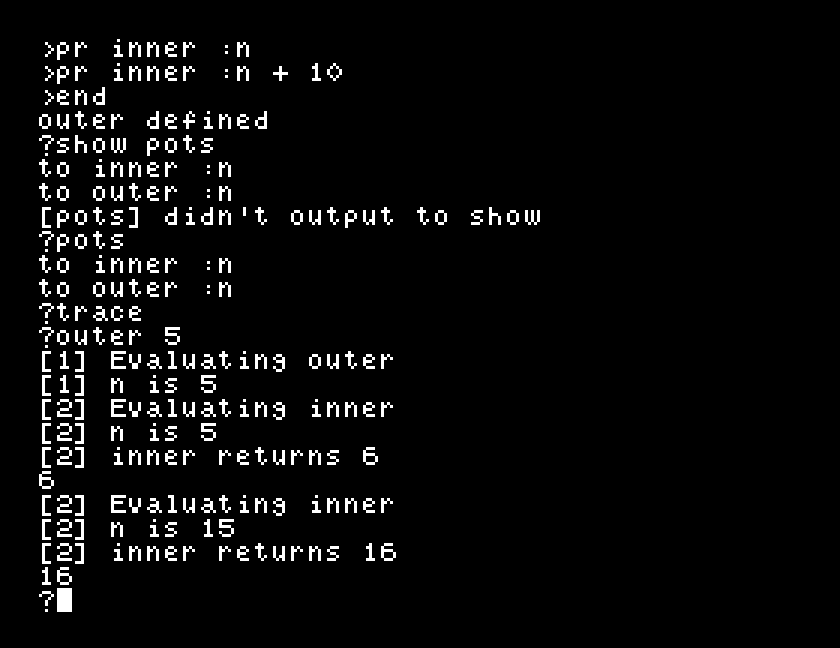
pots, print out titles, lists every procedure you have defined, as its to line:
?pots
to inner :n
to outer :n
It is a table of contents. po "name gives you the whole of one; pots just tells you what is there, which is what you want after a load, or when you have been working for an hour and cannot remember what you called something.
When a procedure does the wrong thing but does not complain, you need to see what it is doing. trace reports every call:
?trace
?outer 5
[1] Evaluating outer
[1] n is 5
[2] Evaluating inner
[2] n is 5
[2] inner returns 6
6
[2] Evaluating inner
[2] n is 15
[2] inner returns 16
16
Three kinds of line:
Evaluating <name>: it went in.<input> is <value>: what that input was actually given. This is the one that solves most problems.<name> returns <value>: what came back out.The number in brackets is how deep you are. outer is 1; the inner it calls is 2. In a recursive procedure it climbs, and watching it climb and never come back down is how you spot a missing stopping condition.
notrace turns it off again.
watch is slower and closer in:
?watch
?add3 5
[1] In add3, make "a :n + 1
[1] In add3, make "b :a + 1
[1] In add3, pr :b
7
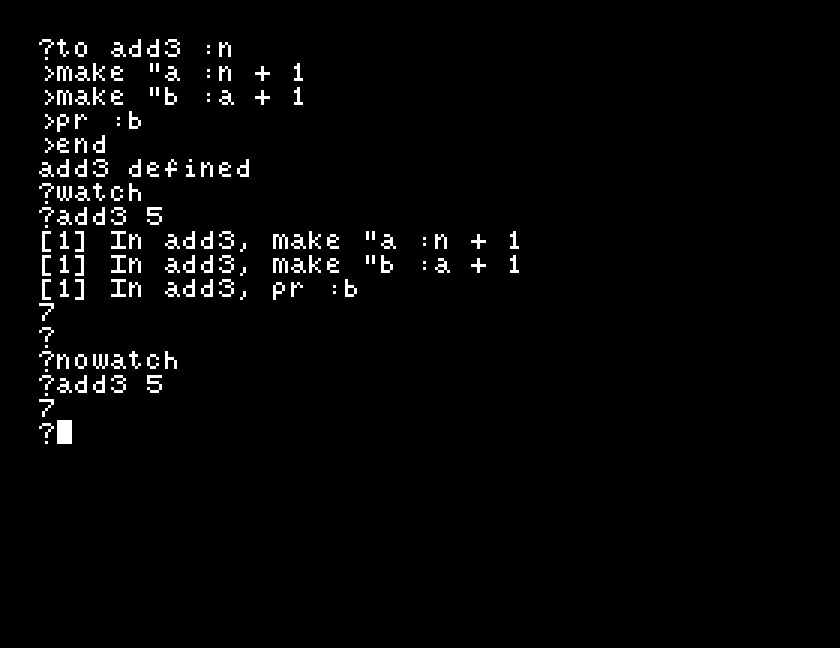
Each line is printed before it runs, and then Dr Logo waits for you to press Return. So you can see exactly which line you are about to execute, and stop reading when you reach the one you did not expect.
nowatch turns it off.
watch is no use on anything that draws. The moment the turtle moves, the screen splits and the four-line text window scrolls your output away. Use trace for drawing procedures, or take the drawing out while you find the bug.
ESC. It prints Stopped! and, if you were inside a procedure, tells you which one and which line it was on:
Stopped! in sp: rt
That is worth having even when you stopped it deliberately, because it tells you where a runaway procedure had got to.
trace it, and watch the bracketed number climb. Stop it with ESC and read what it says.watch a procedure that draws, and see the problem for yourself.pots on a fresh boot, before you have defined anything. What do you get?| Symptom | Cause |
|---|---|
[pots] didn't output to show | pots prints; it does not give a value. Type pots on its own. |
trace output scrolls past too fast | Use watch instead; it waits for you at every line. |
watch seems to have hung | It is waiting for Return. Press it. |
| Nothing is traced | notrace is still in force from earlier, or the work is happening at the prompt rather than inside a procedure. |
Read the whole error message: what, where, and which line. pots says what you have defined, trace reports every call with its inputs and its result, and watch steps one line at a time waiting for Return. notrace and nowatch put things back. ESC stops anything.
S27, where you go from here: what you can now do, what this course left alone, and what to read next.
This form is protected by reCAPTCHA, and the Google Privacy Policy and Terms of Service apply.
