module
14

A procedure can use any word in the language, and by S9 that included words you had defined yourself. There is nothing stopping a procedure using its own name.
That sounds like a mistake. It is one of the most useful things in Logo, and it is how most of the interesting pictures get drawn.
Here is a spiral. Read it as an instruction to somebody else:
to spiral :size
if :size > 60 [stop]
fd :size
rt 90
spiral :size + 5
end
Draw a line this long. Turn right. Now do the whole thing again, but slightly bigger.
Each call does almost nothing: one line and one turn. The shape comes from there being a lot of them, each a little larger than the last.
if :size > 60 [stop]
if takes a test and a list of instructions in brackets, and runs the list only when the test is true. stop leaves the procedure immediately.
Without that line the procedure would call itself forever, because nothing would ever stop it. Every procedure that calls itself needs a way to not. It is the first thing to write, not the last, and the edits below let you see what happens when it is missing.
Notice that the condition is about :size, and that :size gets bigger with every call. That is what makes the test eventually true. A recursion whose input never changes never finishes.
to spiral :size
if :size > 60 [stop]
fd :size
rt 90
spiral :size + 5
end
ss
cs
ht
spiral 5
Starting from
A fresh boot, at the ? prompt. The > is SHIFT and the . key.
What you should see
A square spiral winding outwards from the middle, of about a dozen turns, which stops by itself.
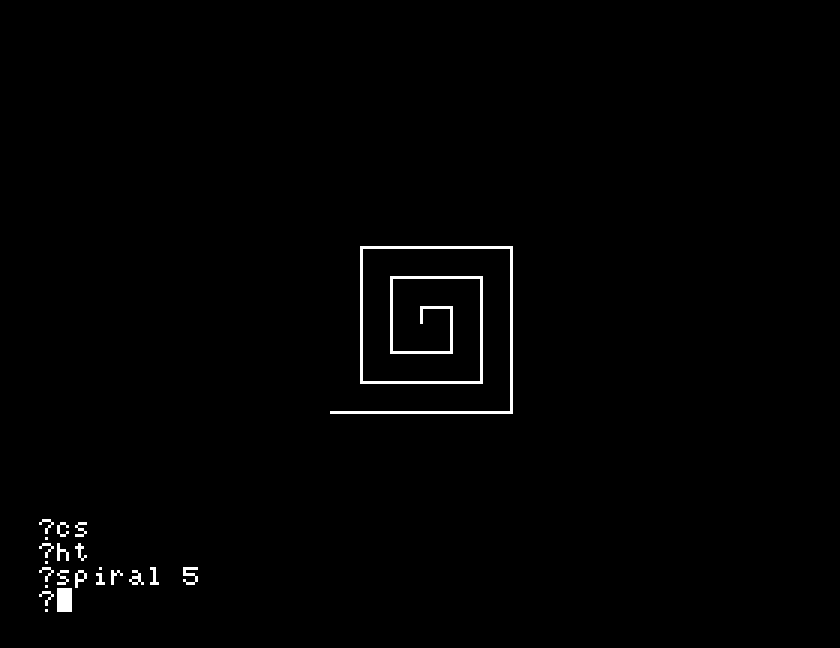
60 to 100. More turns, and the spiral runs out of screen before it runs out of numbers. Which limit stopped it?:size + 5 to :size + 10. The spiral is the same size overall but looks quite different. Why fewer turns?if line out altogether and run spiral 5 again. It will not stop. Watch it for a few seconds, then press ESC. Read what it says; it tells you which procedure it was in and which line it was on.| Symptom | Cause |
|---|---|
| It never stops | There is no if ... [stop], or the input never reaches the test. Press ESC. |
Stopped! in spiral: rt | That is ESC working, naming where it interrupted. |
| It stops immediately and draws nothing | The test was already true on the first call. Check which way round the > is. |
| The spiral goes off the screen | Once the sides are longer than the screen the rest is drawn where you cannot see it. |
I don't know how to _ | The key marked - is not a minus. It is SHIFT and =. |
A procedure may call itself. Each call does a small piece of the job and hands the rest on. if test [stop] is what makes it finish, and the input has to change on each call so that the test eventually becomes true. ESC rescues you when it does not.
S15, lists: the other half of Logo, and the thing the square brackets have been quietly preparing you for since S3.
This form is protected by reCAPTCHA, and the Google Privacy Policy and Terms of Service apply.
