module
29
Every program in this course was written for you to learn from. This one was written to be played. It is ANIMAL, on the course disc: a guessing game that learns, adapted for BBC BASIC by Chris Atkinson and Richard Russell from a game in Creative Computing. You think of an animal; it asks yes-or-no questions and guesses; when it is wrong, you teach it, and it remembers - on the disc - for next time.
It is 146 lines, and by now you can read nearly all of them.
CHAIN "ANIMAL"
It says Just let me refresh my memory while it reads what it has learned from the disc - wait for the first question before answering. Think of a tortoise and answer N to everything:
Are you thinking of an animal ? Y
Does it fly? N
Does it live in water? N
Is it an insect? N
Is it a mammal? N
Does it have a pouch? N
Does it have eight legs? N
Does it have a forked tongue? N
Is it a worm? N
OK, I give up.
Tell me what animal you were thinking
of ? a tortoise
Please tell me a question that would
distinguish a tortoise from a worm
? Does it have a shell
For a tortoise the answer would be ? Y
Are you thinking of an animal ?
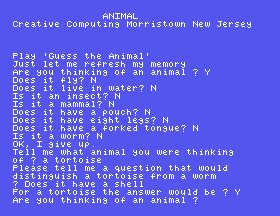
Answer N to that, and it lists every animal it knows, ending worm and tortoise, and asks Do you want to save these on disk? Say Y. Then CHAIN "ANIMAL" again and think of the tortoise: after the forked tongue it asks Does it have a shell? It learned.
(It writes in small letters. Answer Y and N in capitals, as CAPS LOCK gives you; the tortoise above was typed with CAPS LOCK off, so that the list reads naturally.)
Everything it knows is one string array, A$(). At the >, after a game, try PRINT A$(1):
\QDoes it fly\N2\Y3\
(On the Einstein's screen the \ looks like ½.) \Q means this entry is a question. After the question: if the answer is N, go to entry 2; if Y, entry 3. An entry that starts \A is an animal: \Agoldfish. So the whole of its knowledge is a tree of questions, each pointing to two more entries, with animals at the ends. A$(0) is how many entries there are.
Teaching it (PROCnew, lines 320-470) is three new entries: the old animal moves to a new place, the new animal goes after it, and the old animal's place becomes your question, pointing at both. That is the whole trick.
Read the listing - LIST it, a screenful at a time with LIST 190,270 and so on - and you will find:
REPEAT ... UNTIL FALSE, round for ever, like DRIFT's.PROCnew, PROCquestion, PROCread; FNquery asks a yes-or-no question until it gets Y or N, FNart puts "a" or "an" in front of a name.INSTR, MID$, LEFT$, RIGHT$ - PROCquestion finds the numbers after \N and \Y with INSTR, just as DRIFT's parser finds the space.FNconvlc turns capitals into small letters - DRIFT's FNCAPS$, the other way round.MAX=(HIMEM-TOP)/40 - how many entries fit in the memory left - and DIM A$(MAX). After a game PRINT MAX gives 1025.625.DATA for a first, tiny tree - line 1020 - used only when there is no file.Error handling. Line 70:
70 ON ERROR IF ERR=17 THEN 830 ELSE PRINT:REPORT:PRINT" at line ";ERL:END
ON ERROR means: whenever an error happens, do this instead of stopping. ERR is the error's number, and 17 is ESC. So pressing ESC in ANIMAL does not stop it: it jumps to line 830, which lists what it knows and offers to save. Any other error is printed with REPORT (the message) and ERL (the line), and the program ends. ON ERROR OFF, in line 830, puts the normal behaviour back.
Files of data. SAVE keeps a program; ANIMAL keeps its knowledge, in a file of its own, ANIMAL.DAT:
X=OPENIN("ANIMAL.DAT") (line 120) opens the file to read, and gives 0 if it is not there - so the program knows whether it has any memory.INPUT #X,A$(Z) (line 670) reads the next string from it; EOF#X is true when there is no more; CLOSE #X finishes.X=OPENOUT"ANIMAL.DAT" (line 960) makes a new file, PRINT# X,A$(Z) writes to it, and CLOSE# 0 finishes - the manual says 0 means every open file.IF ... THEN 830, a jump to a line number, as S13's GOTO does - an older style, and in a program this size you can see why the course prefers procedures.
There is nothing to type. CHAIN "ANIMAL" to play it; LOAD "ANIMAL" and LIST to read it. ANIMAL is locked on the disc, so it cannot be overwritten by accident - but it rewrites its own ANIMAL.DAT whenever you say Y to saving.
Starting from
The course disc.
What you should see
The game above.
Escape, and which line makes it happen?PRINT A$(0), PRINT A$(1) and PRINT MAX. Read what they tell you.LOAD "ANIMAL" and type LIST 1060,1070. How does FNart decide between "a" and "an"?29.1 Teach it an animal of your own, save, and check the next game asks your question.
29.2 Find the line that decides whether there is room for more animals, and the line that prints Room for ... more.
29.3 Which line would you change to make it say Is it a in capitals - IS IT A? (Just find it; ANIMAL is locked, and should stay as it is.)
Worked solutions are in Appendix II.
| Symptom | Cause |
|---|---|
It asks Are you thinking of an animal ? twice | You answered while it was still reading its memory. Wait for the question. |
File Lock, Drive 0: | You tried to SAVE over ANIMAL. Answer N (S6). |
| It has forgotten what you taught it | You answered N to Do you want to save these on disk? |
ANIMAL keeps a tree of questions in a string array, grows it when it loses, and keeps it in a file. It uses the course's tools - procedures, functions, strings, REPEAT, an array sized by memory - and three new ones: ON ERROR, data files, and THEN with a line number.
S30, Where You Go From Here.
This form is protected by reCAPTCHA, and the Google Privacy Policy and Terms of Service apply.
