module
32

The game works. This section makes it feel finished: a title screen to greet the player, cats that do not start in the same place every time, a clock on the player, and a best time that is still there tomorrow, kept on the disc, in a file of the game's own.
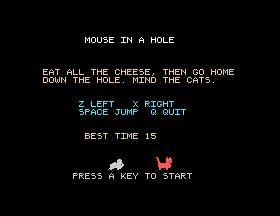
When the program starts, there is a long wait while the mouse and cat shapes are made. A title screen turns that wait into something to read:
22 GOSUB 1510:GOSUB 1400
1390 REM -- THE TITLE SCREEN --
1400 TCOL 15,1:PRINT @12,3;"MOUSE IN A HOLE"
1410 TCOL 11,1:PRINT @5,7;"EAT ALL THE CHEESE, THEN GO HOME"
1420 PRINT @5,8;"DOWN THE HOLE. MIND THE CATS."
1430 TCOL 7,1:PRINT @11,11;"Z LEFT   X RIGHT"
1440 PRINT @11,12;"SPACE JUMP  Q QUIT"
1450 IF BT THEN TCOL 11,1:PRINT @12,15;"BEST TIME";BT
1460 RETURN
Once the shapes exist, the mouse and a cat can stand on the title screen while it waits for a key:
57 MAG 2:SPRITE OFF:SPRITE 0,96,50,14,132:SPRITE 1,144,50,8,136
58 TCOL 14,1:PRINT @10,20;"PRESS A KEY TO START":A=INCH
"Another go" goes back to line 60, after all this, so the title is seen once, when the program is run.
The cats have started in the same place, walking the same way, every game. RND from S16 changes that:
810 CX1=24+4*RND(17):CY1=63:D1=2:IF RND(2) THEN D1=-2
820 CX2=154+4*RND(17):CY2=98:D2=2:IF RND(2) THEN D2=-2
RND(17) is a whole number from 0 to 16, so 24+4*RND(17) is one of 24, 28, 32 and so on up to 88: anywhere on the red cat's platform, on the four-pixel steps that S31's cats take, so it still arrives exactly at its turning points. RND(2) is 0 or 1, so half the time the cat starts walking left.
It starts one step in from each end, never on one. A cat that started right on the end, walking outwards, would step past it and turn round, step back onto the end and turn round again, and go on turning on the spot for ever.
A cat walking left must start facing left, so lines 100 and 110 now choose the shape the same way line 250 does:
100 SPRITE 1,CX1,CY1,8,138-D1
110 SPRITE 2,CX2,CY2,13,138-D2
Set the clock to nothing just before play begins:
115 TI$="000000"
When the mouse gets home, turn TI$ into seconds. The minutes are the third and fourth characters and the seconds the last two, and VAL turns digits into a number:
210 SPRITE OFF 0:TS=VAL(MID$(TI$,3,2))*60+VAL(RIGHT$(TI$,2))
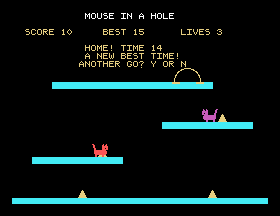
212 PRINT @12,4;"HOME! TIME";TS
214 TEMPO 6:MUSIC "C1E1G1+C1R1+C5R":TEMPO 4
The time is taken first, before the tune, so the tune is not counted.
A variable forgets everything when the program stops. To keep the best time until tomorrow, the program writes it to the disc: not as a program, as SAVE does, but as a data file: a file holding whatever the program chooses to put in it.
Writing it takes four steps, all on one line:
1550 REM -- WRITE THE BEST TIME TO THE DISC --
1560 CREATE "BEST.DAT",FD$:PRINT #FD$:PRINT BT:PRINT #0:CLOSE
1570 RETURN
CREATE "BEST.DAT",FD$ makes a new, empty file called BEST.DAT: throwing away any old one of that name, and opens it. FD$ is the file descriptor, as the manual calls it: a string that BASIC uses to keep track of the open file. You never print it; you just name it.PRINT #FD$ sends everything printed from now on into the file instead of onto the screen.PRINT BT therefore writes the best time into the file, exactly as it would have appeared on the screen.PRINT #0 sends printing back to the screen, and CLOSE finishes the file. Never leave out the CLOSE: without it the file is left on the disc empty.Line 216 calls it when the time is a new best, or when there is no best yet, which is what BT=0 means:
216 IF BT=0 OR TS<BT THEN BT=TS:GOSUB 1560:PRINT @12,5;"A NEW BEST TIME!"
Reading is the same the other way round: OPEN instead of CREATE, and INPUT #FD$ so that INPUT reads from the file instead of the keyboard:
1520 OPEN "BEST.DAT",FD$:INPUT #FD$:INPUT BT:CLOSE
But the very first time the game is played there is no BEST.DAT, and OPEN stops the program with No File Error. The program must be ready for that. ON ERR GOTO says where to go if an error happens, instead of stopping:
1500 REM -- READ THE BEST TIME FROM THE DISC, IF THERE IS ONE --
1510 BT=0:ON ERR GOTO 1540
1520 OPEN "BEST.DAT",FD$:INPUT #FD$:INPUT BT:CLOSE
1530 OFF ERR
1540 RETURN
If the file is there, line 1520 reads it and line 1530 turns the error trap off, so that a mistake later in the game is not sent to line 1540 too. If it is not there, the error jumps straight to 1540, and BT is still 0. Either way, the subroutine returns.
An ON ERR catches one error and is then used up. That is all this needs.
The score line shows the best time too, once there is one:
625 IF BT THEN PRINT @15,2;"BEST";BT
Add lines 22, 57, 58, 115, 212, 214, 216, 625 and 1390 to 1570; change lines 100, 110, 210, 810 and 820.
22 GOSUB 1510:GOSUB 1400
57 MAG 2:SPRITE OFF:SPRITE 0,96,50,14,132:SPRITE 1,144,50,8,136
58 TCOL 14,1:PRINT @10,20;"PRESS A KEY TO START":A=INCH
100 SPRITE 1,CX1,CY1,8,138-D1
110 SPRITE 2,CX2,CY2,13,138-D2
115 TI$="000000"
210 SPRITE OFF 0:TS=VAL(MID$(TI$,3,2))*60+VAL(RIGHT$(TI$,2))
212 PRINT @12,4;"HOME! TIME";TS
214 TEMPO 6:MUSIC "C1E1G1+C1R1+C5R":TEMPO 4
216 IF BT=0 OR TS<BT THEN BT=TS:GOSUB 1560:PRINT @12,5;"A NEW BEST TIME!"
625 IF BT THEN PRINT @15,2;"BEST";BT
810 CX1=24+4*RND(17):CY1=63:D1=2:IF RND(2) THEN D1=-2
820 CX2=154+4*RND(17):CY2=98:D2=2:IF RND(2) THEN D2=-2
1390 REM -- THE TITLE SCREEN --
1400 TCOL 15,1:PRINT @12,3;"MOUSE IN A HOLE"
1410 TCOL 11,1:PRINT @5,7;"EAT ALL THE CHEESE, THEN GO HOME"
1420 PRINT @5,8;"DOWN THE HOLE. MIND THE CATS."
1430 TCOL 7,1:PRINT @11,11;"Z LEFT   X RIGHT"
1440 PRINT @11,12;"SPACE JUMP  Q QUIT"
1450 IF BT THEN TCOL 11,1:PRINT @12,15;"BEST TIME";BT
1460 RETURN
1500 REM -- READ THE BEST TIME FROM THE DISC, IF THERE IS ONE --
1510 BT=0:ON ERR GOTO 1540
1520 OPEN "BEST.DAT",FD$:INPUT #FD$:INPUT BT:CLOSE
1530 OFF ERR
1540 RETURN
1550 REM -- WRITE THE BEST TIME TO THE DISC --
1560 CREATE "BEST.DAT",FD$:PRINT #FD$:PRINT BT:PRINT #0:CLOSE
1570 RETURN
Starting from
LOAD "MOUSE14" from S31.
What you should see
The title screen, while the shapes are made; then PRESS A KEY TO START. Win a game and your time is shown, with A NEW BEST TIME! the first time. Answer N, type RUN, and the title screen shows your best time, read back from the disc.
Save this. SAVE "MOUSE15". This is the finished game.
ERA "BEST.DAT" and run the game. What does the title screen show?BEST.DAT erased, take ON ERR GOTO 1540 out of line 1510 and run it. What happens, and on which line?32.1 Keep the best three times, in order, in BEST.DAT.
32.2 Show the time ticking on the score line while the game is played. Time it with S31's method: what does it cost?
32.3 Ask for the player's initials when they set a new best time, and keep them in the file with it.
Worked solutions are in Appendix II.
| Symptom | Cause |
|---|---|
No File Error at the start | There is no BEST.DAT yet and the ON ERR is missing from line 1510. |
| The best time is never remembered | CLOSE is missing from line 1560, so the file is left empty. |
| A cat starts facing the wrong way | Lines 100 and 110 still give shape 136. |
A title screen gives the player something to read while the program gets ready. RND puts the cats somewhere new each game, and TI$ times the player. A data file keeps a value after the program has stopped: CREATE, then PRINT #FD$ to send printing into it, then PRINT #0 and CLOSE; and to read it, OPEN, INPUT #FD$, and CLOSE. ON ERR GOTO catches the one error you expect, here, no file yet, and OFF ERR puts things back.
S33, Compiling The Game: Xtal's own compiler, and the same game running twice as fast.
This form is protected by reCAPTCHA, and the Google Privacy Policy and Terms of Service apply.
