module
28

The cats walk straight through the mouse, and nothing happens. This section makes something happen: a cat touching the mouse costs a life and sends the mouse back to the floor, and the third time it is the end of the game.
The hard part of that would be working out when two creatures touch. The Einstein does it for you.
The chip that draws the screen draws the sprites too, and while it is drawing them it notices whenever two of them have a lit pixel in the same place. It keeps a note of that, and BASIC can read the note with INP:
INP(9)
INP reads a number from one of the machine's ports: the doors through which the Z80 talks to the chips around it. The manual's INP entry lists them. Port 9 is the screen chip, and what it says is a number from 0 to 255.
Only part of that number is about sprites touching. The rest is about other things, and to pick out the part you want you think of it exactly as you thought of a row of the keyboard in S24: eight bits, worth 128, 64, 32, 16, 8, 4, 2 and 1.
The bit worth 32 is the one. It is on when two sprites have touched.
AND does what it did in S24's line 130: it keeps a bit only where both numbers have it. 32 has one bit, so INP(9) AND 32 keeps that one bit of INP(9) and throws the other seven away. The answer is 32 if the sprites have touched and 0 if they have not.
S11 said that IF takes any number that is not 0 as true. So this line needs no =32 at the end:
178 IF INP(9) AND 32 THEN GOSUB 650
The chip does not say which two sprites touched, only that two did. In this game that is enough: the cats are on different platforms and never meet each other, so if two sprites have touched, one of them is the mouse.
This is also why SPRITE OFF has been at the start of the program since S22. Without it the unused sprites are all piled up in one corner of the screen, touching each other, and the bit would be on from the start.
640 REM -- CAUGHT --
650 LIVES=LIVES-1:TCOL 11,1:PRINT @33,2;LIVES
660 MX=20:MY=22:VY=0:VX=0:G=-1:SPRITE 0,MX,MY
670 FOR W=1 TO 300:NEXT W:W=INP(9)
680 RETURN
Take a life and show it: the number goes at column 33 so that its leading space lands on the space after LIVES and the digit replaces the old one. Put the mouse back where it started, on the floor at the left, on the ground, with no speed in any direction, even if it was caught in mid-jump. Wait a moment, so the player sees what happened.
Then W=INP(9), which looks as if it does nothing; the answer goes into W and is never used. It matters. The chip does not forget a touch when the sprites move apart: the bit stays on until a program reads it, and reading it turns it off. Between the read on line 178 and the mouse being moved on line 660, the chip has drawn the screen again with the cat still on the mouse, and turned the bit back on. Without line 670's read, the next pass would find it on and take another life, for a touch that is already over.
85 LIVES=3
190 IF LIVES=0 OR PEEK(&E045)=64 THEN 200 ELSE 130
200 GOSUB 1810:PRINT @15,4;"GAME OVER"
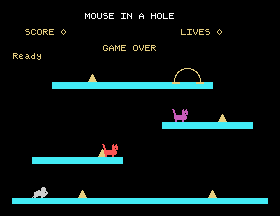
The game now ends in one of two ways: no lives left, or Q as before. Either way it empties the key queue and says GAME OVER.
Add lines 85, 178 and 640 to 680, and change lines 190 and 200.
85 LIVES=3
178 IF INP(9) AND 32 THEN GOSUB 650
190 IF LIVES=0 OR PEEK(&E045)=64 THEN 200 ELSE 130
200 GOSUB 1810:PRINT @15,4;"GAME OVER"
640 REM -- CAUGHT --
650 LIVES=LIVES-1:TCOL 11,1:PRINT @33,2;LIVES
660 MX=20:MY=22:VY=0:VX=0:G=-1:SPRITE 0,MX,MY
670 FOR W=1 TO 300:NEXT W:W=INP(9)
680 RETURN
Starting from
LOAD "MOUSE10" from S27.
What you should see
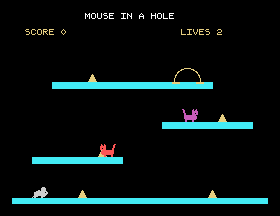
The game as before, until a cat touches the mouse. Then the mouse is back on the floor at the left, and the lives go down by one:
Lose the last one and the game stops:
Save this. SAVE "MOUSE11".
:W=INP(9) off the end of line 670 and get caught once. How many lives does it cost?LIVES=1. What does the score line say before you are caught, and why is it wrong? Which line would you change to put it right?28.1 Make the mouse flash, vanish and reappear a few times, after it is caught, before play carries on. (S22: SPRITE OFF 0 hides it, and it forgets its colour and shape, so bring it back with all five numbers.)
28.2 Give the player an extra life for every 30 points of cheese.
28.3 Let the mouse survive one touch in each game: the first time it is caught, print LUCKY! instead of taking a life.
Worked solutions are in Appendix II.
| Symptom | Cause |
|---|---|
| One touch takes two lives | The W=INP(9) at the end of line 670 is missing. |
| A life goes the moment the game starts | SPRITE OFF is missing from line 60, so the unused sprites are touching each other in a corner. |
| Lives go when the mouse is nowhere near a cat | Something else is a sprite and is touching something; the bit cannot tell you what. Check every SPRITE line. |
| The game never ends | Line 190 has lost LIVES=0 OR. |
The screen chip notices when two sprites touch and keeps one bit on until a program reads it: INP(9) AND 32, which is 32 after a touch and 0 otherwise. AND picks one bit out of a number. It says only that two sprites touched, so a game is arranged so the answer can only mean one thing: here, a cat and the mouse. Read it once more after moving the sprites apart, or the same touch counts twice.
S29, Home: the cheese, the hole, and winning.
This form is protected by reCAPTCHA, and the Google Privacy Policy and Terms of Service apply.
