module
15

S14 filled an array with a loop, because the values followed a rule. Most lists do not: the names of the months, the notes of a tune, the height of each platform in a game. Those have to be written down somewhere.
INPUT is the wrong tool; nobody wants to type twelve month names every time the program runs. DATA puts the list in the program, where it belongs.
40 READ NAME$(I),AGE(I)
60 DATA "ANNA",34,"BEN",29
70 DATA "CLARE",41,"DAN",12
DATA lines hold values separated by commas. They do nothing on their own; if the program runs over one, it is ignored.
READ takes the next value and puts it in a variable. The next READ takes the one after, and so on through every DATA line in the program in line order, as though they were all one long list. One READ can name several variables, as line 40 does.
You can put the DATA lines anywhere. At the end, as here, keeps them out of the way; next to the loop that reads them keeps them findable. What you must not do is lose count: READ past the end of the last DATA is a Data Error, and it names the line the READ was on, not the missing data.
Numbers need no quotes. Text usually does not either:
30 DATA HELLO THERE
read into a string gives HELLO THERE, spaces and all: everything up to the comma or the end of the line.
Use quotes when the text has a comma in it, or has spaces at the start or end you want kept. This course quotes text in DATA throughout, because it makes the list easier to read and it never goes wrong.
RESTORE sends the reading back to the first DATA item, so you can go through the list again:
110 RESTORE
120 READ ANS$
reads ANNA a second time.
RESTORE 40 goes back to the DATA on line 40 instead of the first one. That is how you keep several separate lists in one program: one DATA block per thing, and a RESTORE to the right line before you read it.
10 DIM NAME$(4)
20 DIM AGE(4)
30 FOR I=1 TO 4
40 READ NAME$(I),AGE(I)
50 NEXT I
60 DATA "ANNA",34,"BEN",29
70 DATA "CLARE",41,"DAN",12
80 FOR I=1 TO 4
90 PRINT NAME$(I);" IS";AGE(I)
100 NEXT I
110 RESTORE
120 READ ANS$
130 PRINT "THE FIRST ONE AGAIN: ";ANS$
Starting from
A fresh boot, or NEW.
What you should see
RUN
ANNA IS 34
BEN IS 29
CLARE IS 41
DAN IS 12
THE FIRST ONE AGAIN: ANNA
Ready
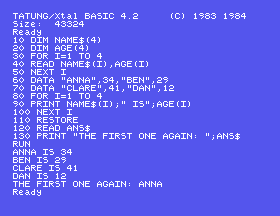
Line 40 reads a name and an age together, and the pairs in the DATA are written in that order, which is the only thing keeping them lined up. Get one item out of step and every name afterwards is wrong, with no error to tell you.
,12 off the end of line 70 and run it. Which line is blamed, and is that where the mistake is?RESTORE 70 and run it. Which name comes out at the end, and why?"ANNA" in line 60. Does it still work? Now try putting a comma inside one of the names without quotes.15.1 Put the twelve month names in DATA and print them numbered 1 to 12.
15.2 Put five test scores in DATA, read them into an array, and print the total and the average.
15.3 Keep two separate lists in one program: three colours and three animals, each in its own DATA line, and print them as three pairs, using RESTORE n to switch between the lists.
Worked solutions are in Appendix II.
| Symptom | Cause |
|---|---|
Data Error in <line> | A READ ran out of DATA. Count the items: it is nearly always one missing, or a loop going round once too often. |
| The names and numbers are out of step | An item missing or an extra one earlier in the list. There is no error for this, only wrong output. |
| A string came out with unexpected spaces | Unquoted DATA keeps every space up to the comma. Quote it. |
| The second pass through the list reads nothing | READ carries on from where it got to. RESTORE first. |
Syntax Error on a line that looks perfect | A keyword inside a variable name: FIRST contains RST. See S8. |
Type Error | A word read into a numeric variable, or a number into a string one. Keep the READ in the same order as the DATA. |
DATA holds a list of values inside the program; READ takes them one at a time, in line order, however many DATA lines there are. Running out is a Data Error. RESTORE goes back to the beginning, RESTORE n to a particular DATA line.
S16, Chance: random numbers, so that a program does something different each time it runs.
This form is protected by reCAPTCHA, and the Google Privacy Policy and Terms of Service apply.
