← Back to Guides
The TC01 System Master Disc: What's On It and How to Run It
Version:
1.0
October 23, 2026
The System Master was the disc in the box with every Tatung Einstein TC01. It holds the machine's disc operating system, three programming languages, two disc utilities, and a set of programs Tatung wrote in 1984 to show the new machine off. This guide explains how to start it, what every file on it is, and how to run each one. It covers the copy in our library, the TC01 System Master Disc.
Switch the Einstein on with no disc in the drive and it tells you what to do:
        ***  EINSTEIN  ***
  Insert disc in drive 0 and
   press Ctrl-BREAK to load
TATUNG/Xtal MOS 1.2    (C) 1983 1984
Ready
>
Put the System Master in drive 0, the left-hand drive, and press Ctrl-BREAK: hold down CTRL and press BREAK. This restarts the machine, which reads the disc. The Einstein Primer notes that you may need to hold BREAK for a second or two, or try a second time. If the disc is already in the drive when you switch on, it starts by itself.
In MAME, the easiest way is to give MAME the disc when you start it, and it boots straight away; our Setting Up MAME guide shows how. MAME's Einstein does not respond to BREAK, so Ctrl-BREAK does nothing there. If you attach the disc after MAME has started, reset the emulated machine instead, and it reads the disc just the same.
Either way, you arrive here:
        ***  EINSTEIN  ***
TATUNG/XtalDOS 1.31   (C) 1983 1984
0:
The 0: is the DOS prompt: it means the computer is ready for a command, and that it is looking at drive 0.
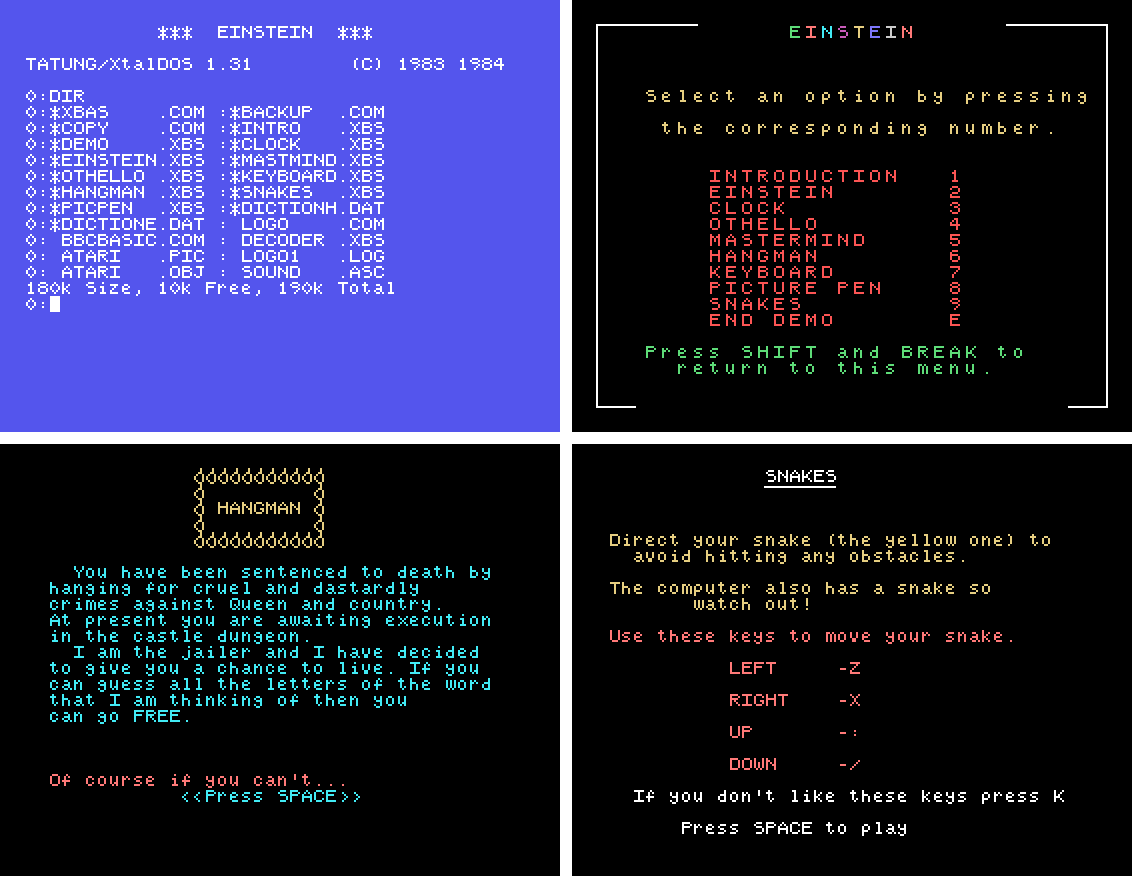
Type DIR and press ENTER. The files are listed two to a line. The list stops after eighteen names; press a key to see the rest. It ends with how much space is used and free: 180k Size, 10k Free, 190k Total. A * before a name means the file is locked, so it cannot be changed or erased by accident.
The part of a name after the dot says what kind of file it is, and that tells you how to run it:
.COM - a program you run straight from the 0: prompt by typing its name. XBAS, LOGO and BACKUP are all run this way..XBS - a program written in Xtal BASIC. Start BASIC first with XBAS, then run the program from BASIC..LOG - procedures for Dr Logo. Start Logo first with LOGO, then load them..DAT - data that another program reads. You do not run these.Most of the disc is BASIC programs, and they are the ones that catch newcomers out: typing HANGMAN at the 0: prompt only gets the answer No File, because Hangman is not a .COM program. Start BASIC first:
0:XBAS
TATUNG/Xtal BASIC 4.2     (C) 1983 1984
Size:  43324
Ready
RUN "HANGMAN"
RUN with a name in quotes loads the program from the disc and starts it; LOAD "HANGMAN" followed by RUN does the same in two steps. There is also a shortcut: typing XBAS HANGMAN at the 0: prompt starts BASIC and runs Hangman in one go. When you have finished, DOS takes you from BASIC back to the 0: prompt.
The easiest way into Tatung's programs is their menu. Start BASIC and type RUN "DEMO", then press a number to choose. When you quit a program - Clock's QUIT PROGRAM, for example - you come back to the menu. The menu says you can press SHIFT and BREAK to return to it at any time; in MAME, where BREAK has no effect, use the program's own way of finishing instead.
| File | What it is | How to run it |
|---|---|---|
XBAS.COM | Xtal BASIC 4.2, the Einstein's own BASIC | XBAS at 0:; DOS to leave |
BBCBASIC.COM | BBC BASIC 2.31, by R.T. Russell | BBCBASIC at 0:; *BYE to leave |
LOGO.COM | Dr Logo, the turtle-graphics language | LOGO at 0:; bye to leave |
BACKUP.COM | Xtal's disc backup and format utility: copies a whole disc, or formats a blank one | BACKUP at 0:, then B to back up, F to format or X to exit |
COPY.COM | Crystal Research's file-copying utility, for copying single files between discs | COPY at 0:; it shows a * prompt for its commands, and ENTER on its own returns to DOS |
DEMO.XBS | Tatung's menu of the nine programs below | XBAS, then RUN "DEMO" |
INTRO.XBS | Tatung's introduction to the machine | From the menu, or RUN "INTRO" |
EINSTEIN.XBS | The machine demonstrating its own features ("Hello I am EINSTEIN...") | From the menu, or RUN "EINSTEIN" |
CLOCK.XBS | An analogue clock, with an alarm | From the menu, or RUN "CLOCK" |
OTHELLO.XBS | The board game Othello | From the menu, or RUN "OTHELLO" |
MASTMIND.XBS | Mastermind: guess the computer's four-digit code | From the menu, or RUN "MASTMIND" |
HANGMAN.XBS | Hangman, set in a castle dungeon | From the menu, or RUN "HANGMAN" |
KEYBOARD.XBS | A keyboard trainer, for learning to type | From the menu, or RUN "KEYBOARD" |
PICPEN.XBS | Picture Pen, a drawing program | From the menu, or RUN "PICPEN" |
SNAKES.XBS | Snakes: steer your snake and avoid the computer's | From the menu, or RUN "SNAKES" |
DICTIONE.DAT, DICTIONH.DAT | Hangman's words: E for the easy list, H for the hard one | Not run. DISP DICTIONE.DAT at 0: shows the words, if you want to cheat |
LOGO1.LOG | Four small Dr Logo procedures: draw, plot, pl1 and pl2 | LOGO, then load "logo1 in small letters, then draw, which draws until you press ESC |
SOUND.ASC | A short BASIC program kept as plain text, which moves sprites about under the control of joystick 1 | XBAS, LOAD "SOUND.ASC", then RUN. It needs a joystick, and with the stick left alone it soon stops with Qty Error in 140 |
DECODER.XBS | A five-line BASIC program that turns four-letter codes into "winning numbers" | XBAS, then RUN "DECODER" |
ATARI.OBJ | Not a program: the text of the notes for "The Ultimate Dungeon Master Cheat Routine", by Edward Penman | Not for running |
ATARI.PIC | Data; nothing on the disc uses it | Not for running |
Tatung's own programs announce themselves in the same way, with a name, a version number, an author and a 1984 date at the top of the listing. The last four files in the table do not, and nothing else on the disc uses them. They look like files added by an owner, and you can ignore them.
Copies of the System Master were not all the same. The one our Xtal BASIC course was built from carries two Logo examples, QUIZ.LOG and SKETCH.LOG, and no BBC BASIC; the Primer walks through running SKETCH.LOG. The Primer also mentions discs that start with an earlier XtalDOS, 1.11, instead of 1.31.
On a real disc, set the write-protect tab before you use it, and work on a copy made with BACKUP. In an emulator the same advice applies: keep the file you downloaded, and use a copy.

This form is protected by reCAPTCHA, and the Google Privacy Policy and Terms of Service apply.
