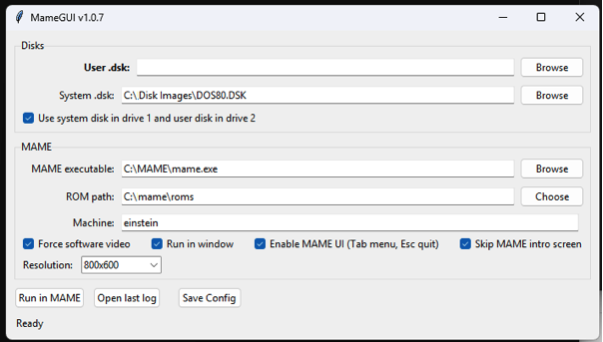
Super lightweight GUI for Mame emulator, allows you to select a Tatung Einstein dsk image and configure a few options such as resolution.
Type
Utility
Supported OS
Cross Platform
Instructions
M.A.M.E. Lite Installation and Usage Instructions
Download the zip file and extract it to your desired location.
If you have M.A.M.E. installed already then proceed to Step 3 if not then you need to download it from the following link - https://www.mamedev.org/release.html, Once downloaded you need to extract the contents to a directory of your choice.
In the above directory there is a file called “Einstein Boot Disk.dsk” this needs to be placed in the same directory as any other disks images you already have or wherever you plan to keep your disk images.
Navigate to the location you extracted the files to in Step 1 and run M.A.M.E. Lite the following screen will appear .
You now need to complete the following tasks:-
Click on the “Browse” button to the extreme right of the “User .dsk” field and navigate to where your Einstein Disk images are kept, then select the disk you want to run.
Click on the “Browse” button to the extreme right of the “System .dsk” field and navigate to where your Einstein Disk images are kept, then select the “Einstein Boot Disk.dsk” image (referenced in Step 3).
Click on the “Browse” button to the extreme right of the “MAME executable” field and navigate to the directory M.A.M.E,. Is installed in and as shown in the picture select the Mame.exe file.
Click on the “Choose” button to the extreme right of the “ROM path” field and navigate to where the rom files are stored directory M.A.M.E,. Is installed in and as shown in the picture select the Mame.exe file.
Leave the “Machine” field and the following tick boxes as they are and click on the down arrow to the right of the “Resolution” field and select your desired resolution.
Now click on the “Save Config” button so that the above is all stored - from this point on when running the application you will then only need to change the “User .dsk” field to your disk of choice.