Having Fun With Jet Set Willy
Introduction
This article like many others I will be doing, is a recreation, tidy up, etc of articles originally
published in old User Group Magazines. As the quality of these old magazines is quite
poor, I decided to take it upon myself to recreate those articles and present them in an
improved format, with pictorial enhancements and where possible improved content.
This time for a change from the technical articles, I thought I would have some fun with Jet
Set Willy. This article was originally Published in Einstein Monthly News as part of their
Harry the Hacker series of articles.
How to start on any screen
Insert the JSW disk and from DOS type;
LOAD JSW.COM and press ENTER ;note the number of Blocks this will be
used when saving the program
MOS and press ENTER
(Note: the dot in the next few lines is important as it marks the end of the change)
Now type whichever of the following lines you choose and then save the program:-
M 5D22 00. and press ENTER ; This is the OFF LICENCE
M 5D22 02. and press ENTER ; This is UNDER THE MEGATREE
M 5D22 03. and press ENTER ; This is AT THE FOOT OF THE MEGATREE
M 5D22 04. and press ENTER ; This is THE DRIVE
M 5D22 05. and press ENTER ; This is THE SECURITY GUARD
M 5D22 0B. and press ENTER ; This is THE HALL
M 5D22 12. and press ENTER ; This is ON THE ROOF
M 5D22 14. and press ENTER ; This is the BALLROOM EAST
M 5D22 15. and press ENTER ; This is the BALLROOM WEST
M 5D22 16. and press ENTER ; This is THE KITCHENS - MAIN STAIRWAY
M 5D22 17 and press ENTER ; This is THE KITCHEN
M 5D22 18. and press ENTER ; This is the WEST OF THE KITCHEN
M 5D22 19. and press ENTER ; This is the COLD STORE
M 5D22 1B. and press ENTER ; This is THE CHAPEL
M 5D22 1C. and press ENTER ; This is the FIRST LANDING
M 5D22 1D. and press ENTER ; This is THE NIGHTMARE ROOM
M 5D22 1E. and press ENTER ; This is THE BANYAN TREE
M 5D22 1F. and press ENTER ; This is the SWIMMING POOL
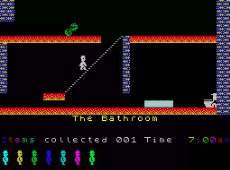
M 5D22 21. and press ENTER ; This is THE BATHROOM
M 5D22 22. and press ENTER ; This is the TOP LANDING
M 5D22 23. and press ENTER ; This is the MASTER BEDROOM
M 5D22 29. and press ENTER ; This is THE ATTIC
M 5D22 2A. and press ENTER ; This is UNDER THE ROOF
M 5D22 2D. and press ENTER ; This is UNDER THE DRIVE
M 5D22 2E. and press ENTER ; This is the TREE ROOT
M 5D22 31. and press ENTER ; This is THE WINR CELLAR
M 5D22 33. and press ENTER ; This is the TOOL SHED
M 5D22 34. and press ENTER ; This is the BACK STAIRWAY
M 5D22 35. and press ENTER ; This is the BACK DOOR
M 5D22 36. and press ENTER ; This is the WEST WING
M 5D22 39. and press ENTER ; This is ABOVE THE WEST BEDROOM
M 5D22 3A. and press ENTER ; This is THE BEACH
M 5D22 3B. and press ENTER ; This is THE YACHT
The ones not listed above do not let Willy move or he gets killed straight away.
You can now save the modified program by typing
Y and press ENTER
SAVE nn JSW1.COM and press ENTER ;note the nn should be
replaced with the number
of Blocks noted for saving earlier
You should now have your modified copy of JSW on disc. Load and enjoy.
Happy gaming.