



How to Use a Gotek USB Drive with the Tatung Einstein and 256 Computers
If you are a retro computing enthusiast or a collector of classic hardware, you will know that preserving and running software from older systems can be both exciting and challenging. One of the most common obstacles is dealing with ageing floppy disks that are no longer reliable or even functional.
What many people do not realise is that you can now easily transfer DSK files from your modern computer to the classic Tatung Einstein and 256 systems using a Gotek USB floppy emulator. This simple yet powerful upgrade brings decades-old technology into the digital age, allowing you to breathe new life into your vintage machines.
What a Gotek Does and Why It Matters
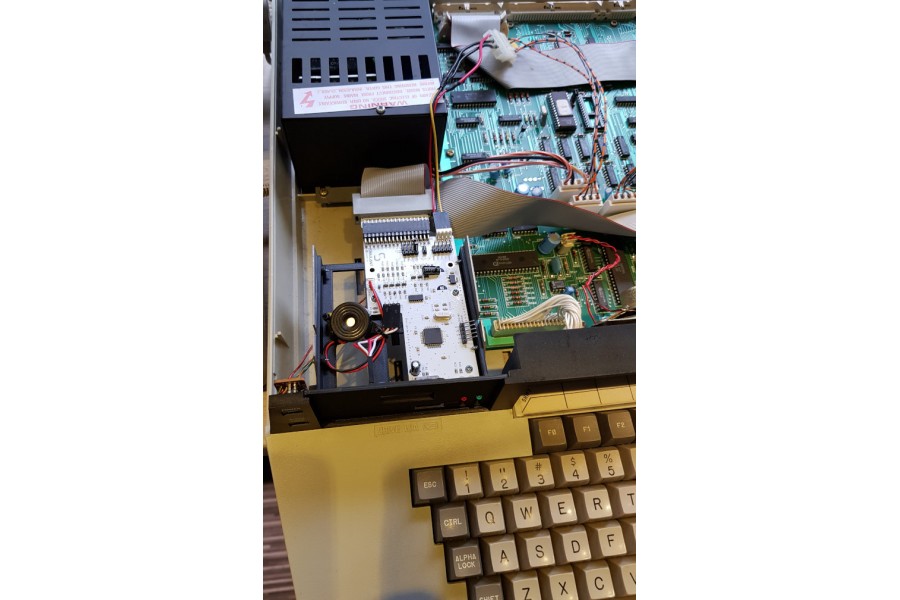
A Gotek device is a modern floppy disk emulator designed to replace the original disk drive in retro computers like the Tatung Einstein TC01 and 256. Instead of relying on fragile magnetic disks, the Gotek uses a USB flash drive to store disk image files (DSK files) that are exact digital copies of your original software.
To the Einstein, the Gotek behaves exactly like a standard floppy drive. This means your beloved machine continues to function as intended, but now you can load software directly from a USB stick instead of a physical disk. It is an elegant and practical solution for those who want to continue using their vintage hardware without worrying about disk degradation or compatibility issues.
Why This Upgrade is a Game Changer
There are several reasons why using a Gotek on your Tatung Einstein is worth considering:
- Preserve your software library: Old floppy disks degrade over time. By converting them into DSK files, you ensure they remain accessible indefinitely.
- Faster and easier loading: USB storage is not only more reliable, it also significantly speeds up the process of loading and swapping disks.
- Expand your collection: Many classic titles and utilities are available online as DSK images, allowing you to explore software that was once hard to find.
- Modern convenience: Managing DSK files from a modern PC is simple, and transferring them to the Einstein is as easy as copying files to a USB stick.
How to Connect a Gotek to a Tatung Einstein
Setting up a Gotek emulator is straightforward, but there are a few steps you should follow to ensure everything works perfectly.
1. Remove the Original Floppy Drive
Begin by carefully opening your Tatung Einstein and removing the original floppy disk drive. Keep any screws or brackets as you may need them for the new installation.
2. Connect the Gotek to the Floppy Interface
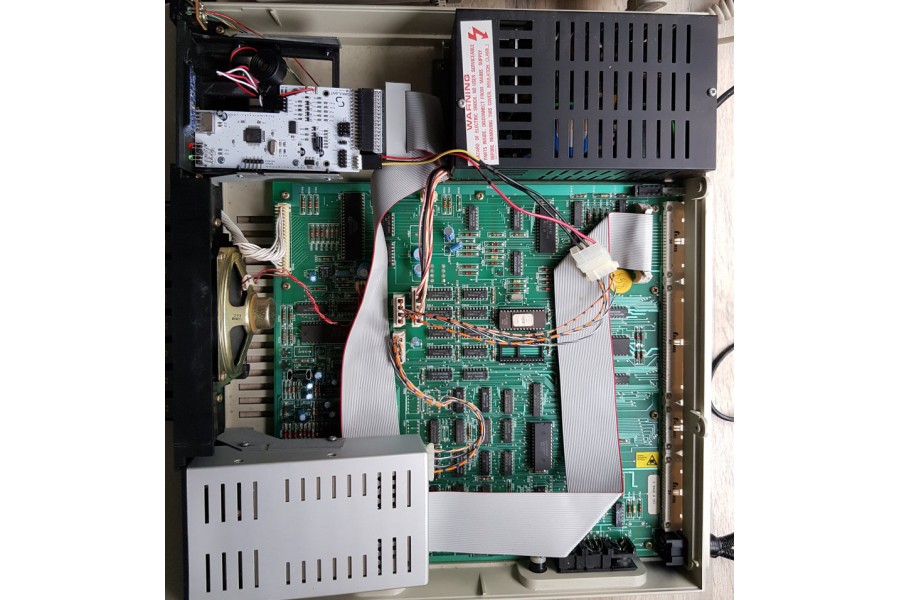
The Einstein TC01 uses a standard floppy interface but requires a power adapter, making the Gotek installation straightforward. However, for the Einstein 256, you will need a floppy interface adapter, and the power supply cable must be modified for the Gotek to function correctly.
Please consult your Gotek supplier for details on the correct power cables and floppy interface for your specific machine, as the Gotek kits differ between the TC01 and 256 models.
Tatung Einstein TC01
Tatung 256 computer

3. Insert Your USB Stick
Once the Gotek is connected, you can insert a USB flash drive containing your DSK image files. The system will read these as if they were physical floppy disks, allowing you to boot software, load programs, or run games exactly as you did in the 1980s.
Where to Buy a Gotek Emulator and Accessories
There are several suppliers online that offer complete Gotek kits specifically designed for the Tatung Einstein TC01 and 256. These kits often include everything you need, such as:
- The Gotek floppy disk emulator
- An OLED display for easy disk selection
- A fitting adapter and mounting caddy
- Screws and installation hardware
Choosing a complete kit ensures a smoother installation process and guarantees compatibility with your specific machine.
Final Thoughts: Keeping Retro Technology Alive
The Tatung Einstein remains one of the most fascinating machines from the golden era of British home computing. By adding a Gotek floppy emulator, you give this classic system a new lease of life, combining the charm of vintage technology with the convenience of modern storage.
Whether you are preserving your personal software collection, exploring rare titles from computing history, or simply enjoying the nostalgic thrill of loading old programs, the Gotek makes it all possible with minimal effort. It is one of the most rewarding upgrades you can make to your retro computing setup.
