The Einstein 256 disc of Dragon’s Lair has a message hidden in its copy protection. The person who wrote the loader left it there, with three questions for anyone who got that far. We found it in 2026 with modern tools. This guide asks a different question: could someone have found it at the time, with only an Einstein and the software you could buy for it? They could, and this is how.
Everything here was done on a standard Einstein in MAME, typed at the keyboard, using Xtal BASIC, the machine’s built-in monitor and Kuma’s ZEN assembler, all software of the time. It is a reconstruction. We knew what we were looking for, and a programmer in the 1980s would have had to work each step out. The last section gives the answers to the three questions, so stop before it if you want to find them yourself.
This guide is about reading the message. It does not copy the game or remove its protection.

Start the way anyone would. Boot the system disc, put the Dragon’s Lair disc in the drive and type DIR.
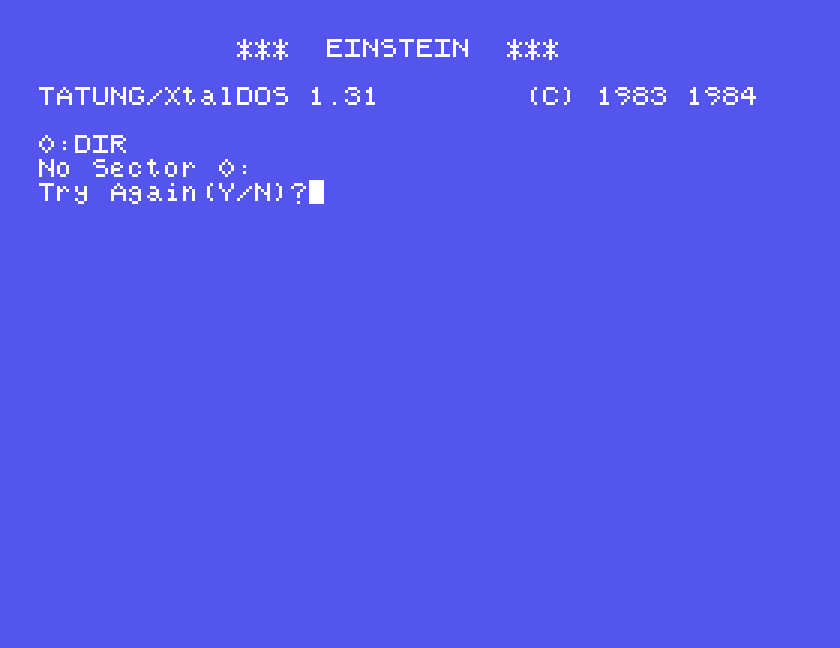
The game boots and plays, so the disc is not damaged. Yet DOS says a sector is missing. Every sector on a floppy carries its own number in a small header, and DOS only ever asks for sectors 0 to 9. “No Sector” on a disc that works means the sectors are there but are called something else. That was a well-known protection trick, and it is the first sign that this disc is worth a closer look.
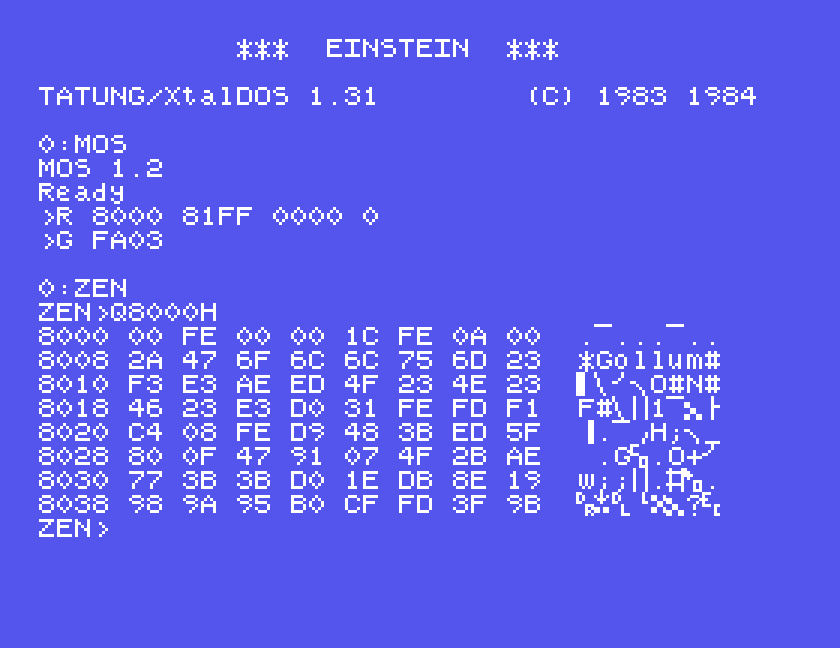
The Einstein has a machine-code monitor built in. Type MOS at the DOS prompt to reach it. Its R command reads sectors straight into memory, and T shows memory as hex with the text beside it. The reference card gives R as start address, end address, sector and track as two hex bytes, then the drive. So this reads sector 0 of track 0 into memory at 8000 and shows the start of it:
R 8000 81FF 0000 0
T 8000 8037
Sector 0 does exist: it is the boot sector, which the machine has to be able to find. In among the gibberish, eight bytes in, is *Gollum#. That is an odd thing to find on Dragon’s Lair. Ask for sector 1 instead, with R 8200 83FF 0100 0, and the monitor answers Disc: No Sector!.
In the copy in our library, the four bytes at 801C read F1 4C 4F 52 where the picture shows 31 FE FD F1. That is a later change to that copy and makes no difference to anything below.
None of the Einstein disc utilities we tried will show a sector’s number. They work through DOS. But Xtal BASIC has OUT and INP, which talk to the hardware directly, and the disc controller chip sits at ports 24 to 27. BASIC is far too slow to read data off the disc this way. It does not need to. It can ask the controller for sector number 0, then 1, then 2, up to 255, and each time check one bit of the reply that says whether such a sector was found.
Boot the system disc, type XBAS, put the Dragon’s Lair disc in, and type this in:
10 REM WHAT IS ON THIS DISC?
15 CLS
20 OUT 35,1
30 T=0
40 PRINT "TRACK";T;": ";
50 OUT 27,T
60 OUT 24,16
70 IF INP(24) AND 1 THEN GOTO 70
80 S=0
90 OUT 26,S
100 OUT 24,128
110 IF INP(24) AND 1 THEN GOTO 110
120 X=INP(24)
130 IF (X AND 16)=0 THEN PRINT CHR$(S AND 127);
140 S=S+1
150 IF S<256 THEN GOTO 90
160 PRINT
170 T=T+1
180 IF T<25 THEN GOTO 40
Line 20 selects drive 0. Lines 50 to 70 move the head to track T and wait. Lines 90 to 110 ask for sector S and wait. Line 130 prints S as a character if the controller found it. It is slow, several minutes a track, so all 25 tracks take an hour or two. Change the 25 in line 180 to try just a few.
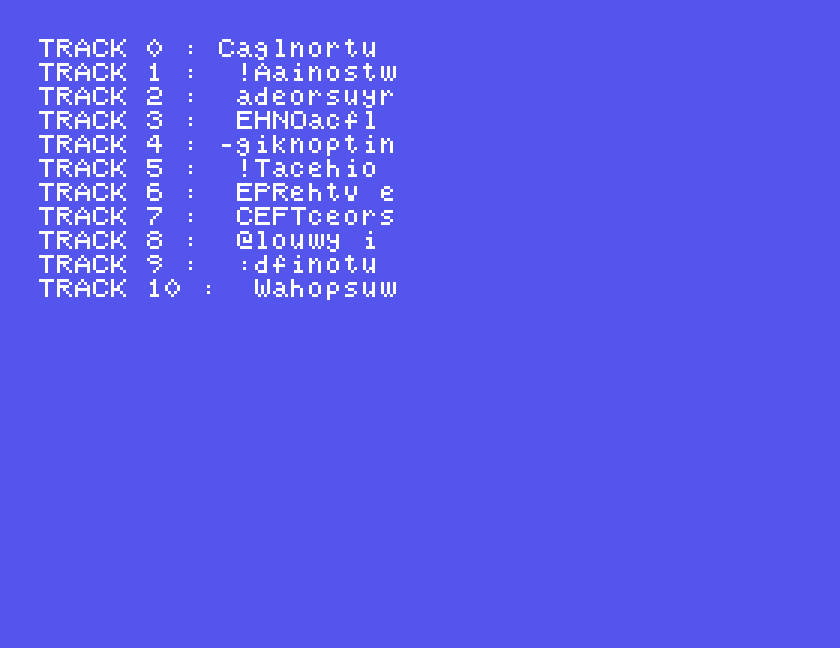
The sectors are not numbered at all. They are lettered, with capitals, spaces and punctuation, ten to a track. It is plainly text, but it comes out in number order, so each line is an anagram: Caglnortu, then !Aainostw. You could puzzle at it for a long time. It was not meant to be read this way, and the next step shows why.
Go back to the boot sector. The machine loads it at address FE00 and starts it at FE1C; the first six bytes say so. The first 52 bytes are ordinary machine code, and ZEN’s manual describes a u command that disassembles eight instructions at a time. This is what they say:
FE08  "*Gollum#"       eight letters that are also eight harmless instructions
FE10  DI
FE11  EX (SP),HL
FE12  XOR (HL)
FE13  LD R,A
FE15  INC HL
FE16  LD C,(HL)
FE17  INC HL
FE18  LD B,(HL)
FE19  INC HL
FE1A  EX (SP),HL
FE1B  RET NC
FE1C  LD SP,0FDFEH     the sector starts running here
FE1F  POP AF
FE20  CALL NZ,0FE08H
FE23  D9 48 3B         three bytes of data, not instructions
FE26  LD A,R
FE28  ADD A,B
FE29  RRCA
FE2A  LD B,A
FE2B  SUB C
FE2C  RLCA
FE2D  LD C,A
FE2E  DEC HL
FE2F  XOR (HL)
FE30  LD (HL),A
FE31  DEC SP
FE32  DEC SP
FE33  RET NC
It is a decryption loop, and a clever one. Three things are going on.
DEC SP twice followed by RET jumps to it again. It ends when it decrypts its own last instruction. The byte at FE33 is part of the encrypted sector, and once it has been changed it is no longer a RET, so the processor runs on into the code it has just uncovered.LD A,R reads the Z80’s refresh register, which goes up by one each time the processor fetches an instruction code. The loop is 13 instructions, one of them with a two-byte code, so R goes up by 14 each time round. Step through this in a debugger and R counts the debugger’s instructions too, and the key comes out wrong. That is the point of it.You cannot single-step it, but you do not have to. The sums are simple. Write your own loop that does the same sums, with an ordinary register going up by 14 in place of R, and run it on a copy of the sector.
ZEN loads from its own disc, so there is some swapping. Boot the ZEN disc, type MOS, put the Dragon’s Lair disc in and read the boot sector to 8000. Put the ZEN disc back, return to DOS with G FA03, and start ZEN. The sector stays in memory throughout.
MOS
R 8000 81FF 0000 0
G FA03
ZEN
In ZEN, Q8000H shows the sector is still there.
Type E to enter text, then these lines, then a full stop on a line by itself to finish:
ORG 9000H
LOAD 9000H
LD HL,8200H
LD B,3BH
LD C,48H
LD E,62H
LOOP: LD A,E
OR 80H
ADD A,B
RRCA
LD B,A
SUB C
RLCA
LD C,A
DEC HL
XOR (HL)
LD (HL),A
LD A,E
ADD A,14
AND 7FH
LD E,A
LD A,L
CP 33H
JR NZ,LOOP
LD A,H
CP 80H
JR NZ,LOOP
DONE: NOP
END
The middle of it is the disc’s own loop, copied instruction for instruction. Register E stands in for R. It starts at 62, which is E2 without its top bit, has the top bit put back each time by OR 80H, and goes up by 14. HL starts just past the end of the copy at 8200 and the loop stops when it has done the byte at 8033, the copy’s FE33.
Type A to assemble, and press ENTER at OPTION>. Then run it with G9000H, giving 9025H when ZEN asks for a breakpoint. That is the address of the NOP at DONE.
Now look at the copy with Q8100H, and press Q again for more.
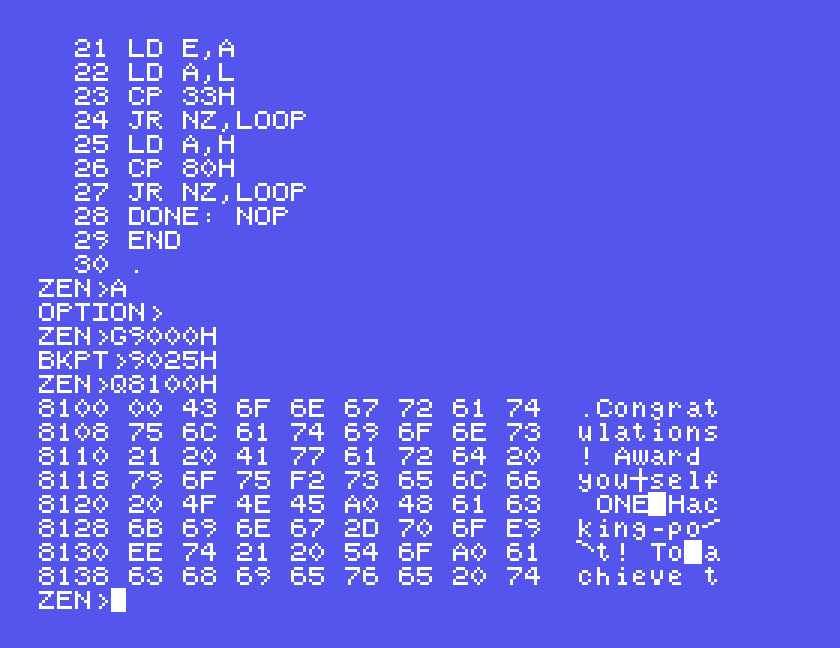
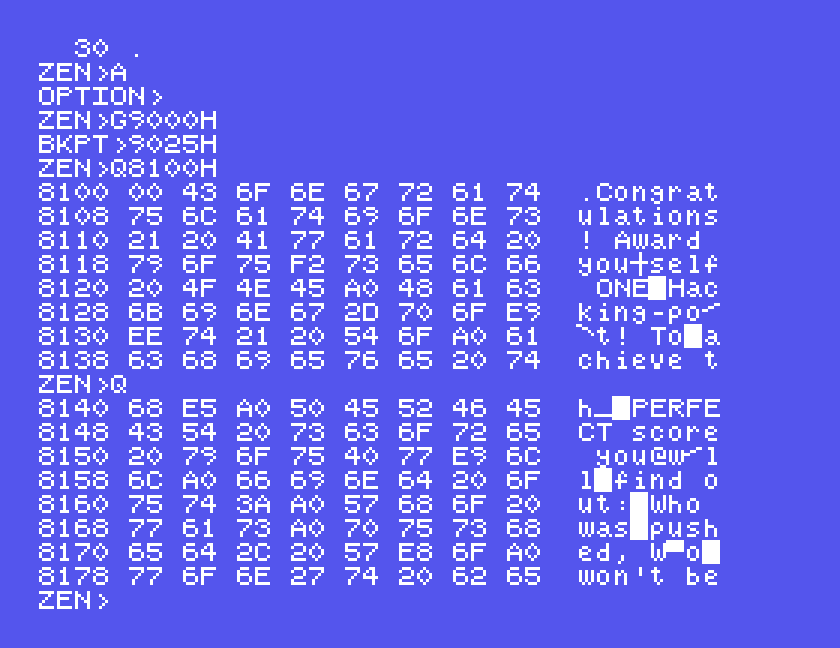
Congratulations! Award yourself ONE Hacking-point! To achieve the PERFECT score you will find out: Who was pushed, Who won’t be nice any more, and the name of Glorfindel’s horse. Post your answers to the IMPLEMENTER (me). (The answers are on this disk!)
There it is, in order, and it explains the lettered sectors. The loader uses this text as its list of what to read: each letter in turn is the number of the next sector it fetches, ten letters to a track. The sectors had to be lettered to match. The message is the copy protection, and the congratulations are for getting into the loader, which is the only place it can be read. Just before the message in the sector, the implementer signed his work: C. Lloyd-Parker.
This section gives the three answers.
The rest of the disc is encrypted the same way with a different key, and the first routine has already worked it out. Type X in ZEN to see the registers where it stopped.
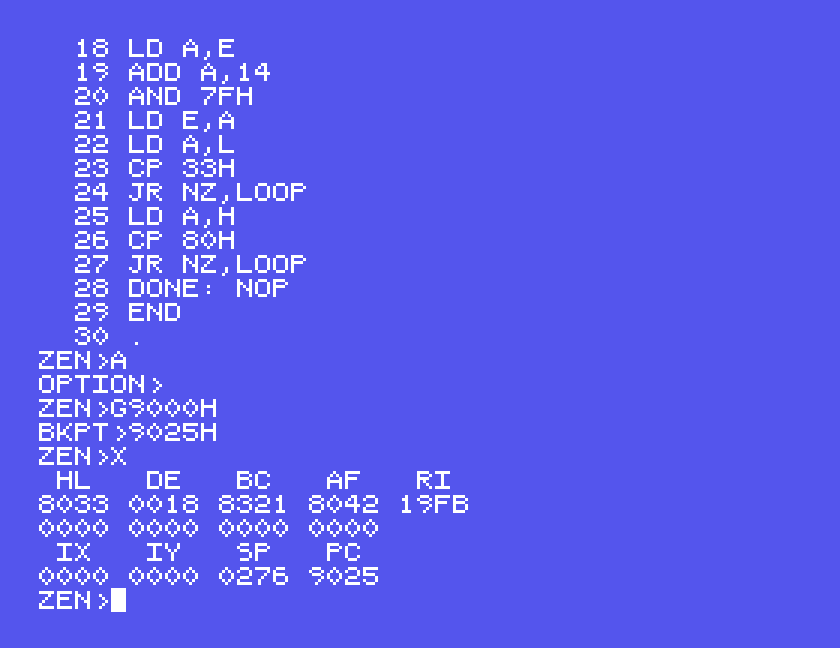
The decrypted loader saves exactly these values, R as 98 and BC as 8321, and uses them for every block it loads. Its own loop for those blocks works upwards through memory, and R has gone up by five when it is first read, so the first key value is 9D.
The loader also says where to look. It loads its first stage starting from the message’s first letter, C, and the game itself starting from its twenty-fourth, the y of “yourself”. Ten letters to a track puts those on track 0 and track 2. C is 43 in hex and y is 79, so from the monitor:
R 8200 83FF 4300 0
R 8400 85FF 7902 0
Back in ZEN, this routine decrypts each of the two sectors from the start of the key:
ORG 9000H
LOAD 9000H
LD HL,8200H
CALL UNLOCK
LD HL,8400H
CALL UNLOCK
DONE: NOP
UNLOCK: LD B,83H
LD C,21H
LD E,1DH
LD D,2
LOOP: LD A,E
OR 80H
ADD A,B
RRCA
LD B,A
SUB C
RLCA
LD C,A
XOR (HL)
LD (HL),A
INC HL
LD A,E
ADD A,14
AND 7FH
LD E,A
LD A,L
OR A
JR NZ,LOOP
DEC D
JR NZ,LOOP
RET
END
Assemble it, run it with G9000H and a breakpoint at 900CH, then look with Q8240H and Q8480H.
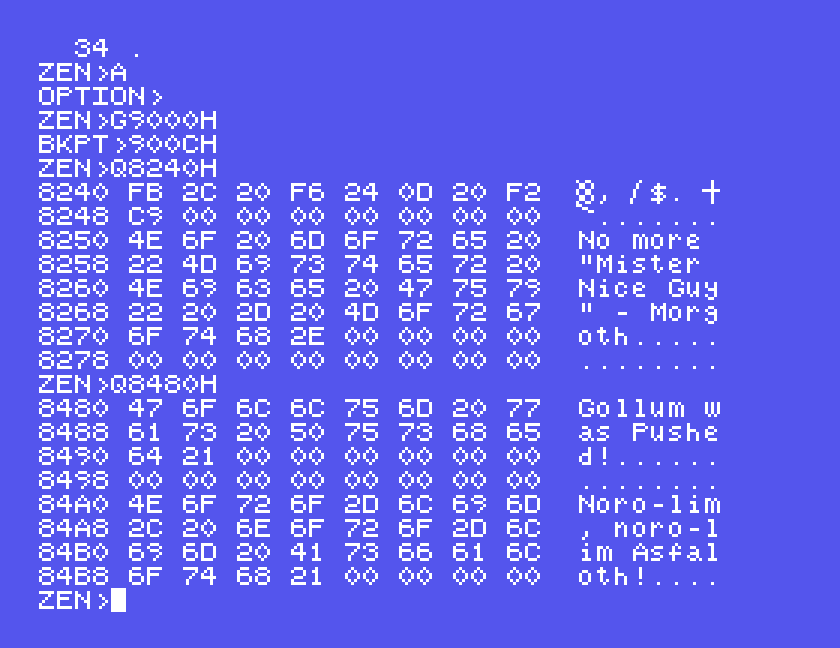
The Morgoth line is the best hidden. It sits in the loader’s first stage, which the loader decrypts, runs once to draw the title screen, and encrypts again straight away.
The message and all three answers could be reached on a standard Einstein in the 1980s, with the monitor that came in the machine and an assembler sold for it. We did not use a debugger, and single-stepping would have given the wrong key. What it took was reading 52 bytes of machine code closely enough to see that the key was the refresh register, that it went up by 14, and where it started.
We had the advantage of knowing the answer first. The disc carries no date, and we have found no sign that anyone posted their answers to the implementer. If you did, or if you are the implementer, we would love to hear from you.